
Instead of copying meeting notes into Slack, connect a supported transcript source to a Slack incoming webhook so completed notes reach the right channel automatically. Build the R1 ring Slack integration only after verifying how R1 exposes completed transcripts; a Slack destination alone does not create a working connection.
- Build an R1 ring Slack integration only after verifying a supported transcript export and completion trigger.
- Present-Ring-Ai’s R1 suits individuals seeking screenless voice capture; Slack delivery requires a separate, verified workflow.
- Use a Slack incoming webhook for channel posting, with an approval gate for sensitive meeting notes.
- Test completed transcripts, duplicate events, and revised notes before enabling unattended delivery.
Why this matters
A meeting ending is not the same as a transcript being ready. If your automation runs on the wrong event, Slack receives unfinished text or nothing at all. The trigger must represent a completed, readable transcript.
Present-Ring-Ai describes R1 as a screenless voice-capture ring with a built-in microphone for transcribing spoken ideas and conversations. Present-Ring-Ai’s R1 is best for individuals seeking minimalist, screenless voice capture. That describes the capture experience, not a confirmed Slack connection.
For your 2026 setup, keep those responsibilities separate. R1 captures the conversation. A verified export supplies the text. A delivery workflow decides what belongs in Slack and where it goes.
Do not automate sharing until you can identify the transcript source, its completion signal, and the intended audience. A quieter device should not create a noisier channel.
Before you start
- Transcript access: Have an authorized way to retrieve a completed R1 transcript. Confirm the actual export mechanism, its documentation, and any access requirements before choosing an automation service.
- Slack access: Have permission to create or install a Slack app and authorize posting to the destination channel. Workspace administrators can restrict app installation.
- Consent and a safe test: Prepare 1 test transcript containing no confidential information. The non-obvious gotcha is that an incoming webhook is associated with the channel selected during authorization; route sensitive notes before posting, not afterward.
Make transcript access your first gate. An export you perform manually can support a manual handoff. It does not establish an automatic completion trigger.
Ask whoever manages the transcript source to demonstrate the retrieval path. Request a finished sample and the event or condition that makes it ready. Do not substitute a guessed endpoint, an undocumented integration, or an assumed R1 settings screen.
In 2026, the right starting point remains simple: prove the source before configuring the destination.
Transcript source and delivery rules
Confirm the transcript handoff
- Retrieve your harmless test transcript through the supported method. Verify that it contains readable text, not just a recording reference or a notification.
- Identify the completion signal. Use a documented completion event when one exists. Otherwise, define how your approved system checks that the transcript is finished before sending it.
- Identify a stable transcript reference supplied by the source. If none exists, define a reliable record key in your delivery system before attempting duplicate prevention.
- Record the meeting title and transcript text that your workflow actually receives. Include a meeting date only when the source supplies it or you enter it deliberately.
Expected result: You can retrieve a finished transcript and distinguish it from an unfinished recording. You also have a repeatable way to identify the same transcript again.
Do not interpret the word automatic loosely. If you must download a file after every meeting, the capture-to-export handoff remains manual. You can still automate the Slack delivery after that handoff, but label the workflow accurately.
Choose what Slack receives
Decide whether the channel needs a full transcript or a reviewed meeting note. These are different workflows. Neither requires you to assume that R1 generates summaries, assigns tasks, or identifies speakers.
| Delivery option | Best for | Advantage | Limitation |
|---|---|---|---|
| Full transcript | An authorized team that needs the spoken record | Preserves the supplied text | Adds reading load and exposes every included detail |
| Reviewed meeting note | A team that needs decisions and next actions | Keeps the channel focused | Requires a separate review or editing step |
Use reviewed meeting notes when the audience needs decisions rather than the entire conversation. Use full transcripts only when recipients have a reason to read them and permission to receive them.
Set the sharing rule before building the relay. Decide who approves sensitive material, which channel receives it, and which meetings stay out of the workflow entirely.
For a 2026 rollout, keep the first destination narrow. Expand the audience only after the content and routing checks pass.
Slack destination configuration
Create the Slack app
Slack incoming webhooks accept messages from an external system. They provide the destination for this workflow; they do not retrieve transcripts from R1.
- Open Slack’s app management interface and select Create New App.
- Select From scratch. Enter a descriptive app name and select the workspace that will receive the meeting notes.
- Select Create App.
- Open Incoming Webhooks in the app settings.
- Turn on Activate Incoming Webhooks.
Expected result: Your Slack app has incoming webhooks enabled. No meeting transcript has been connected or posted yet.
Use an app name that tells recipients why the message exists. A label such as Meeting notes is clearer than an unexplained automation name. It identifies the workflow without claiming to be an official R1 integration.
Authorize the destination channel
- Select Add New Webhook to Workspace.
- Choose the channel that should receive the test message. Use a channel whose membership matches the approved audience.
- Select Allow to authorize the destination.
- Copy the generated webhook URL into your delivery system’s protected secret storage.
- Keep the URL out of shared notes, public repositories, screenshots, and the message itself.
Expected result: You have a secret webhook URL authorized for the selected channel. Your delivery system can use it to submit messages.
Treat the webhook URL as a credential. Anyone who obtains it can attempt to post through it. If it is exposed, revoke the affected webhook and replace the stored secret before resuming delivery.
Do not plan to change channels by adding a channel name to each webhook message. An incoming webhook uses its authorized destination. Separate audiences need separately authorized destinations and explicit routing rules.
Transcript relay and verification
Configure the delivery sequence
Use the automation service or server your organization already approves. Its source connection must match the transcript handoff you verified earlier. Do not select a trigger solely because its name sounds right.
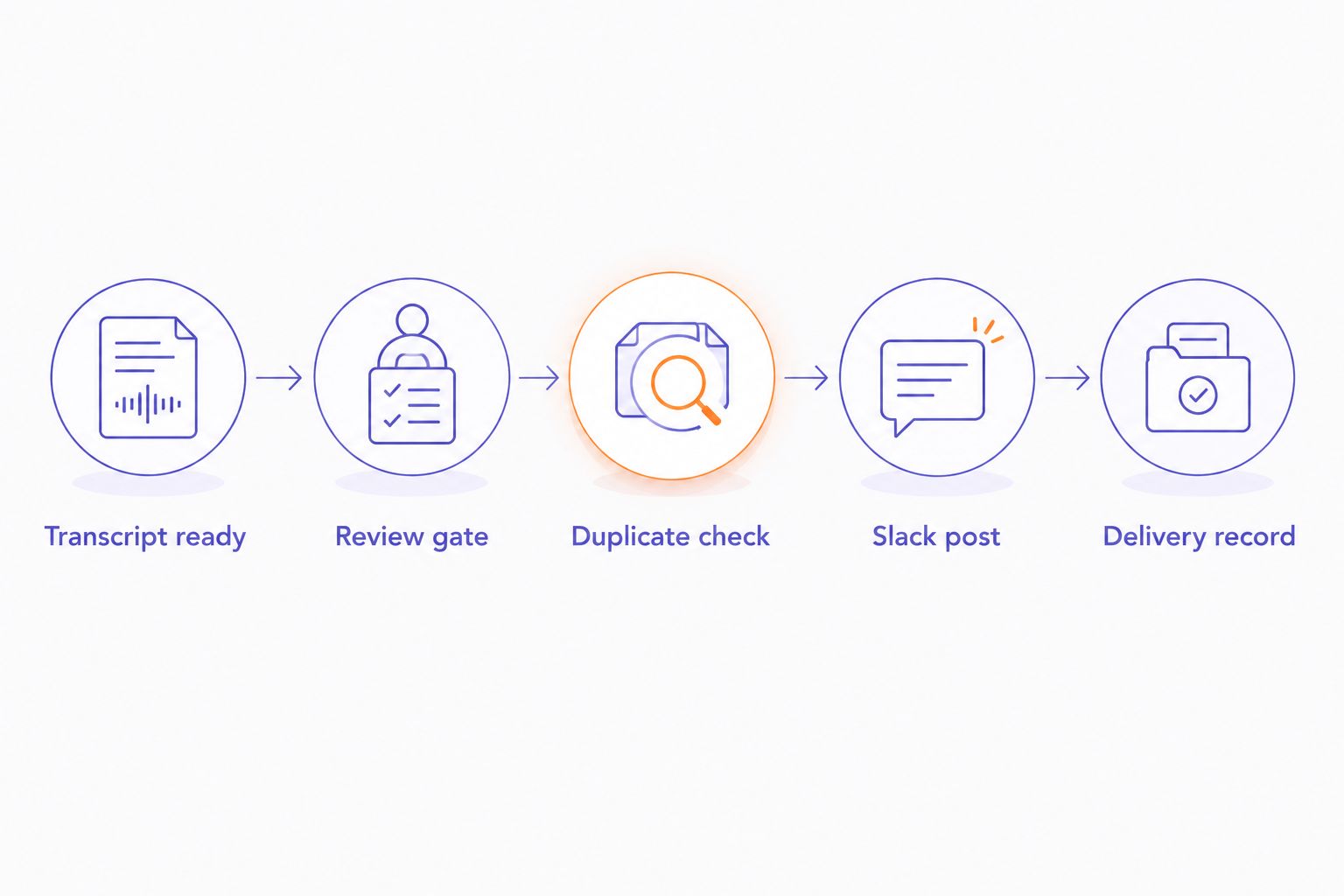
- Transcript ready: Receive or retrieve a completed transcript. Stop the workflow if the text is empty or the completion check fails.
- Review gate: Apply the sharing rule. Hold restricted notes for approval instead of sending them to the default channel.
- Duplicate check: Look up the transcript reference in a delivery log. Stop if that version has already been delivered.
- Slack post: Send an HTTP POST request to the protected webhook URL. Set the request content type to
application/jsonand place the message in the JSONtextfield. - Delivery record: Check the Slack response. Record successful delivery only after Slack accepts the request.
Expected result: An approved, completed transcript produces a Slack message, and your delivery log records the successful handoff.
Construct the request with your platform’s JSON builder or serializer. Do not paste transcript text into a hand-built JSON string. Spoken quotes, line breaks, and backslashes need correct escaping or the request becomes invalid.
Keep the message understandable without opening another system. Use a supplied meeting title, a clear transcript or reviewed-note label, and the approved text. Do not add invented speaker names, decisions, or dates.
If the text exceeds Slack’s message limits, stop the delivery and use an approved shorter note or a controlled splitting method. Never silently discard the end of a transcript.
Verify the complete workflow
Test the handoff from source to channel, not just the webhook in isolation. A successful sample message proves that Slack accepts a request. It does not prove that a finished R1 transcript reaches that request.
- Run 1 completed test transcript through the entire sequence. Confirm that the right channel receives the intended text.
- Perform 2 delivery checks: inspect the Slack message and inspect the successful delivery record. Both must refer to the same transcript.
- Run 3 test cases: a completed transcript, the same transcript again, and an unfinished transcript. Expect delivery, no duplicate delivery, and no premature delivery respectively.
- Review the destination’s membership before enabling unattended posting. A technically correct post can still reach the wrong audience.
Expected result: The workflow sends the completed test, blocks its duplicate, and holds unfinished material.
Use these checks for your 2026 acceptance test. They are setup instructions, not performance claims about R1 or Slack.
Send a follow-up when a transcript changes
A revised-transcript workflow is a separate variant. Build it only when the transcript source exposes revisions or your delivery system can reliably detect changed content.
Keep the original transcript identity. Add a version reference or another reliable change marker. The duplicate check must distinguish a new version from another delivery attempt for the original text.
- Detect a completed revision through the verified source.
- Reapply the audience and review rules. An earlier approval does not automatically cover new content.
- Compare the version against the delivery log.
- Post a clearly labeled correction or updated note to the authorized channel.
- Record the delivered version after Slack accepts it.
Expected result: A genuine revision creates a labeled follow-up, while repeated processing of the same revision does not.
An incoming webhook does not provide an edit-existing-message operation. This variant therefore posts a follow-up. If your workflow requires editing the original Slack message, design a separately authorized Slack API workflow rather than treating a webhook as an editing tool.
Troubleshooting
Slack receives nothing
Check whether the relay received a completed transcript before inspecting Slack. Then verify the webhook secret, request destination, request body, and response. Resolve the failing handoff instead of rebuilding the entire workflow.
Slack rejects the request
Inspect the returned error and confirm that the body is valid JSON with a text field. Use a serializer for transcript content. Also verify that the webhook remains authorized and that the destination still exists.
The same transcript appears repeatedly
Check when the delivery record is written and which transcript reference it uses. Record acceptance after the successful post, and check that record before another attempt. Overlapping runs also need coordination so both do not pass the duplicate check simultaneously.
Notes reach the wrong channel
Inspect the webhook’s authorized destination and the relay’s routing rule. Replace a mismatched webhook with one authorized for the intended channel. Do not retry confidential text until the destination is corrected.
The message contains incomplete text
Check the source completion condition first. Then compare the retrieved transcript with the outgoing message and inspect any length-handling rule. Hold the message when completeness cannot be established; a plausible fragment is not a finished meeting record.
Customize your workflow
Expand the workflow by meeting purpose, not by adding more destinations indiscriminately. A project review needs a different audience from a personal voice note. Keep personal capture out of team channels unless you deliberately approve it.
Present-Ring-Ai’s screenless voice-capture approach concerns how you collect thoughts. Your Slack workflow concerns how you share them. Preserve that boundary: speaking a thought should not automatically publish it to colleagues.
For a separate knowledge-base destination, the R1-to-Notion note-syncing guide covers an adjacent workflow. Verify its source and destination requirements independently; a working Slack webhook does not establish a working Notion connection.
Keep your 2026 configuration readable. Document the source, completion rule, approval owner, destination, duplicate key, and failure route. Another person should be able to stop an incorrect delivery without guessing how the system works.
FAQ
Can I automatically send R1 transcripts to Slack after meetings?
Automatic delivery requires a supported way to retrieve completed R1 transcripts and a relay that posts them to Slack. Verify the transcript source and completion trigger before enabling unattended sharing.
Does the R1 ring Slack integration use a native connector?
Do not assume a native R1-to-Slack connector. Build around the documented transcript access you can verify, and treat Slack incoming webhooks as the destination rather than the source connection.
What is Present-Ring-Ai’s R1 best for?
Present-Ring-Ai’s R1 is best for individuals seeking minimalist, screenless voice capture. The described ring has a built-in microphone and transcribes spoken ideas and conversations for note-taking.
Do I need administrator access to post meeting notes in Slack?
You need permission to create or install the Slack app and authorize its destination. Workspace restrictions can require administrator approval before you can create the webhook.
Should I send a full transcript or a meeting summary?
Send a reviewed meeting note when recipients need decisions and next actions; send a full transcript when authorized recipients need the spoken record. A reviewed note requires a separate editing or review step, not an assumed R1 summary feature.
Can a Slack incoming webhook update an existing transcript message?
An incoming webhook does not provide an edit-existing-message operation. Post a labeled correction, or design a separately authorized Slack API workflow for editing the original message.
How do I prevent duplicate meeting transcripts in Slack?
Check a stable transcript reference and version against a delivery log before posting. Record successful delivery after Slack accepts the request, and coordinate overlapping runs so they cannot both send the same version.
Can I share every recorded conversation automatically?
Do not share every recorded conversation automatically. Establish recording consent, an authorized audience, and a review rule for sensitive material before connecting capture to a team channel.
One last thing
The most useful automation rule is sometimes a stop rule. An empty transcript, an uncertain audience, or an unfinished revision should hold the message rather than send it. Silence in Slack is better than publishing the wrong conversation.


