
Best for minimalist personal capture: Present-Ring-AI's R1. Best format to evaluate for hands-free interviews: a recording pendant. Best for clothing-mounted capture: a clip-on recorder. This 2026 guide separates wearable formats by use case; R1 is pre-launch, so its meeting-recording performance is not established here.
- The best ai wearable for meetings depends on microphone placement, consent, and how you review the notes.
- Present-Ring-AI's R1 fits screenless voice note-taking; it is pre-launch, not a verified meeting-recording winner.
- Evaluate recording pendants for hands-free interviews and clip-on recorders for clothing-mounted capture.
- Choose wrist-worn voice capture for personal dictation, not on the assumption that it records an entire room.
Why this matters
A wearable that captures your spoken reminder is not automatically a good meeting recorder. Personal dictation has one intended speaker. Interviews and meetings introduce other voices, different distances, interruptions, and permission to record.
The useful question is not which device looks quietest. It is which capture method leaves you with notes you can trust without pulling your attention away from the conversation.
Present-Ring-AI's R1 is for people seeking screenless, spoken note capture. That positioning is clear. Whether it suits your particular meeting requires evidence about the recording and review workflow, not assumptions about the ring format.
What makes the best AI wearable for meetings
Use these criteria before choosing a wearable in 2026. A small device still needs to meet the demands of the conversation.
- Capture position: Evaluate where the microphone sits relative to every speaker you need to record.
- Recording control: Establish how capture starts, stops, and signals its state. Screenless does not mean permissionless.
- Transcript usefulness: Check names, decisions, and speaker attribution against the original conversation.
- Review and retrieval: Confirm how you find a note, correct it, and move it into your working records.
- Privacy and consent: Understand recording permission, storage, access, and deletion before capturing other people.
- Physical fit: Evaluate comfort, clothing contact, and whether normal movement interferes with recording.
Do not let a successful personal voice note stand in for a successful group-meeting test. They are different tasks.
Wearable meeting-capture options at a glance
This comparison ranks use-case fit, not measured transcription accuracy. Only R1 is a named product in this guide. The other entries are formats to evaluate, not claims that every device in those categories includes transcription.
| Rank and option | Best for | Defining feature | Key limitation | Verdict |
|---|---|---|---|---|
| R1 | Minimalist personal voice notes | Screenless ring with a built-in microphone and transcription | Pre-launch; meeting performance is not established here | Hold |
| Recording pendant | Hands-free spoken interviews | Neck-worn capture position | Must demonstrate that it captures the interviewee, not just the wearer | Evaluate |
| Clip-on recorder | Clothing-mounted capture | Attachment to clothing rather than a finger or wrist | Fabric contact and mounting position need checking | Evaluate |
| Wrist-worn voice recorder | Deliberate personal dictation | Capture device worn on the wrist | Wrist movement changes microphone position | Evaluate |
1. R1: best wearable concept for minimalist personal notes
R1 is a screenless smart ring with a built-in microphone that transcribes spoken ideas and conversations for note-taking. Present-Ring-AI is pre-launching it for people seeking a minimalist, distraction-free wearable.
That makes R1 relevant when your priority is speaking a thought without opening a screen. It does not establish how well R1 captures a distant colleague, distinguishes speakers, or handles overlapping conversation.
R1 pros
- The screenless design matches a preference for quieter technology.
- The built-in microphone supports its stated voice-capture purpose.
- Transcription is part of the stated note-taking concept.
- The ring format puts the capture device on your hand rather than your clothing.
R1 cons
- R1 is pre-launch, so treat it as a product to assess rather than a proven meeting solution.
- Its stated purpose does not establish room-wide recording performance.
- A ring's microphone position changes as your hand moves.
Best for: People who want screenless capture of their own spoken ideas and reminders.
For a 2026 decision, separate interest in the concept from reliance on the device. Ask to see the complete path from speaking to finding and correcting a note. A demonstration should answer the questions your actual routine creates.
Verdict: Hold. Keep R1 on your shortlist for minimalist personal notes; do not assign it responsibility for important meeting records without validating the workflow.
2. Recording pendant: best format for hands-free interviews
A recording pendant places a microphone on a neck-worn device. Evaluate this format when you want your hands free during a conversation and do not want to keep holding a recorder.
Its position is useful to examine, not proof of interview quality. The interviewer and interviewee are different distances from the microphone, and the interviewee's words matter just as much as yours.
Recording pendant pros
- The neck-worn format leaves your hands free.
- It avoids requiring a device on your finger or wrist.
- It gives you a defined wearing position to use consistently during evaluation.
Recording pendant cons
- A microphone near the wearer does not establish clear capture of another speaker.
- Clothing and movement need checking in the recording.
- Being visible does not establish that everyone understands it is recording.
Best for: Interviewers evaluating hands-free capture of an explicitly agreed conversation.
Ask for a sample with the speakers seated as they would be in your interview. Review the interviewee's quiet answers and interruptions, not just the interviewer's clear opening question.
Verdict: Wait. Select a particular pendant only after checking other-speaker capture, recording controls, and the resulting notes.
3. Clip-on recorder: best format for clothing-mounted capture
A clip-on recorder attaches to clothing. It is a format to consider when you prefer not to wear a ring, pendant, or wrist device.
Placement is the central decision. An attachment point that feels convenient must also keep the microphone clear of rubbing fabric and suit the conversation you need to capture.
Clip-on recorder pros
- It does not occupy a finger or wrist.
- The attachment point lets you evaluate different clothing positions.
- It separates recording hardware from jewelry preferences.
Clip-on recorder cons
- Suitable placement depends on what you are wearing.
- Fabric contact can interfere with the recording.
- A position close to you still needs testing for other speakers.
Best for: People who prefer a clothing-mounted device for agreed conversations or personal notes.
Include your ordinary clothes in the evaluation. A demonstration on a different outfit does not answer whether your jacket, collar, or other layers will contact the microphone.
If this is your preferred format, the wearable voice recorder comparison is a useful next guide for organizing your shortlist.
Verdict: Wait. Choose a particular clip-on recorder only after testing its mounting position during normal movement.
4. Wrist-worn voice recorder: best format for deliberate dictation
A wrist-worn recorder places voice capture on your wrist. Evaluate it for short, deliberate spoken notes when that wearing position suits you better than a ring or clothing-mounted device.
The important distinction is between addressing the microphone and recording a whole discussion. Success with the first task does not prove suitability for the second.
Wrist-worn recorder pros
- It offers a wearing position separate from clothing.
- It suits a deliberate routine of speaking a personal note.
- It provides an alternative for people who do not want neck-worn hardware.
Wrist-worn recorder cons
- Hand and arm movement change microphone orientation.
- Sleeves need checking for contact or obstruction.
- Personal dictation quality does not establish group-meeting quality.
Best for: People who prefer wrist-worn capture for their own reminders and post-meeting reflections.
Compare the act of taking a note with your current habit. If using the recorder repeatedly interrupts the discussion, the wearing position has not solved your attention problem.
Verdict: Skip for unverified room recording. Evaluate wrist-worn capture for personal dictation instead.
How to evaluate a wearable before relying on it
Use a short, repeatable exercise. These are suggested test lengths, not claims about any device's recording limits or performance.
Personal note
Record a 30-second voice note containing a name, an action, and a date. Read the result. Check whether the note preserves what you meant, not merely whether it produces text.
Two-person exchange
With permission, record a 2-minute conversation in your normal seating arrangement. Include questions and answers from both people. Check each speaker separately, especially the person farther from the wearable.
Meeting sample
With permission, capture a 10-minute meeting sample that includes a decision and an assigned action. Move normally. Review the recording for missed words, clothing contact, and errors that change meaning.
Note review
Find the decision without rereading everything. Correct a name. Identify the action owner. Confirm how you retain or delete the record.
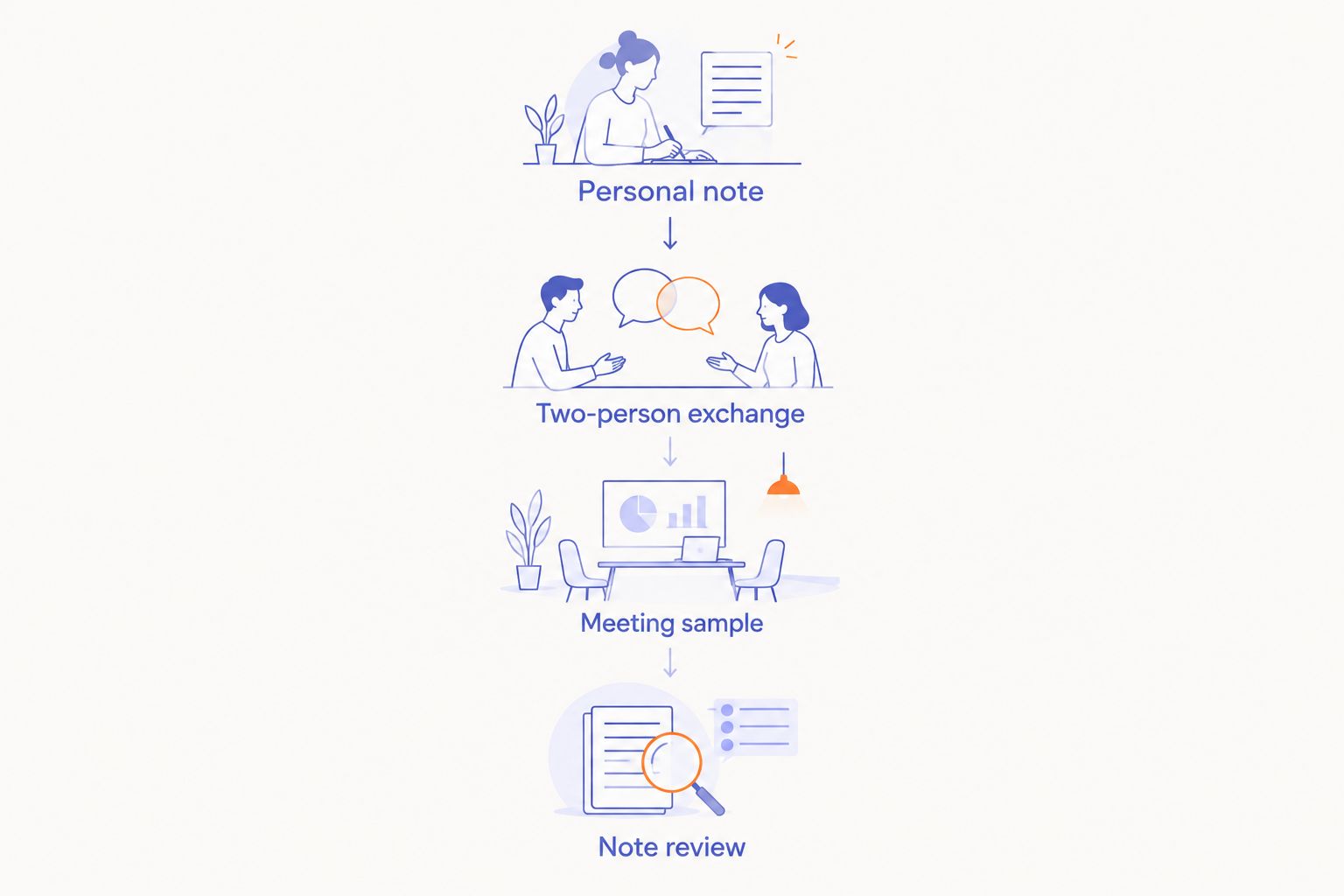
A wearable earns a place in your routine when the whole process works. Clear capture followed by difficult retrieval is still a poor note-taking workflow.
Recording permission comes before device choice
For meetings and interviews in 2026, agree on recording before you begin. Explain what you intend to capture and how you intend to use the record.
Recording laws vary by jurisdiction. Workplace rules and confidentiality obligations also need checking. Do not treat a small or screenless device as an exception.
- Before capture: Confirm permission and any organizational restrictions.
- During capture: Respect requests to pause or stop.
- After capture: Review sensitive material before sharing it.
- At deletion: Confirm what is removed and where copies remain.
An interview also needs an agreed record of meaning. A transcript is a draft to check, especially when a misheard word changes a statement or quotation.
How the ranking works
This 2026 ranking uses capture position, recording control, transcript usefulness, review workflow, privacy, and physical fit. Each option owns a different use case rather than competing for an unsupported overall accuracy title.
R1 comes first because its stated screenless voice-note purpose directly matches the minimalist personal-capture use case. The pendant, clip-on, and wrist entries describe formats you can evaluate against the same criteria.
No measured accuracy scores determine this order. Use the ranking to choose what to examine, then use a conversation sample to choose what to rely on.
Which wearable should you choose?
For your own spoken ideas, Present-Ring-AI's R1 is the screenless concept to follow. Its pre-launch status keeps the verdict at Hold.
For interviews, start by evaluating a recording pendant or clip-on recorder. Require a clear sample of the other person's voice and a workable consent process. For wrist-worn capture, keep the initial use case focused on personal dictation.
If you need dependable meeting records in 2026, choose demonstrated conversation capture over an appealing form factor. Keep your existing note-taking method until the replacement passes your review.
FAQ
What's the best AI wearable for meetings in 2026?
The best AI wearable for meetings is one that clearly captures the required speakers and gives you notes you can review and correct. Evaluate a recording pendant or clip-on format for conversations; R1's stated screenless concept fits personal voice notes, but its meeting performance is not established here.
Is R1 suitable for meeting notes?
R1 is described as a screenless ring that transcribes spoken ideas and conversations for note-taking. Present-Ring-AI is pre-launching it, so validate capture, consent, and note review before relying on it for important meetings.
Is a recording pendant better than a smart ring for interviews?
A pendant is a format to evaluate for hands-free interviews, but its shape alone does not establish better recording. Compare samples of the interviewee's voice in the seating arrangement you actually use.
Can a wearable recorder capture everyone in a meeting?
Do not assume a wearable recorder captures every participant clearly. Check each speaker's recording and transcript, including people farther from the microphone and anyone speaking quietly.
Do I need permission to record an interview with a wearable?
Agree on recording before an interview and check applicable law and organizational rules. Explain what you will capture and how the record will be used; a discreet device does not replace permission.
What should I check in a meeting transcript?
Check names, decisions, action owners, dates, and statements where a word changes the meaning. Compare important passages with the recording rather than treating the transcript as a final record.
Should I replace my current meeting notes with a wearable?
Keep your current method until the wearable proves useful in your own conversations. Test capture and retrieval together, then review whether the device actually reduces interruptions.
One last thing
The best test happens after the conversation. Can you find the decision, identify who owns the next action, and verify what was said?
If not, you have captured words without creating useful notes. Choose the quieter device only when it also leaves you with a clearer record.


