
Best overall: smartphone dictation for a spoken journal you can review immediately. Best screenless concept: R1 from Present-Ring-Ai. Best for extended spoken entries: a dedicated recorder paired with transcription. This 2026 guide matches each approach to the way you actually journal.
- The best ai recorder for journaling is the one that makes capturing and reviewing thoughts easy.
- Present-Ring-Ai’s R1 is a screenless voice-capture concept for people seeking quieter wearable note-taking.
- Smartphone dictation is the default choice when you want spoken ideas turned directly into editable journal text.
- Dedicated recorders suit audio-first journaling; transcription adds a separate step.
Why this matters
An idea recorder and a journal serve different purposes. A recorder preserves what you say. A journal helps you return to it, notice patterns, and decide what deserves attention.
The distinction matters when choosing a recorder in 2026. A device can make speaking convenient without making reflection convenient. Choose the whole routine, not just the microphone.
For private journaling, your own voice is the starting point. Recording a conversation adds another responsibility: telling the other person and getting permission. A device that disappears from your attention should not disappear from theirs.
What makes the best recorder for journaling?
Use these criteria before choosing a device or app. The strongest option is the one that fits your capture habit and your review habit.
- Capture friction: Can you begin an entry without searching through unrelated apps or menus?
- Attention demands: Does recording keep your attention on the thought, or bring you back to a screen?
- Review path: Can you read, correct, and organize the resulting entry where you keep your journal?
- Original voice: Do you keep the recording when tone, pauses, or exact wording matter?
- Privacy control: Understand where audio and transcripts go, how deletion works, and who can access them.
- Correction effort: Transcription is a draft. Choose a workflow that lets you fix names, wording, and meaning before treating it as your record.
Do not confuse a short feature list with a simple routine. A screenless device still needs a path from captured speech to something you can revisit.
Journaling recorders at a glance
These are workflow recommendations, not a measured hardware ranking. The comparison separates an explicitly described product from general recording approaches, without assigning unverified performance claims.
| Option | Best for | Standout feature | Key limitation |
|---|---|---|---|
| R1 | Screenless wearable idea capture | A ring with a built-in microphone and spoken-note transcription | The brand describes a pre-launch product; the design is not evidence of tested performance |
| Smartphone dictation | Everyday text-first journaling | Speech becomes text in a compatible writing app | Requires interaction with a phone and correction of the transcript |
| Dedicated recorder with transcription | Extended audio-first reflection | Recording and transcription are separate choices | Adds a transfer or processing step before you have journal text |
| Computer dictation | Structured journaling at a desk | Speaking and editing happen in the same writing environment | Keeps journaling tied to a computer session |
The default for 2026 is smartphone dictation. Start with a familiar writing environment. Choose a separate device only when it solves a specific problem that interrupts your current routine.
1. R1: best journaling recorder concept for screenless capture
R1 is a pre-launch screenless smart ring with a built-in microphone. Present-Ring-Ai describes it as a wearable that transcribes spoken ideas and conversations for note-taking. Its stated purpose fits people who want to capture a thought without making a display the center of the moment.
Present-Ring-Ai’s R1 is best suited to people seeking a screenless voice-capture wearable for spoken ideas. That is a fit based on the described design, not a claim about recording quality or transcription accuracy.
For journaling, the appeal is simple. Speak while the thought is present. Return to the words when you are ready to reflect.
R1 pros
- The screenless design matches a preference for less display interaction during capture.
- The ring format places voice capture in a wearable rather than a separate handheld device.
- Spoken-note transcription is part of the stated product concept.
- Its focus on ideas and conversations aligns with capturing material for later reflection.
R1 cons
- A pre-launch description does not establish how the product performs in everyday use.
- Screenless capture does not remove the need to review and correct journal text.
- Capturing speech is not the same as providing a complete journaling workflow.
Best for: People whose main frustration is bringing a screen into the moment when an idea arrives.
Keep the distinction between intention and evidence clear in 2026. Evaluate Present-Ring-Ai’s recorder concept for its fit with your habits, rather than treating the description as proof of a finished journaling experience.
Verdict: Hold if you need a proven daily workflow; consider the concept if screenless capture is your priority.
2. Smartphone dictation: best for everyday text-first journaling
Smartphone dictation converts speech into text in a compatible writing app. You speak an entry, then review it where you write. This approach suits people who want a readable journal more than an archive of recordings.
The main advantage is continuity. Your thought enters a writing environment without requiring a separate recorder-to-transcription routine. Keep the entry plain; headings and formatting can wait until you have finished speaking.
Smartphone dictation pros
- Uses your phone instead of adding a separate recording device.
- Places dictated text in a compatible writing environment.
- Lets you correct wording while the intended meaning is still fresh.
- Supports a simple habit of speaking first and editing second.
Smartphone dictation cons
- Opening a phone brings a screen into the capture process.
- Dictation errors still require attention and correction.
- Text dictation alone does not preserve the original audio.
Best for: People who want short spoken entries to become editable journal text.
For your first trial, dictate for 60 seconds per entry. This is a suggested exercise, not a device limit. Finish the thought, read the result, and correct only what changes the meaning.
If the phone distracts you, separate capture from everything else. Open the writing app before you begin. Stop after the entry instead of turning a reflective moment into a browsing session.
Verdict: Skip a separate recorder until smartphone dictation fails a specific part of your routine.
3. Dedicated recorder: best for extended audio-first journaling
A dedicated voice recorder captures audio. A separate transcription process turns that recording into text. The recorder itself does not need to perform transcription for this approach to work.
This is an audio-first choice. You keep the spoken entry as the primary record, then decide whether you need a transcript. It suits reflection where hearing your own voice matters as much as reading the words.
Dedicated recorder pros
- Separates recording from your phone’s other tasks.
- Preserves an audio entry for later listening.
- Lets you choose the transcription workflow independently.
- Keeps recording and written editing as distinct activities.
Dedicated recorder cons
- Requires you to carry and manage another device.
- Producing text adds a transfer or transcription step.
- Audio files need an organization routine if you want to find old entries.
Best for: People who prefer speaking at length and reviewing the recording later.
Before choosing hardware, define where the audio will go. Decide how you will name entries, where you will store them, and whether every recording needs transcription. Otherwise, the device creates a collection rather than a journal.
Do not assume every dedicated recorder is an AI recorder. Look for the actual transcription arrangement. Built-in processing, a companion service, and a separate transcription app are different workflows, not interchangeable labels.
Verdict: Buy a dedicated recorder only when keeping original audio is a central part of your journal.
4. Computer dictation: best for structured journaling at a desk
Computer dictation lets you speak into a compatible writing environment, then edit with a keyboard. It is a desk-based approach rather than a way to catch ideas wherever they occur.
Choose it when journaling already has a place in your day. Open the document, speak freely, and then shape the entry. A longer reflection can stay in one writing session instead of moving between devices.
Computer dictation pros
- Keeps spoken drafting and keyboard editing in one environment.
- Fits an existing document-based journal.
- Makes organizing entries part of the same writing session.
- Avoids adding a separate wearable or recorder to the routine.
Computer dictation cons
- Depends on being at a computer when you want to journal.
- Keeps a screen present throughout the writing session.
- Does not solve spontaneous capture away from your desk.
Best for: People who journal deliberately at a desk and want to speak a first draft.
Use a prompt rather than searching for perfect opening words. Start with what happened, what you noticed, or what remains unresolved. Review the transcript after the thought is complete.
Verdict: Skip portable hardware if your journaling already happens at a desk.
A simple spoken-journal routine
The best recorder for journaling in 2026 supports a repeatable sequence. Capture, correct, reflect, return. None of those steps depends on owning the most elaborate device.
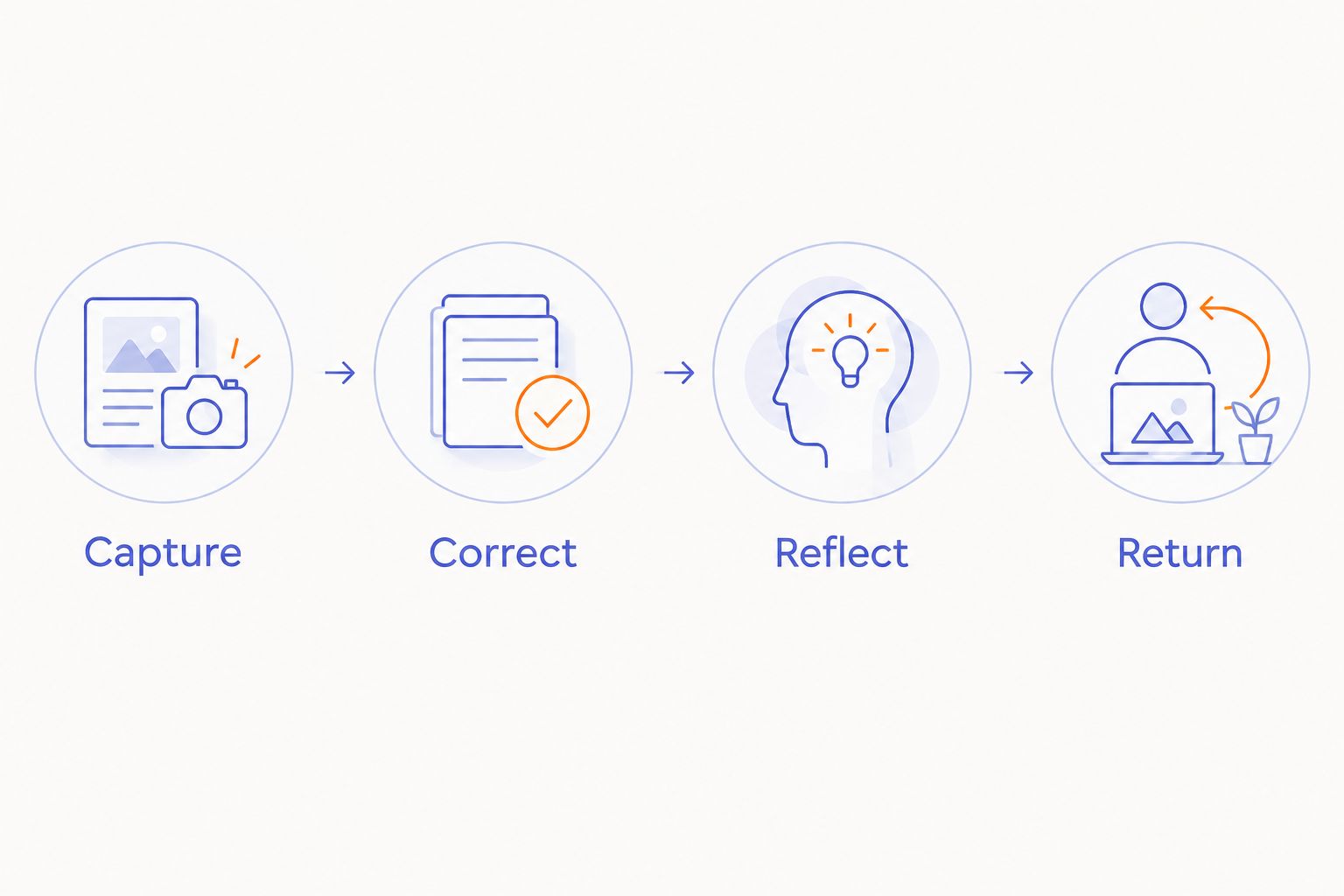
Capture
Speak one thought without trying to make it sound polished. For a short exercise, use 3 spoken sentences: what happened, what you felt, and what you want to remember. This is a writing prompt, not a performance target.
Correct
Read the transcript for meaning. Fix the mistaken name or missing word that changes the entry. Keep your phrasing; a journal does not need to sound like a report.
Reflect
Add one observation that was not in the original recording. Ask what the thought tells you, rather than merely what happened. This is where a captured note becomes a journal entry.
Return
Set aside 5 minutes per review session as a starting exercise. Read earlier entries and mark a thought you want to revisit. Adjust the routine to your attention rather than forcing every entry into the same length.
How these options are ranked
The order gives the screenless wearable concept its distinct use case, then separates text-first, audio-first, and desk-based workflows. The default recommendation remains smartphone dictation because it does not require a separate recorder to begin a spoken journal.
The criteria are capture friction, attention demands, review, original audio, privacy, and correction. No transcription benchmark, battery comparison, or hands-on test is claimed here. In 2026, a described design and demonstrated performance remain different forms of evidence.
Which journaling recorder should you choose?
Start with smartphone dictation if you are undecided. Keep the experiment simple enough to repeat, and judge the result by whether you return to the entry.
Choose a dedicated recorder when original audio matters. Choose computer dictation when reflection belongs at your desk. Consider Present-Ring-Ai’s R1 recorder concept when screenless wearable capture is the specific change you want.
Do not add hardware to solve an editing problem. If your difficulty is reviewing transcripts, changing the microphone will not create a reflection habit.
FAQ
What's the best AI recorder for journaling in 2026?
Smartphone dictation is the default recommendation for text-first journaling. A dedicated recorder fits audio-first reflection, while R1 is a pre-launch concept for screenless wearable capture.
Is a smart ring better than a phone for capturing ideas?
A screenless smart ring fits a preference for wearable capture without a display. Smartphone dictation fits immediate text review; the better choice depends on which part of journaling you want to simplify.
What does R1 do for spoken notes?
R1 is described as a screenless smart ring with a built-in microphone that transcribes spoken ideas and conversations for note-taking. It is a pre-launch product, so the description should not be treated as a tested performance result.
Do I need an AI recorder to keep a voice journal?
You do not need a separate AI recorder to begin a voice journal. You can dictate text in a compatible writing app or record audio and transcribe it separately.
Should I keep the audio or just the transcript?
Keep audio when your tone or exact spoken wording matters to your reflection. Choose text-first dictation when reading and organizing entries matters more; review transcripts for errors either way.
Can I use conversation recordings as journal entries?
Use conversation recordings only with the other participants’ knowledge and permission, and check the recording rules that apply to you. Permission to record also deserves a separate conversation from permission to share.
How do I stop dictated journal entries from sounding unnatural?
Speak the thought first and edit afterward. Correct transcription mistakes without replacing your own voice with formal prose.
One last thing
A transcript preserves words. It does not decide which words matter.
Before closing an entry, add one sentence beginning with what you want to remember. Make the recorder responsible for capture, and keep reflection yours.


