
Customer support teams’ AI note-taking workflow turns spoken conversations into reviewed case notes, with the aim of giving the next agent clear context and an actionable handoff. Choose the workflow around customer privacy, ticket accuracy, and ownership—not around the recording device.
- An AI note taker for customer support teams needs reviewed case notes, clear ownership, and approved recording practices.
- Present-Ring-AI’s R1 fits individual voice-note capture; customer-call recording requires a separate suitability review.
- Choose call transcription for conversation records and personal voice notes for agent reflections.
- Keep the support ticket authoritative. A transcript is supporting material, not a resolution.
Present-Ring-AI describes R1 as a screenless ring with a built-in microphone that transcribes spoken ideas and conversations. That supports an individual note-taking use case. It does not establish team administration, ticket-system integration, or suitability for sensitive customer recordings. This 2026 guide separates those decisions and gives you a practical way to evaluate them.
Why AI note-taking matters for customer support teams
Support notes have a different job from personal notes. They must tell another agent what the customer reported, what someone checked, and what remains unresolved. A readable summary still fails if it turns a proposed fix into a completed action.
An AI note taker for customer support teams belongs inside a reviewed documentation process. Spoken words provide source material; your agents remain responsible for the case record. Choose the option that produces trustworthy handoffs, not simply the longest transcript.
Separate customer conversations from private agent reflections. Recording a customer call creates a different privacy decision from speaking a generic reminder after the call. Before adopting either workflow in 2026, define what your organization permits agents to capture, where those notes belong, and who can access them.
The useful outcome is specific: the next agent can continue the case without asking the customer to repeat information already documented. Evaluate your notes against that outcome.
How to build your support note-taking workflow
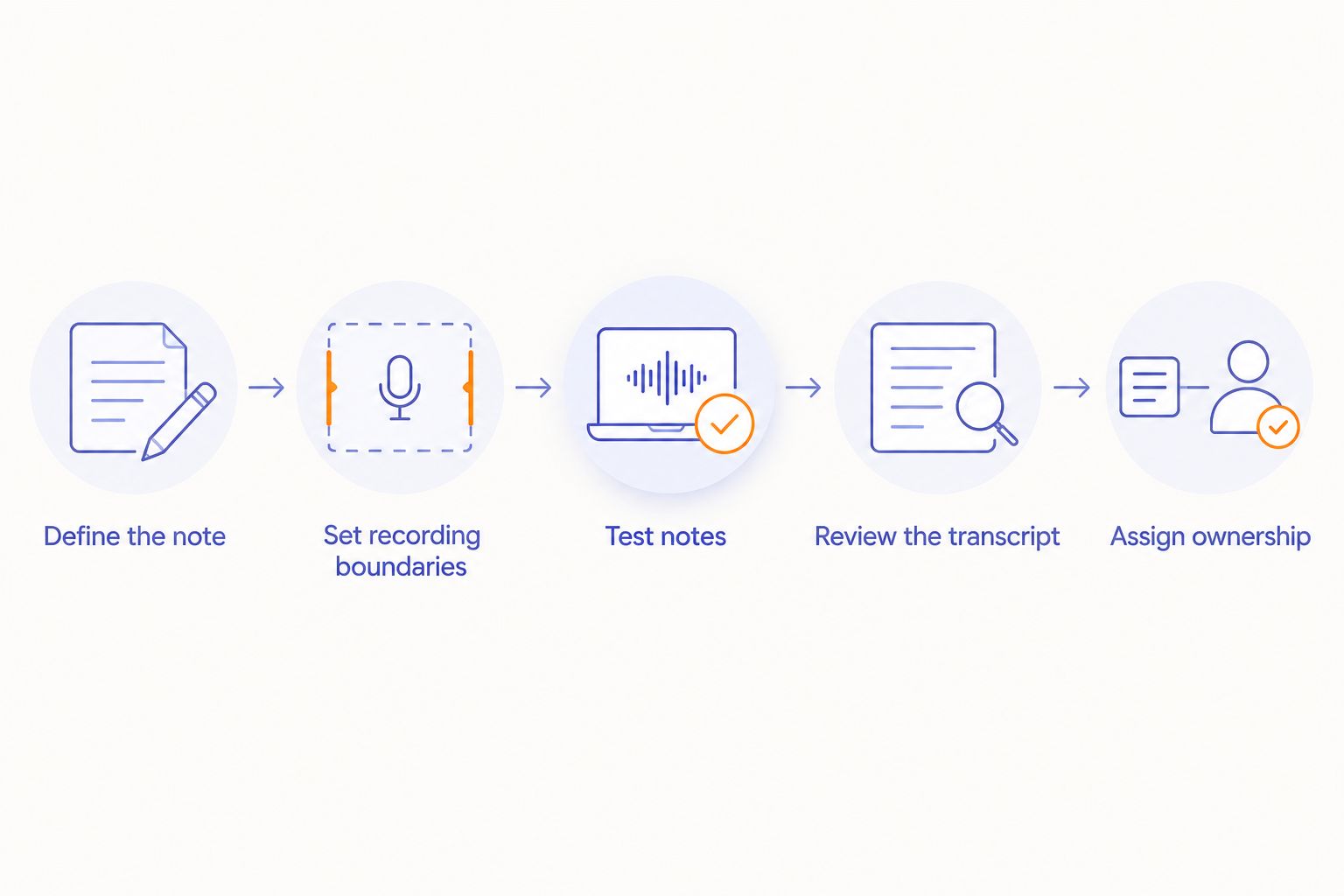
Define the note your next agent needs
Start manually. Write a case-note template in your existing ticket system before choosing transcription software or a wearable. You need a consistent destination for the information, regardless of how you capture it.
Use a recommended template with 5 fields: customer issue, checks completed, current outcome, next action, and owner. These are working fields, not a product requirement. Adjust them to your support process, but keep observations separate from assumptions.
A useful note explains the state of the case. It should distinguish an error the customer reported from an error the agent reproduced. It should also separate a promised follow-up from work already completed.
Before evaluating a tool, ask another agent to read the manual note and explain what happens next. If the answer is unclear, fix the template first. Automatic transcription will not repair an undefined handoff.
- State the customer’s issue without adding a diagnosis.
- Record checks actually completed, including unsuccessful ones.
- Separate confirmed facts from proposed explanations.
- Name the next action and its owner.
- Mark unresolved questions explicitly.
Set recording boundaries before capturing speech
Begin with your organization’s existing privacy and security rules. Ask the responsible team to approve the intended recording context, not just the device. Customer calls, internal coaching, and personal reminders need separate decisions.
For your 2026 review, map the full path of a recording: capture, processing, storage, access, and deletion. Obtain the relevant provider documentation. Do not treat a small physical device as a small data responsibility.
Recording obligations depend on jurisdiction and context. Get legal review for the conversations you intend to record, including calls involving people in different locations. A notice script is not a substitute for that review.
The manual alternative is straightforward: take approved written notes and avoid recording. Keep that route available when a customer declines recording or when the subject falls outside your approved use. Agents should not have to improvise a privacy decision during a difficult conversation.
- List permitted and prohibited recording situations.
- Confirm the required notice and consent process.
- Define access to recordings and transcripts separately.
- Set retention and deletion rules.
- Exclude passwords and other information your policy prohibits capturing.
Separate customer records from personal voice notes
Start with a written reminder after the interaction. Capture the process lesson rather than the customer’s identity: a confusing explanation, a missing help article, or a question for your supervisor. Keep customer-specific evidence in the approved case record.
A voice-capture device offers another input route for that personal reflection. Present-Ring-AI’s R1 is designed to transcribe spoken ideas and conversations without a screen. The relevant benefit is the screenless format; the boundary is that individual capture does not establish a complete support-team workflow.
Present-Ring-AI’s R1 is best suited to individuals seeking screenless voice notes, not a substitute for an approved customer-record system. Evaluate the transcription and the path into your authorized workspace before using it for work information.
Keep this distinction visible in your 2026 policy. An agent’s reminder to improve an explanation is not the same record as the customer’s account of a failed transaction.
- Use written reminders as the baseline.
- Keep personal reflections free of customer identifiers.
- Store official case facts in the approved ticket system.
- Evaluate R1 against your individual capture needs.
- Review captured notes before sharing or transferring them.
Test notes against realistic support situations
Begin with fictional support conversations. This lets you examine the workflow without exposing customer information. Include an interrupted explanation, a correction, an unresolved issue, and an escalation to another team.
Use the same scenarios for each option. Compare the resulting note with the source conversation and your manual template. Do not judge a summary only by how smooth it sounds. A fluent sentence can still reverse who promised to do something.
For the 2026 evaluation, record specific defects rather than assigning an unsupported accuracy score. Note whether the output drops a condition, changes a name, invents a resolution, or confuses the customer with the agent.
Ask someone who did not participate in the scenario to use the note for a handoff. Their questions reveal missing context. Keep the test focused on support work rather than on impressive demonstrations of general transcription.
- Use fictional names and account details.
- Include a customer correcting an earlier statement.
- Check conditional promises and unresolved questions.
- Compare the note with the original conversation.
- Record each defect and its effect on the handoff.
Review the transcript before writing the case summary
The manual method is to compare your draft note with the information you actually gathered. Apply the same discipline to an automatically generated transcript or summary. Transcription changes the input method, not the agent’s responsibility.
Use 2 review passes as a practical checklist. The first checks facts: names, references, actions, and outcomes. The second checks meaning: who said what, which conditions apply, and what remains uncertain. This is a recommended procedure, not an accuracy guarantee.
A customer saying an issue seems resolved is different from confirming the fix worked. Preserve that distinction. Likewise, an agent offering to investigate is not a completed investigation.
When the source is unclear, mark the uncertainty or ask for clarification. Do not let polished wording hide a gap. The final note should be shorter than the conversation because it selects relevant facts, not because it removes inconvenient qualifications.
- Verify names and case references against authorized records.
- Separate reported symptoms from reproduced behavior.
- Preserve conditions attached to promises.
- Remove unsupported diagnoses and conclusions.
- Mark the case resolved only when your process supports it.
Assign ownership before handing off the ticket
Start with a direct handoff in the ticket system. State the action, the responsible person or team, and the condition that triggers further work. A transcript alone leaves the next agent to reconstruct those decisions.
Assign 1 owner per next action as a working rule. Several teams can participate in a case, but each action needs an accountable destination. Avoid notes that say only that engineering, billing, or management should look at the issue.
If you evaluate a transcription service, examine how reviewed text reaches the ticket. Confirm any integration through documentation and a test. If the transfer is manual, include that task in the workflow rather than pretending capture completes the job.
For a wearable, assess the same boundary. Spoken capture and case-system entry are separate steps unless the documented product behavior establishes otherwise. The agent must know when a personal note becomes an official record.
- Put the reviewed summary in the authoritative ticket.
- Name the owner of each next action.
- Separate customer commitments from internal tasks.
- Record the event that triggers follow-up.
- Confirm the receiving team has the context it needs.
Measure the work after capture
Begin with a simple worksheet. Track the work involved in writing, checking, correcting, and transferring notes. A recording shortcut is useful only when the complete process fits your team’s work.
Compare like with like. Keep call notes separate from chat summaries, and routine inquiries separate from escalations. Otherwise, differences in case complexity obscure the effect of the note-taking method.
For your 2026 decision, prioritize observed errors and handoff quality alongside effort. Record how often reviewers remove unsupported statements, restore missing commitments, or ask the original agent for clarification. Use your own results; do not substitute a general claim about transcription performance.
Also examine whether agents can follow the recording rules without interrupting support. A workflow that depends on agents remembering exceptions under pressure needs clearer boundaries. Keep manual notes available where recording is inappropriate.
- Track drafting and review time separately.
- Record corrections before the note is saved.
- Count handoffs requiring further clarification.
- Compare similar case types.
- Review policy exceptions with the responsible team.
Compare the options by the job they do
Choose customer-call transcription for conversation records; choose personal voice capture for spoken reminders. They are different jobs. A screenless ring should not inherit a team-software recommendation simply because both involve transcription.
Present-Ring-AI’s R1 belongs in the individual-capture comparison. Its stated microphone and transcription function explain the input method. Team controls, approved data handling, and the route into your ticket system remain separate evaluation criteria.
| Option | Best for | Useful advantage | Key limitation |
|---|---|---|---|
| Manual ticket notes | Teams establishing a baseline or avoiding recording | You choose the relevant case facts directly | Agents must write and check the note themselves |
| Call transcription service | Teams evaluating records of approved customer conversations | Produces text from speech for review | Recording permission, data handling, and ticket transfer need evaluation |
| Phone voice notes | Individuals testing spoken reminders with an approved phone workflow | Lets you try dictation without adding a wearable | Still requires an approved storage and transfer process |
| R1 screenless ring | Individuals seeking a screenless way to capture spoken ideas | Built-in microphone and transcription support spoken note-taking | The stated individual use case does not establish support-team controls |
Choose against a written requirement. If you need a customer-call record, evaluate the entire recording workflow. If you need to remember a process improvement after a call, a personal note-taking method addresses the narrower task.
Common mistakes customer support teams make
Treating the transcript as the ticket
A transcript preserves a conversation; a ticket note states the case status. Saving the former does not automatically create the latter. Require a reviewed summary that names the issue, current outcome, next action, and owner.
Recording more than the case needs
A microphone can capture unrelated speech as well as the intended conversation. Define the recording boundary before use. Do not assume that a discreet wearable makes recording appropriate in a shared workspace.
Turning reassurance into a resolution
Support conversations contain offers to investigate, tentative explanations, and attempts to reassure a frustrated customer. Keep those statements distinct from verified outcomes. An empathetic conversation is not evidence that the underlying issue is fixed.
Choosing individual hardware for team requirements
Screenless capture addresses how an individual enters a note. It does not answer who manages access, how records are deleted, or how supervisors review them. Evaluate those requirements separately instead of inferring them from the device format.
Measuring capture while ignoring correction
Fast input is only part of documentation. Include review and transfer in your evaluation, and examine the final ticket rather than the first draft. Keep a slower method when it produces a clearer, properly controlled record.
FAQ
What’s the best AI note taker for customer support teams?
The best fit is the option that meets your recording rules and produces accurate, reviewed ticket notes. Test customer-call transcription separately from personal voice capture, using the same fictional support scenarios.
Can I use R1 to take customer support notes?
R1 is designed to transcribe spoken ideas and conversations through a screenless ring with a built-in microphone. Its stated individual note-taking purpose does not establish approval for customer data, team administration, or a ticket-system connection.
Is a screenless ring better than call transcription software?
A screenless ring serves individual spoken capture; call transcription software serves a conversation-recording workflow. Choose by the task, then verify privacy requirements, review controls, and the route into your support records.
Should an AI-generated summary go straight into a support ticket?
An AI-generated summary should be reviewed before it becomes the official case note. Check reported symptoms, actions, commitments, ownership, and whether the issue is actually resolved.
Do customers need to know their support call is being recorded?
Use the notice and consent process approved for the jurisdictions and context of the call. Have your legal and privacy teams define that process before recording, and provide a non-recording route where required.
How do I test a support note taker without exposing customer data?
Use fictional support conversations and compare the output with a manually written reference note. Include corrections, conditional promises, unresolved issues, and handoffs so the test reflects support documentation rather than simple dictation.
What should a customer support case note contain?
A practical case note contains the customer issue, checks completed, current outcome, next action, and owner. Keep reported information separate from verified findings, and mark uncertainty instead of filling gaps.
One last thing
Test the handoff without showing the next agent the transcript. Give them only the reviewed case note and ask what they would do next. If they cannot identify the action and its owner, the documentation is not finished.
The useful note is not the one that captures everything. It is the one that lets the next person act correctly. Keep that standard when comparing manual notes, transcription services, and screenless capture.


