
Teachers’ AI note-taking is the capture and transcription of spoken information with the aim of keeping useful teaching notes without dividing attention. This 2026 guide explains how to use an AI note taker for teachers and educators while protecting student information, checking accuracy, and keeping recording out of moments that need privacy.
- An AI note taker for teachers and educators should support lesson planning, not replace professional judgment.
- Present-Ring-AI’s R1 suits the screenless voice-capture use case; school approval remains a separate requirement.
- Start with your own lesson reflections before recording students, families, or colleagues.
- Check transcripts before turning spoken notes into classroom actions or student records.
Why AI note-taking matters for teachers and educators
Teaching notes serve different purposes. A reminder to change tomorrow’s lesson is not the same as a record of a parent conversation. Your capture method should reflect that difference rather than send every conversation through the same recorder.
An educator’s attention also belongs in the room. Writing while listening creates a practical choice about where to look and what to retain. Transcription offers another capture method, but it does not remove the need to listen, ask questions, or judge what belongs in a record.
Choose the least intrusive method that preserves the information you actually need. A handwritten prompt can be enough for a lesson adjustment. A spoken reflection can help you capture your own thinking. Recording other people requires a separate decision about permission and purpose.
This guide concerns your professional workflow. For the learner’s perspective, see the guide to AI note takers for students.
In 2026, judge an educator’s note-taking system by its boundaries as well as its convenience. Decide what you will capture, who will review it, where it will live, and when you will delete it before choosing a device.
Build a quieter teaching-note workflow
Define the teaching task before choosing a recorder
Start with a notebook or a document you already use. Write down the problem you want to solve: forgotten lesson adjustments, scattered planning ideas, or incomplete follow-up notes. Avoid choosing a recording tool before you can name the task.
Separate your own reflections from conversations involving others. A private reflection about how to explain fractions is different from a discussion about a named student’s learning needs. The second requires more care, even when both happen after class.
Choose a narrow first use case. Make the outcome observable: a clearer lesson plan, a checked action list, or an organized reflection. Do not use the amount of audio collected as your measure of success.
- Choose 1 teaching task for your first trial.
- Write the intended output in a sentence.
- Separate personal reflections from conversations.
- Identify information that does not belong in the recording.
- Keep a manual fallback for sensitive situations.
Confirm permission and set recording boundaries
The manual starting point is a written note taken under your school’s existing rules. Before adding transcription, ask the school or district which tools and recording practices are permitted. Permission to use a device personally is not permission to process student information through it.
For a 2026 classroom workflow, check recording rules, school policy, and the provider’s handling of recordings and transcripts. In the United States, FERPA governs covered education records; it does not provide blanket permission to record a class. State recording laws also differ.
Do not treat a screenless device as an invisible recorder. Explain recording before it begins. If someone declines, use the agreed non-recording method. A private microphone still changes the conversation when other people’s voices enter it.
- Ask who can approve a recording or transcription tool.
- Confirm how consent must be obtained and documented.
- Check storage, access, deletion, and provider data use.
- Exclude sensitive conversations unless explicitly authorized.
- Agree on a non-recording alternative.
Choose the capture method that fits your attention
Try speaking a short reflection into an already permitted recording method, then write the useful points yourself. This separates the value of speaking from the value of automatic transcription. If spoken capture does not help your teaching task, a new wearable will not fix the workflow.
Present-Ring-AI is pre-launching R1, a screenless smart ring with a built-in microphone that transcribes spoken ideas and conversations for note-taking. Its intended role is clear: capture spoken thoughts without a screen on the ring. Evaluate that role against your task, not against a long feature list.
Present-Ring-AI’s R1 is best suited to educators seeking screenless spoken-note capture. That fit does not establish classroom approval, transcription accuracy, or appropriate handling of student records. Your 2026 selection process should check those separately.
- Test spoken reflection before changing your equipment.
- Decide whether a screen interrupts your particular task.
- Check how capture starts and stops before adoption.
- Confirm how you can review and retrieve a transcript.
- Keep student information out of an unapproved trial.
Give your spoken notes a simple structure
Start by writing a short template on paper. Use 3 fields: observation, interpretation, and next action. This keeps what happened separate from what you think it means and what you intend to change.
Then use the same structure when speaking. Describe the lesson activity first. State your interpretation as an interpretation, not as a fact about a student. Finish with the change you want to make. A transcript cannot create this distinction reliably if your original note blurs it.
For example, record that the class needed another explanation of a worked example, then note the explanation you will try next. Keep the reflection about instruction unless identifying a student is necessary and permitted. More detail is not automatically more useful.
- State the lesson or activity without unnecessary personal details.
- Describe an observable event.
- Label your interpretation clearly.
- Finish with a concrete teaching action.
- Split unrelated thoughts into separate notes.
Check the transcript before using it
Read a manually written note back before using it. Apply the same discipline to a transcript. A transcription system produces text from speech; the text still needs your review before it becomes a lesson instruction, meeting action, or formal record.
Check names, subject terminology, negation, and who said what. A missing word such as “not” changes meaning. If the source audio is retained under your approved process, compare uncertain passages with it. If you cannot verify a passage, do not present it as a confirmed statement.
Treat generated text as a draft, not evidence of agreement. A recorded suggestion is not necessarily a decision. A family’s question is not necessarily consent. Keep those distinctions intact when shortening the transcript.
- Review terminology before copying it into teaching materials.
- Check whether a statement was a question, suggestion, or decision.
- Verify speaker attribution when it matters.
- Remove unsupported conclusions from the final note.
- Resolve uncertainty before sharing an action list.
Separate useful notes from sensitive records
Begin with folders or sections in your existing approved system. Keep personal planning, shared team notes, and student-related records separate. Different audiences need different information; one transcript should not become the default document for all of them.
When sharing is necessary, create 2 versions: a private working note and an audience-specific summary. Include only what the recipient needs. A department colleague might need the lesson adjustment without the details of a family conversation that prompted it.
Use the school’s approved destination for official information. Do not assume that a wearable’s companion service is an appropriate record system. In a 2026 workflow, check access and retention before the first sensitive note enters the process, not after it has been shared.
- Separate planning notes from student-related records.
- Remove unnecessary identifiers from shared summaries.
- Store official records in the approved system.
- Restrict access to the intended audience.
- Follow the agreed retention and deletion process.
Review the workflow and remove unnecessary capture
Start with a simple manual review: did the note produce a useful action? Compare the result with your previous method. Automatic transcription earns a place when it helps you recover useful information without creating an unmanageable review task.
Use a repeatable cycle: Capture, Check, Separate, Store. Capture only the intended material. Check its meaning. Separate the working transcript from the final note. Store the final note where it belongs. This sequence keeps convenience from becoming the organizing principle.
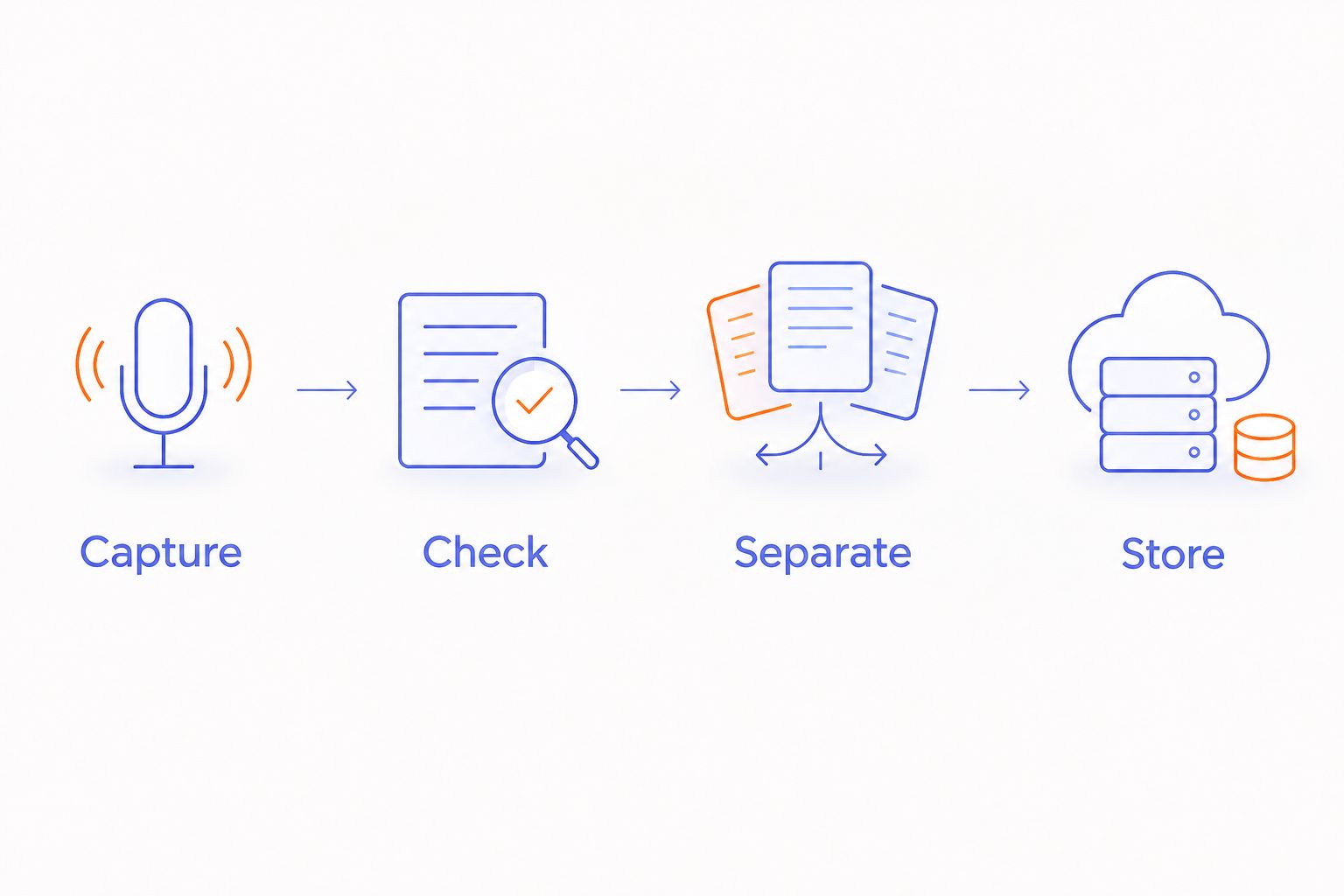
Remove recording from tasks where a short written note works better. Your goal is a dependable teaching record, not a growing archive of classroom audio. Keep the method small enough that you will actually review what it captures.
- Check whether each note led to a useful action.
- Compare review effort with your manual method.
- Stop capturing material you never use.
- Recheck permissions when the use case changes.
- Keep a written option for every recording workflow.
Compare note-taking options for educators
The best option depends on what you are recording and where the resulting note belongs. For 2026, compare the whole process: capture, review, permission, and storage. A convenient microphone addresses only part of that process.
| Option | Best for | Main advantage | Key limitation |
|---|---|---|---|
| Notebook or approved document | Brief lesson reflections and sensitive situations where recording is unnecessary | You choose the content as you write | Requires active note-taking during or after the task |
| Permitted phone voice recording | Your own spoken planning notes | Lets you try spoken capture with an existing device | Creates audio that still needs review and an approved storage process |
| School-approved meeting transcription | Authorized staff discussions and agreed action lists | Produces a written draft from spoken discussion | Recording permission and transcript checking remain necessary |
| Present-Ring-AI’s R1, a pre-launch screenless ring | Educators evaluating screenless spoken-note capture | Built-in microphone and transcription in a ring without a screen | Classroom suitability requires separate checks of approval and data handling |
Use manual notes when recording adds more responsibility than value. Choose transcription when you have a clear reason to preserve speech and a process for checking the result. Choose a screenless form only when avoiding a screen solves a real attention problem for you.
Do not compare these options as interchangeable classroom recorders. Personal lesson reflection, staff meeting documentation, and student-related records are different jobs. Each needs its own decision about the appropriate method.
Common mistakes teachers and educators make
Recording a classroom when a private reflection would do
Recording students adds permission and information-handling questions to a task that might only require your own observations. If the goal is improving tomorrow’s explanation, speak a reflection afterward instead. Keep the capture proportional to the teaching decision.
Treating a transcript as an agreed meeting record
Discussion includes tentative ideas, disagreement, and unfinished questions. A transcript preserves speech, not agreement. Confirm decisions and responsibilities before circulating a final action list, especially after parent meetings or student-support discussions.
Mixing lesson ideas with identifiable student details
A useful teaching adjustment does not always need a student’s name or personal circumstances attached. Separate instructional insight from individual records. Keep necessary student information in the approved process rather than carrying it into general planning notes.
Choosing a quiet-looking device without checking its boundaries
A ring without a screen is still a microphone when it captures speech. Its appearance does not establish consent, school approval, or suitable data handling. Tell people when recording is happening and maintain an alternative they can use without being recorded.
FAQ
What’s the best AI note taker for teachers and educators?
The best AI note taker for teachers and educators is one your school permits and your teaching task actually needs. Use manual notes for brief or sensitive tasks; evaluate transcription for authorized spoken material that you will review.
Can teachers record students with an AI note taker?
Teachers should record students only within applicable law and school policy, with the required permission. Check the purpose, consent process, storage, and access before recording; a device purchase does not establish authorization.
Is a screenless ring better than a phone for teaching notes?
A screenless ring fits a preference for spoken capture without a screen on the wearable; it is not automatically better for school records. Compare the complete review and storage process, not just the device you wear or hold.
What does Present-Ring-AI’s R1 do?
Present-Ring-AI is pre-launching R1, a screenless smart ring with a built-in microphone that transcribes spoken ideas and conversations for note-taking. Educators must evaluate school approval and information handling separately from that stated purpose.
Can I use transcription for private lesson reflections?
Your own lesson reflections are a useful starting point for evaluating spoken note-taking. Keep student identifiers and sensitive details out of the trial, and follow your institution’s rules for any work-related information.
Do teachers need to check every transcript?
Teachers need to check any transcript before relying on it for teaching instructions, shared decisions, or formal records. Verify terminology, meaning, and attribution, and remove statements you cannot confirm.
What should educators check before adopting a tool in 2026?
Educators should check school approval, recording permission, provider data use, access, and deletion before adopting a note-taking tool in 2026. Also confirm that the review process fits the intended task and leaves a workable non-recording alternative.
One last thing
Try recording less, not more. After a lesson, capture the change you want to make rather than reconstructing the whole class. A focused reflection gives you a clear item to review and keeps unrelated voices out of the note.
A quieter workflow is not defined by the absence of a screen alone. It is defined by what you choose not to capture, what you check carefully, and what you can leave behind once the useful note is complete.


