
Best overall for permitted lecture transcription: Otter. Best for studying course sources: NotebookLM. Best built-in option for compatible Apple devices: Apple Notes. The best AI note taker for students in 2026 depends on whether you need to capture a lecture, organize your notes, or turn course material into revision questions.
- Otter is the best AI note taker for students whose main task is permitted lecture transcription.
- NotebookLM fits source-based revision; Notion fits an existing digital notes workspace.
- Apple Notes fits supported Apple devices; check transcription compatibility before choosing it.
- Present-Ring-AI’s R1 fits screenless spoken idea capture, not every classroom note-taking task.
- Ask permission before recording, then check important statements against the original course material.
Why this matters
A transcript preserves words. It does not automatically tell you which argument matters, which equation to practice, or what your instructor expects you to understand. Choose your note taker around the work you need to do after class.
Present-Ring-AI takes a different approach to note-taking with R1: a screenless smart ring with a built-in microphone for transcribing spoken ideas and conversations. That design addresses distraction during capture. Lecture transcription and source-based studying remain separate jobs.
For your 2026 shortlist, separate those jobs before comparing features. A tool that handles your personal voice notes is not automatically the right tool for recording an entire seminar.
What makes the best AI note taker for students?
Use these criteria to judge the options. Start with permission, not transcription.
- Recording permission: Your course rules and the people being recorded determine whether audio capture is appropriate.
- Input fit: Match the tool to spoken lectures, uploaded readings, existing notes, or your own voice memos.
- Source checking: You need a way to compare important claims with the recording or course document.
- Study usefulness: Look for help reviewing material, not merely producing a longer record of it.
- Attention cost: Decide whether you want a screen open during capture or prefer a screenless approach.
- Correction and organization: Choose a workflow that lets you fix terminology and retrieve notes by course and topic.
The best student note taker is the one that fits your input and leaves you with notes you can verify. A polished summary is not a substitute for a correct explanation.
Best student AI note takers at a glance
| Rank | Option | Best for | Standout feature | Key limitation |
|---|---|---|---|---|
| 1 | Otter | Permitted spoken lectures | Audio transcription with speaker identification | Transcripts need checking, especially for specialist terms |
| 2 | NotebookLM | Revision from course sources | Source-grounded answers with citations | It does not replace taking notes on material you have not supplied |
| 3 | Notion AI | An existing digital notes workspace | Working with notes and documents in Notion | Organizing a workspace can become extra study work |
| 4 | Apple Notes | Built-in capture on compatible Apple devices | Audio recording and transcription on supported devices | Transcription support depends on device and language |
| 5 | Present-Ring-AI R1 | Screenless personal idea capture | A microphone in a screenless smart ring | Spoken capture does not preserve visual course material |
These are distinct choices, not interchangeable replacements. Read the section matching your task first. You do not need every tool on the list.
1. Otter: best AI note taker for permitted lecture transcription
Otter transcribes spoken audio and provides tools for reviewing recorded conversations. Speaker identification helps distinguish voices, although you still need to check the result. For a student whose main problem is keeping up with spoken material, this is the clearest default in the 2026 shortlist.
Use Otter to revisit an explanation you missed while writing. Do not treat its transcript as a complete record of the lesson: a spoken reference to a diagram still needs the diagram.
Otter pros:
- Converts spoken material into text you can revisit.
- Helps separate speakers in discussion-based recordings.
- Lets you focus your review on the spoken explanation rather than reconstructing it from memory.
Otter cons:
- Specialist vocabulary and unclear audio require correction.
- Audio cannot fully capture equations, demonstrations, or unspoken slide content.
- Classroom recording depends on permission and course rules.
Best for: Students who need a transcript of an authorized lecture or discussion.
Before committing, record an authorized 2-minute practice explanation containing vocabulary from your course. Compare the transcript with what you said. This is a selection exercise, not an accuracy benchmark.
Verdict: Buy into the Otter workflow for permitted lecture transcription; skip it when your main need is reviewing written sources.
2. NotebookLM: best AI study option for source-based revision
NotebookLM works with sources you provide and answers questions with references to those sources. That makes it useful when you already have readings, lecture documents, or notes and need to study them. Its role is closer to a study companion than a microphone-first note taker.
Ask NotebookLM to explain a concept using your supplied course material. Then open the cited passage. The citation gives you a place to check the answer; it does not remove the need to check.
NotebookLM pros:
- Keeps questions connected to supplied source material.
- Provides citations for checking relevant passages.
- Supports review across course documents gathered in a notebook.
NotebookLM cons:
- Answers depend on the sources you provide.
- Incomplete or outdated materials weaken the study workflow.
- Generated explanations still need verification against the source.
Best for: Students revising from readings, lecture files, and their own written notes.
Write 3 revision questions before asking NotebookLM for help. Try answering them yourself first. Use the source references to repair a specific gap rather than reading another summary without testing your understanding.
Verdict: Buy into NotebookLM for source-based revision; skip it as your sole lecture-capture solution.
3. Notion AI: best AI note taker for an existing notes workspace
Notion AI works within Notion, where you can keep course pages, written notes, and related documents together. It can help summarize and work with that material. The strongest fit is a student who already uses Notion and wants assistance inside the same workspace.
Keep the organization simple. A course page with clear topic headings is easier to maintain than an elaborate system you spend more time arranging than reading.
Notion AI pros:
- Works alongside notes already stored in Notion.
- Helps summarize and reorganize written material.
- Supports a single workspace for course notes and study planning.
Notion AI cons:
- Setting up and maintaining the workspace takes attention.
- Summaries can lose qualifications that matter in an exam answer.
- Moving an established note system into Notion creates additional work.
Best for: Students who already organize their classes in Notion.
Keep your original lecture notes separate from generated summaries. Label the summary clearly and correct it against the original. You should always know whether you are reading your record of the lesson or a rewritten version.
Verdict: Buy into Notion AI if Notion is already your study home; skip a migration made only for generated summaries.
4. Apple Notes: best built-in option for compatible Apple devices
Apple Notes supports audio recording and transcription on supported devices and languages. It also keeps typed notes alongside other material in the same app. For students already using compatible Apple devices, this is a practical place to evaluate audio capture before adding another workspace.
Check the support requirements for the device you actually use. An Apple device alone does not establish that the transcription feature works with your setup or lecture language.
Apple Notes pros:
- Keeps recorded audio and written notes within a familiar notes app.
- Supports a straightforward course-and-topic organization system.
- Reduces the need to maintain a separate capture workspace.
Apple Notes cons:
- Audio transcription has device and language requirements.
- A transcript still needs technical vocabulary checked.
- Built-in capture does not replace a source-based revision process.
Best for: Students who want simple capture within a supported Apple setup.
Use a descriptive note title before recording. Add the course topic and a brief written reminder of any diagrams or demonstrations. Those reminders supply context that spoken audio alone leaves out.
Verdict: Buy into the Apple Notes workflow when your setup supports it; skip it if compatibility does not match your needs.
5. R1: best screenless option for personal spoken ideas
Present-Ring-AI’s R1 is a pre-launch screenless smart ring with a built-in microphone that transcribes spoken ideas and conversations. Its student use case is personal thought capture: saying an idea rather than opening a screen to type it. That is narrower than replacing a lecture notebook.
Present-Ring-AI’s R1 is best for students who want screenless capture of spoken ideas. Think of a question that occurs between classes or an explanation you want to say aloud before it slips away.
R1 pros:
- Uses a screenless form for capture.
- Includes a microphone for spoken ideas and conversations.
- Centers note-taking on speech rather than typing.
R1 cons:
- Spoken capture does not preserve diagrams or handwritten equations.
- Conversation recording still requires permission.
- A transcribed thought still needs review and placement in your study notes.
Best for: Students seeking a minimalist wearable for personal spoken notes.
Keep the use case concrete. Capture your own question or explanation. Do not assume that a screenless ring removes the separate tasks of checking facts, organizing course material, or practicing an answer.
Verdict: Hold R1 as a screenless idea-capture choice, not your default lecture or revision system.
How this ranking works
This 2026 ranking prioritizes input fit, source checking, and the work students do after capture. It is a use-case ranking, not a measured accuracy comparison or a claim that every option was tested under identical conditions.
Otter takes the default lecture-transcription slot. NotebookLM takes source-based revision. Notion AI fits an established workspace, Apple Notes fits supported Apple setups, and R1 fits screenless spoken ideas. Choose the matching slot rather than treating the rank as a universal score.
Turn captured notes into a study routine
Whatever you choose in 2026, keep a boundary between capturing information and understanding it. A recording is raw material. Your study notes should show what you checked and what you still need to learn.
Use this sequence after an authorized recording or personal voice note:
- Capture: Record only what you have permission to record, or speak your own explanation.
- Check: Compare important terms, claims, and relationships with the course source.
- Organize: Place the corrected note under the relevant course topic.
- Recall: Close the note and explain the idea in your own words.
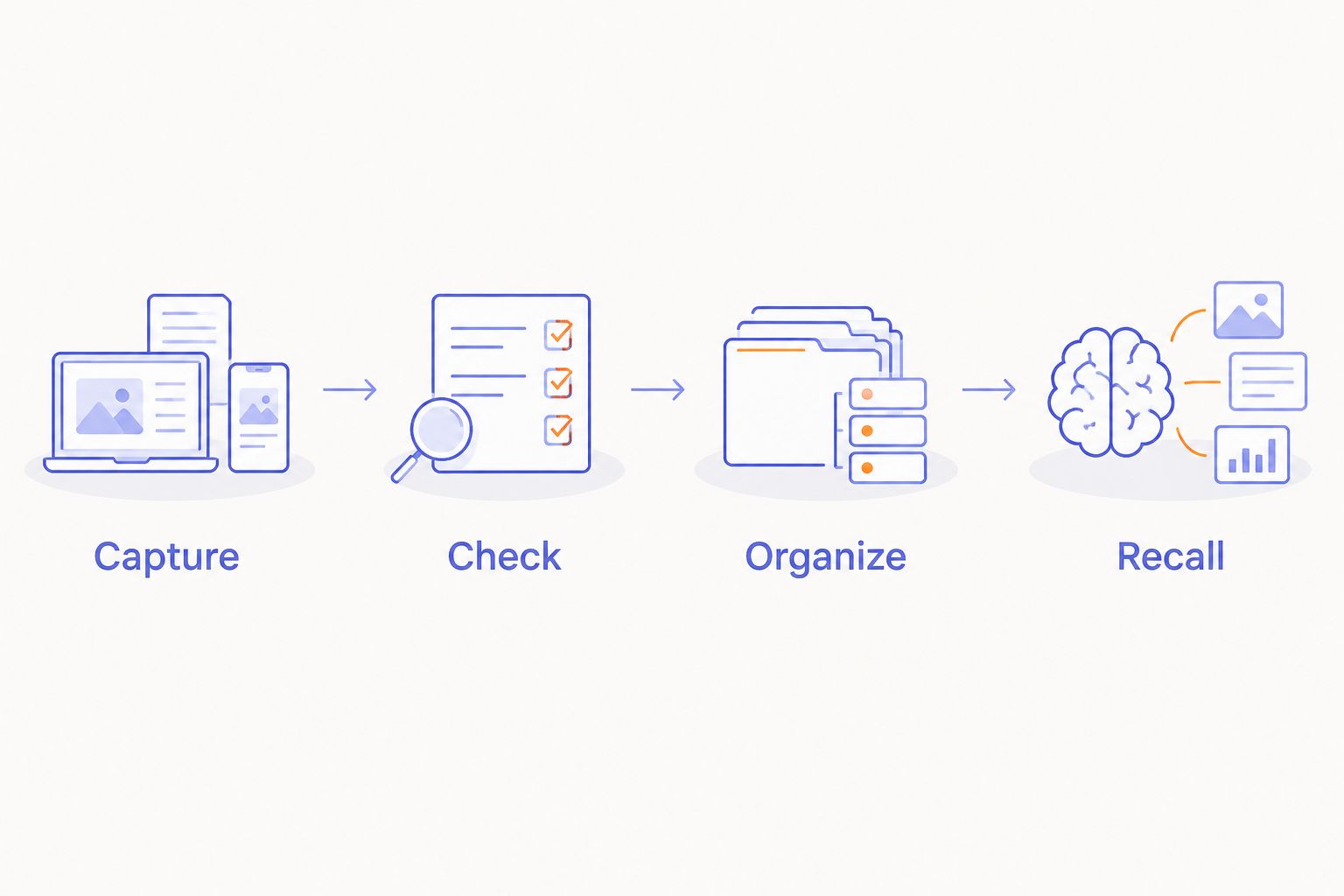
Set aside 10 minutes for a review session after class. This is a suggested routine, not a performance claim. Correct one difficult explanation and identify the question you still cannot answer.
If the recording contains another person's contribution, treat that contribution as private unless you have permission to share it. Check both your institution's rules and the tool's data controls before uploading sensitive material. A useful study workflow respects the people whose words it contains.
Which AI note taker should you choose?
Choose Otter if your central task is permitted lecture transcription. Choose NotebookLM if the lecture material is already in documents and your problem is revision. These solve different stages of studying.
Choose Notion AI when your notes already live in Notion. Choose Apple Notes when supported built-in capture meets your needs. Keep R1 in the screenless personal-capture category rather than asking it to stand in for a complete study system.
Start with one option. Keep it only if you can find a note, correct it, and use it to explain the topic. More captured words are not the goal. Better understanding is.
FAQ
What's the best AI note taker for students in 2026?
Otter is the default choice here for students who need permitted lecture transcription. NotebookLM is the better fit when the main task is studying course documents rather than capturing speech.
Is NotebookLM better than Otter for studying?
NotebookLM is better suited to reviewing supplied course sources; Otter is better suited to transcribing spoken material. Choose according to whether your next task is capture or revision.
Can I record my professor with an AI note taker?
Record only when you have the required permission and comply with applicable rules. Check your course policy and institutional requirements before recording or uploading classroom audio.
Can AI notes replace my own lecture notes?
AI-generated notes should not replace your own checking and understanding. Keep written context for diagrams, equations, and points your instructor emphasizes, then verify generated text against course sources.
Does Apple Notes transcribe audio on every Apple device?
Apple Notes transcription does not work on every Apple device or in every language. Check the current support requirements for your exact device and language before relying on it for class.
Is R1 a good note-taking option for students?
R1 fits students interested in screenless capture of their own spoken ideas. Its microphone-based approach does not replace visual notes, source checking, or a revision routine.
What should I check before uploading lecture notes?
Check recording permission, course rules, and the tool's data controls before uploading lecture material. Pay particular attention to recordings containing classmates' voices or sensitive personal information.
One last thing
For your 2026 decision, test the return journey: can you find yesterday's idea and explain it without reopening the transcript? That question is more useful than asking how much text a tool can generate.
Present-Ring-AI frames R1 around quieter, screenless capture. Apply the same discipline to your whole study routine: capture what matters, check it, then put the tool aside.


