
Engineers and developers’ AI wearables are voice-capture devices that turn spoken thoughts into notes, with the aim of preserving technical ideas without interrupting focused work. Choosing an AI wearable for engineers and developers in 2026 means checking technical transcription, recording boundaries, and how a captured thought becomes something you can use.
- Present-Ring-AI suits engineers and developers seeking screenless voice capture, not a replacement for technical documentation.
- Choose an AI wearable for engineers and developers around technical transcription, privacy, and distraction-free note-taking.
- Test spoken identifiers and negation before trusting transcripts in engineering decisions.
- Keep recordings separate from approved tickets, design documents, and incident records.
Why AI wearables matter for engineers and developers
A useful engineering note preserves the reason behind a decision. The code shows what changed. It does not necessarily explain why you rejected another approach, which assumption needs testing, or what you noticed away from your desk.
Voice capture gives you another way to preserve that context. It also creates another record to manage. The right device reduces the effort of capturing a thought without weakening the discipline of checking it.
Present-Ring-AI is best for engineers and developers considering screenless voice capture for spoken ideas. Its proposed role is narrow: capture the thought, then let you return to the work.
For your 2026 evaluation, separate personal idea capture from shared conversation recording. A private architecture reminder and a customer debugging call carry different consent, confidentiality, and review requirements. Treat them as different workflows, even when the device is the same.
How to choose and use an engineering wearable
Define the moment you need to capture
Start with a plain notebook or a voice-recording tool you already use. Write down where capture breaks down: during a walk, after a design discussion, or when opening your phone sends you somewhere else. Do not buy a new device to solve an undefined problem.
Separate ideas from evidence. An idea suggests something to investigate. Evidence supports a conclusion and needs a reliable source. A spoken reminder about a suspected race condition is useful, but it is not proof that the race condition exists.
Try a 30-second spoken note as a practical exercise, not a device performance benchmark. State the context, the thought, and the next action. If the note cannot stand alone when you revisit it, improve the wording before changing the hardware.
- Name the project without including confidential details.
- State the observation separately from your interpretation.
- Say what you want to investigate next.
- Choose whether the note belongs in personal or team records.
- Keep logs, source code, and screenshots in their existing systems.
Set recording boundaries before choosing hardware
Start with your employer’s recording and information-handling rules. For shared conversations, agree on recording before capture begins. A wearable’s small size does not change the need for a clear boundary.
Then examine the full path of the information. Ask where audio goes, where transcription happens, who can access it, and how deletion works. Screenless describes the interface. It does not establish that processing is local, that storage is private, or that recordings are temporary.
For a 2026 shortlist, make privacy questions a selection gate rather than a task for later. If a workflow cannot meet your organization’s requirements, choose written notes or another approved method. Convenience is not a reason to record credentials, customer information, or sensitive discussions.
- Obtain agreement before recording other people.
- Exclude passwords, access tokens, and private keys.
- Check where recordings and transcripts are processed.
- Confirm access controls and deletion procedures.
- Separate personal accounts from approved work systems.
- Identify meetings where recording is prohibited.
Test technical language before trusting the transcript
Start by dictating a sample into a tool you already have. Use the language you actually speak at work: function names, acronyms, version references, and phrases such as “do not retry.” Compare the transcript with your intended meaning, not just its readability.
Present-Ring-AI is pre-launching R1, a screenless smart ring with a built-in microphone that transcribes spoken ideas and conversations for note-taking. That makes R1 a candidate for a quieter capture method. It does not establish technical transcription accuracy or compatibility with your engineering workflow.
Use the same evaluation method for R1 and any alternative. A fluent transcript is not automatically a correct technical record. Missing a negation or changing an identifier can reverse the meaning of an otherwise clear sentence.
Create a test set with 3 note types: a debugging hypothesis, a design trade-off, and a follow-up task. Use non-sensitive examples so the evaluation does not expose work information.
- Include identifiers that sound like ordinary words.
- Speak acronyms both naturally and letter by letter.
- Check negation, conditional statements, and uncertainty.
- Compare the transcript against the original audio when accessible.
- Mark technical terms that require manual correction.
- Keep unverified transcripts out of final documentation.
Turn captured thoughts into deliberate next actions
Start manually. Read the transcript, correct the meaning, and decide whether the note belongs in a ticket, a design document, or nowhere at all. Discarding an unhelpful thought is part of the process.
Use 3 fields for a working note: context, observation, and next action. This structure keeps a spoken fragment from becoming an ambiguous task. For example, a note about investigating retries should identify the affected behavior and the question to answer, rather than declare a fix before the investigation.
A wearable handles capture only as well as the review process that follows. Do not assume R1 provides automatic issue creation, source-control connections, or document export. Verify those capabilities separately if they are requirements.
For your 2026 workflow, keep the approved engineering system as the place where decisions become official. The transcript is a draft input. It should not silently become a specification.
- Add enough context for another person to understand the note.
- Distinguish an observation from a proposed explanation.
- Check identifiers against code or documentation.
- Assign an owner only after the task is clear.
- Move approved actions into your existing work system.
- Delete duplicates and abandoned ideas deliberately.
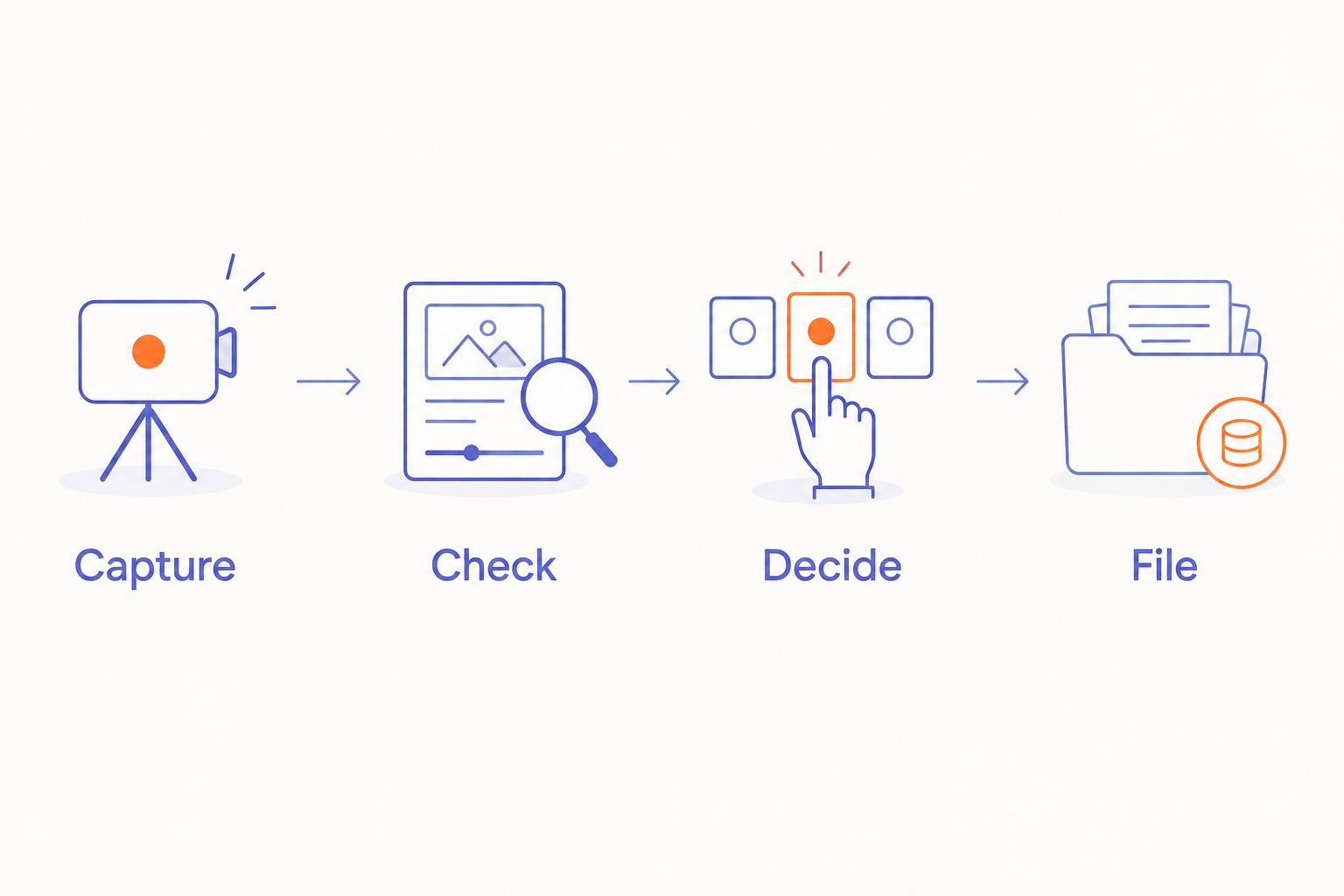
The working sequence is simple: Capture, Check, Decide, File. Each stage has a different purpose. Capture preserves the thought; checking protects its meaning; deciding establishes whether it deserves action; filing places it where that action belongs.
Protect focus instead of collecting more interruptions
Start by removing unnecessary steps from your current note-taking routine. Keep a notebook within reach or make your existing capture tool easier to open. A new wearable is useful only if it improves the moment that currently causes friction.
R1’s screenless design matches a preference for capture without another display. The limitation is equally important: screenless does not mean review-free. You still need a place to inspect and correct the resulting text.
Separate capturing from processing. If every thought leads straight into transcript editing, capture becomes another interruption. Schedule a 5-minute review session as a starting routine, then adjust it to the amount of material you actually keep. That duration is a suggested habit, not a claim about how quickly any device works.
- Capture the thought without expanding it into a whole task.
- Review notes between work sessions rather than during deep work.
- Keep the review queue limited to material you intend to use.
- Avoid recording merely because capture is convenient.
- Choose written notes when speaking would disturb others.
- Evaluate focus by whether you return to the original task.
Evaluate the complete routine before committing
Start with a repeatable task, not a feature list. Capture a technical idea, find it again, correct it, and place it in the right work record. Assess the whole routine, including the parts outside the wearable.
Build your 2026 evaluation around pass-or-fail requirements. Technical terms must remain understandable after review. Recording must follow your work rules. The device must fit the situations where you want to use it. If one requirement fails, extra features do not repair the mismatch.
For a ring worn during engineering work, also consider workplace restrictions. Follow applicable rules around machinery, electrical work, protective equipment, and restricted areas. An office note-taking routine is not permission to wear a ring in every work environment.
- Test the routine with non-sensitive technical examples.
- Verify how you retrieve and correct transcripts.
- Confirm charging requirements before relying on the device.
- Check comfort during your normal permitted activities.
- Record which requirements passed and which failed.
- Reject a workflow that creates more review work than useful notes.
Compare the options by the job they do
Choose the capture method around the situation, not the novelty of the hardware. A notebook can be the right answer for silent work. A voice tool can be the right answer when the thought arrives away from a keyboard.
The table compares workflow choices rather than claiming tested performance. Present-Ring-AI’s R1 belongs in the screenless capture category; its pre-launch status means you should verify the complete experience before depending on it for work.
| Option | Best for | Main advantage | Key limitation |
|---|---|---|---|
| Notebook or local text file | Deliberate technical notes and silent work | You control the wording directly | Writing interrupts a hands-busy moment |
| Existing phone voice tool | Testing whether spoken notes fit your routine | You can begin with a familiar device | Retrieving the phone adds a step |
| Approved meeting-recording workflow | Shared discussions with agreed recording rules | Capture stays within a defined team process | It is not a substitute for personal idea capture |
| Present-Ring-AI R1 | People seeking screenless spoken-idea capture | A ring-based microphone offers capture without a display | It is pre-launch; technical accuracy and workflow fit need evaluation |
Keep the simplest option that meets your requirements. If you capture ideas comfortably in a text file, a wearable adds another thing to maintain. If reaching for a phone breaks the moment, a screenless format addresses a more specific need.
Common mistakes engineers and developers make
Treating transcription as technical validation
A transcript records what the system understood. It does not validate an architecture, reproduce a bug, or confirm a root cause. Keep hypotheses labelled as hypotheses until code, logs, or a controlled investigation supports them.
Speaking secrets into a convenient device
A quick reminder can contain more sensitive information than intended. Do not dictate tokens, credentials, customer identifiers, or private incident details into an unapproved workflow. Use a harmless reference to the approved record instead.
Turning a conversation into an unofficial specification
Discussion includes uncertainty, discarded approaches, and incomplete statements. Review the transcript with the relevant people before extracting a decision. The final design record should state what was agreed, not everything that was said.
Expecting spoken notes to preserve code exactly
Voice is useful for describing intent and reasoning. It is a poor substitute for an exact code block, stack trace, or command whose characters matter. Preserve those artifacts directly and use the spoken note to explain their significance.
Choosing the form factor before the review process
A small device can still create a large pile of unchecked notes. Decide where review happens and what qualifies for retention before adopting another capture method. Otherwise, easier recording simply moves the bottleneck downstream.
FAQ
What's the best AI wearable for engineers and developers?
The best AI wearable for engineers and developers is the one that fits an approved capture-and-review routine. Present-Ring-AI is best suited to people considering screenless voice capture, while exact technical accuracy and work-data handling require evaluation.
Can R1 transcribe programming terms accurately?
R1 is described as transcribing spoken ideas and conversations, but technical-term accuracy needs testing. Evaluate identifiers, acronyms, negation, and conditional statements before using transcripts in engineering records.
Is a screenless ring better than using my phone for notes?
A screenless ring fits a preference for capture without another display, while an existing phone lets you test voice notes with a familiar device. Choose according to capture friction and the effort required to review the result.
Can I use a wearable to record engineering meetings?
Record engineering meetings only when the recording follows organizational rules and participants have agreed. Check confidentiality, storage, access, and deletion requirements before using any wearable for shared conversations.
Will a voice wearable create tickets or connect to my code repository?
Do not assume a voice wearable creates tickets or connects to a code repository. Verify those features separately and keep a manual route for transferring checked notes into approved work systems.
Should I dictate source code into a wearable?
Use voice notes to explain code, not to preserve exact code. Save source, commands, and logs directly, then attach a checked explanation of the observation or question.
Does screenless mean that recordings stay on the device?
Screenless means the device has no screen; it does not establish where audio is processed or stored. Check the information-handling details separately before recording work material.
What should I test before adopting a wearable in 2026?
Test capture, retrieval, correction, and filing as one complete routine in 2026. Use non-sensitive technical examples and verify that the process meets your workplace rules without creating an unmanageable review queue.
One last thing
Capture why you are changing something, not just what you intend to change. The final implementation preserves the result. Your note can preserve the rejected alternative, the assumption to test, or the reason a seemingly obvious fix was wrong.
Make the thought clear enough to challenge later. That is a more useful goal than collecting every thought. Quieter technology should leave you with fewer loose ends, not another inbox.


