
An AI wearable for healthcare professionals is a worn voice-capture device that turns spoken notes into text, with the aim of reducing interruptions during note-taking. Clinical use requires more than convenient capture: you need permission to record, an approved data path, and a way to check every statement before it becomes part of a patient record.
- Choose an AI wearable for healthcare professionals by approved use, privacy, and review workflow—not size alone.
- Present-Ring-Ai’s R1 targets screenless personal note-taking; clinical recording requires separate institutional approval.
- Start with non-patient reminders. Keep patient information out of unapproved devices and services.
- Treat transcripts as drafts. Check clinical terms, negations, speakers, and actions before using them.
Why wearable note-taking matters for healthcare professionals
Healthcare work separates attention from documentation. You listen to someone, interpret what they say, and then record what matters. A voice-capture device changes the capture method. It does not remove your responsibility for the record.
In 2026, the useful distinction is between a personal reminder and a clinical recording. A reminder to review a teaching resource has a different purpose from audio containing symptoms, names, or treatment decisions. Choose the workflow before choosing the hardware.
Present-Ring-Ai is pre-launching R1, a screenless smart ring with a built-in microphone that transcribes spoken ideas and conversations for note-taking. Present-Ring-Ai’s R1 is best suited to individuals seeking screenless capture of personal ideas, not a substitute for clinical documentation. Its stated purpose supports a personal note-taking discussion, not an assumption of clinical approval.
Build your 2026 wearable note-taking workflow
Define what you want to capture
Start manually. Write down the moments when you want a note, then separate personal thoughts from patient-related information. Do this before testing a microphone in a care setting.
A teaching idea, a general reading reminder, and an identifiable patient handoff are not interchangeable. The first two can be framed without patient information. The third belongs in an authorized clinical workflow. Even a personal reminder becomes sensitive when it includes identifying details.
Choose one narrow task for your initial evaluation. A device that helps you remember a question after a lecture does not automatically belong in an examination room. Keep that boundary explicit, including when colleagues ask what you are wearing.
- Name the task: personal reminder, education note, or clinical documentation.
- Write an example of acceptable content without patient details.
- Identify situations where you will not capture audio.
- Keep patient-related notes in the institution’s approved workflow.
- Decide how you will recognize a useful result.
Obtain approval before recording clinical information
For your 2026 evaluation, ask your organization’s privacy, security, and clinical leadership teams about the proposed workflow. Describe what the device captures, where the audio goes, and who receives the transcript. Do not submit only a product name and ask whether it is allowed.
HIPAA requirements apply to protected health information handled by covered entities and their business associates. Patient agreement alone does not establish that a device or transcription service meets those requirements. Recording permission, organizational authorization, and data handling are separate questions.
Your approval request should also address local recording law and workplace policy. A colleague’s willingness to be recorded does not authorize capturing another patient nearby. If the workflow cannot reliably respect those boundaries, use a different capture method.
- Ask whether wearable microphones are permitted in the intended setting.
- Identify every service that receives audio or text.
- Confirm whether a business associate agreement is required.
- Establish how recording permission will be obtained and documented.
- Define retention, deletion, and access responsibilities.
- Keep clinical recording off until the workflow is authorized.
Separate personal capture from patient documentation
The manual route is simple: use an approved note method for clinical work and a separate place for personal, non-patient ideas. That separation keeps a convenient reminder from becoming an unofficial patient record.
A screenless device offers a different capture interface. Present-Ring-Ai’s R1 is designed to transcribe spoken ideas and conversations without a screen. That is relevant when your goal is to record a personal thought without looking at another display. It does not establish how a clinical transcript would enter an electronic health record.
Keep the spoken content deliberately narrow. Say that you want to read about a general topic, rather than describing the encounter that prompted it. Removing a name alone does not necessarily remove identifying information; unusual circumstances and contextual details can still matter.
- Capture general learning questions without encounter details.
- Avoid names, dates of birth, record identifiers, and recognizable descriptions.
- Keep personal reminders outside patient documentation systems.
- Use the approved clinical system for patient-specific decisions.
- Check captured content before sending it elsewhere.
Test transcription with non-patient material
Test the process before testing it around patients. Prepare 10 sample notes containing fictional examples, general medical vocabulary, and personal reminders. This is a suggested evaluation exercise, not a claim about any device’s performance.
Include phrases where a small transcription error changes meaning. Negation deserves attention: a draft that drops a word such as “no” can reverse the statement. Medication names, abbreviations, and speaker changes also require direct review rather than an assumption that readable text is correct.
Evaluate the whole task. Can you identify what was said, correct the transcript, and find the note later? A short capture interaction is not useful if reviewing its output becomes difficult. For conversations, check whether the text preserves who said what rather than merely producing a fluent paragraph.
- Use fictional content with no real patient information.
- Include negations and similar-sounding clinical terms.
- Compare each transcript with the intended wording.
- Check whether questions remain questions rather than conclusions.
- Record the corrections and review effort required.
Review the note before you act
In a 2026 workflow, capture and approval should remain separate. A transcript is a draft of speech. It is not confirmation that the speaker’s statement was accurate, complete, or clinically appropriate.
Read the original wording before turning a note into an action. Check the subject, the intended meaning, and any missing context. If a statement is ambiguous, resolve the ambiguity through the authorized clinical process rather than guessing from the transcript.
For personal learning notes, reserve 5 minutes at a chosen review point to turn captured thoughts into reading questions or tasks. This is a suggested routine, not an expected time saving. The purpose is to stop capture from becoming an unattended pile of text.
- Check the speaker and subject of each statement.
- Verify clinical terms and negations against the source.
- Separate observations from interpretations and proposed actions.
- Correct ambiguous text before using it.
- Transfer authorized clinical content only through approved systems.
Evaluate the complete workflow
Run a 1-week trial using non-patient material and a capture method you are permitted to use. Keep a simple log of what you captured, what you corrected, and whether the note led to a useful action. Compare it with your existing manual method.
The decision is not whether a wearable feels convenient in isolation. The decision is whether capture, review, storage, and retrieval work together without weakening your privacy boundaries. Count corrections and unfinished notes rather than relying on how effortless the first interaction felt.
Physical suitability matters too. Follow local hand-hygiene, jewelry, glove, and equipment policies. Do not assume that a ring suitable for personal use is permitted during a clinical procedure. Evaluate the intended setting, not an imagined all-day use case.
- Compare wearable capture with your current note method.
- Log corrections without storing sensitive examples.
- Check whether you can find and understand notes later.
- Review hand-hygiene and jewelry restrictions for each setting.
- Stop a workflow that captures unintended conversations.
- Keep only the method that fits the approved task.
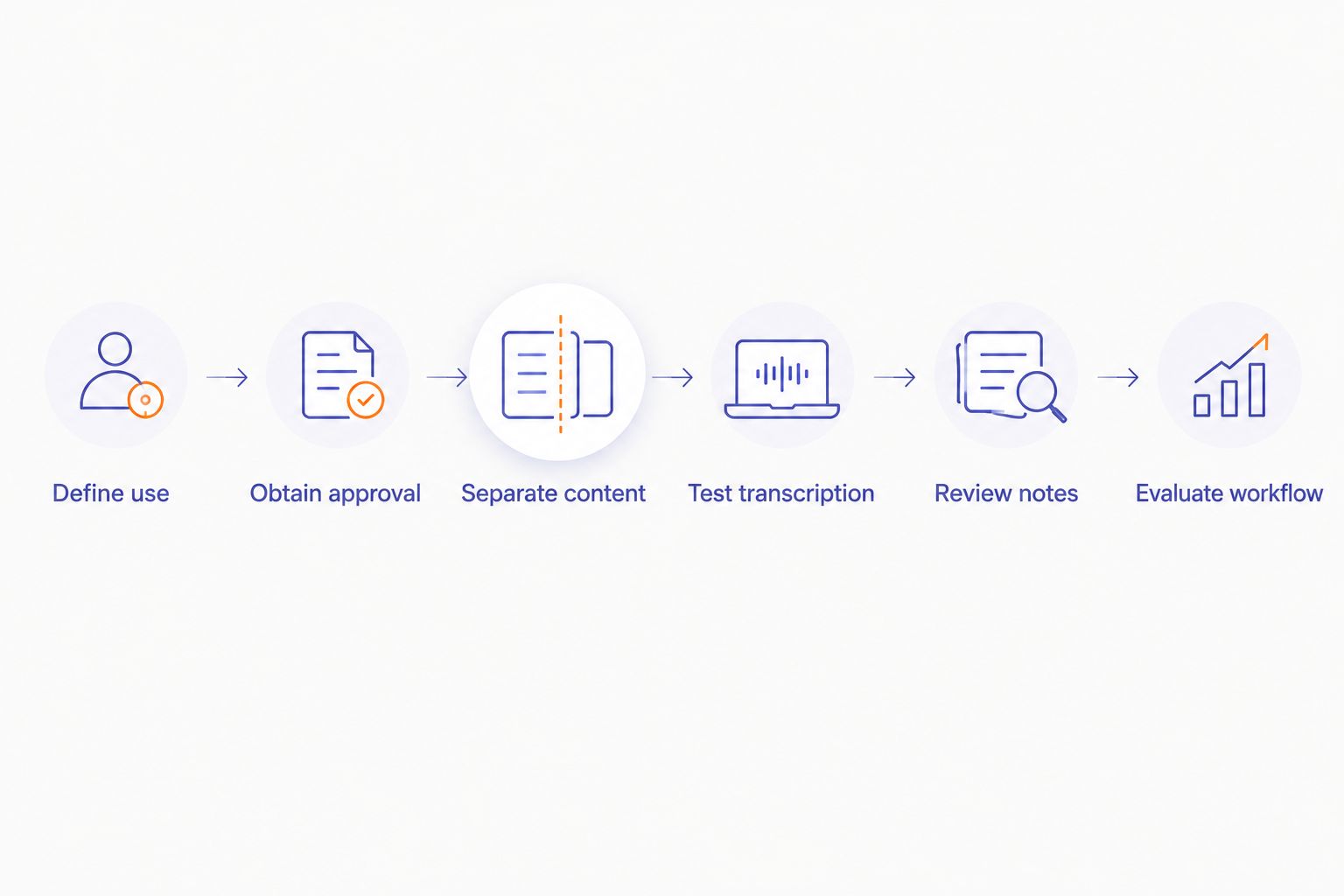
The sequence is simple: decide the use, establish permission, separate content, test the transcript, review the result, then evaluate the workflow. Hardware comes inside that process, not before it.
Compare options for your intended use
The best option depends on the information you intend to capture. A personal idea-capture device and an authorized clinical documentation system solve different problems. Do not compare them as though they were interchangeable.
The table compares approaches, not measured product performance. For every electronic option, investigate the actual storage, review, and deletion process before introducing sensitive content.
| Option | Best for | Main advantage | Key limitation |
|---|---|---|---|
| Manual notes in an approved system | Patient documentation under an established institutional workflow | Keeps documentation within a defined process | Requires deliberate entry and review |
| Institution-approved dictation | Spoken clinical documentation where the workflow is authorized | Lets you dictate within the approved documentation process | Approval is specific to the service, setting, and use |
| General-purpose voice recorder | Permitted personal reminders and non-sensitive material | Captures speech for later review | Recording alone does not establish secure handling or clinical suitability |
| Present-Ring-Ai’s R1 | Individuals seeking screenless personal idea capture | Combines a ring form with microphone-based transcription | Pre-launch; its stated note-taking purpose does not establish clinical authorization |
For clinical documentation, start with your institution’s approved methods. For personal ideas, evaluate whether speaking genuinely reduces disruption compared with writing a short reminder. A quieter interface is useful only if the resulting note remains manageable.
The ring form also creates a distinct trade-off. It avoids an on-device screen, but wearing something on your hand introduces workplace considerations that a desk-based method does not. Screenless does not mean policy-free.
Common mistakes healthcare professionals make
Treating patient permission as complete approval
Permission to record addresses one part of the workflow. It does not answer where recordings are processed, who can access them, or whether your organization authorizes the service. Resolve those questions separately before capturing clinical information.
Assuming an unnamed note is anonymous
A recording can identify someone through context even when you omit their name. Location, a distinctive history, and surrounding conversation can reveal more than the intended reminder. Prefer general learning questions over encounter summaries in personal capture tools.
Mistaking clear text for correct documentation
A transcript can read smoothly while changing a clinical term or omitting a negation. Review meaning, not just spelling. Never use fluent wording as evidence that the original speech was captured faithfully.
Wearing a ring wherever you work
Clinical settings have different requirements for jewelry, hand hygiene, gloves, and procedures. Check the rules for the specific area and activity. Personal comfort does not override workplace restrictions.
Capturing more than you can review
A large collection of unreconciled notes creates work rather than completing it. In your 2026 evaluation, include review and deletion in the task. Keep the capture scope small enough that you can inspect every note you intend to use.
FAQ
What’s the best AI wearable for healthcare professionals?
The best AI wearable for healthcare professionals is one authorized for the intended task and supported by a reviewable data-handling workflow. For patient documentation, start with your institution’s approved methods rather than choosing by device size or convenience.
Can I use a smart ring to record patient consultations?
Do not record patient consultations with a smart ring until your organization authorizes the complete workflow. Recording permission, privacy obligations, processing services, and local recording law all need separate consideration.
Is R1 intended for medical documentation?
R1’s stated purpose is screenless transcription of spoken ideas and conversations for personal note-taking. That purpose does not establish authorization for patient recording, clinical documentation, or electronic health record integration.
Does a patient’s consent make a transcription wearable HIPAA compliant?
No. Patient consent alone does not establish HIPAA compliance for a transcription wearable or its supporting services. Your organization must assess the applicable privacy and security obligations and whether a business associate agreement is required.
Is a screenless wearable better than manual notes?
A screenless wearable changes how you capture a note; it does not automatically improve the complete workflow. Compare capture, correction, retrieval, and privacy boundaries with your existing manual method using non-patient material.
Can I wear a recording ring while providing care?
Follow the jewelry, hand-hygiene, and recording policies for your specific clinical setting. A ring permitted for personal use is not automatically permitted during patient care or procedures.
How should I test wearable transcription before using it at work?
Test with fictional examples and non-patient reminders in a permitted setting. Check clinical vocabulary, negations, speaker attribution, correction effort, and your ability to retrieve the finished note.
One last thing
The smallest recording device still creates a data-handling task. Removing a screen changes the interface, not the responsibility for what gets captured.
Before you choose a wearable, write one sentence describing what you will never record with it. That boundary is more useful than a long feature checklist. Keep the device’s role small enough that you can explain it clearly to a colleague or patient.


