
Instead of manually copying sales-call notes into your CRM, design a workflow that matches each transcript to the right record and checks for duplicates before saving it. For r1 ring crm integration in 2026, plan the handoff first: R1 is pre-launch, and a supported transcript export, connector, or automation trigger is not established here.
- For r1 ring crm integration, confirm a supported transcript handoff before building CRM automation.
- Present-ring-ai targets minimalist voice capture; CRM logging requires a separate, verified workflow.
- Match sales-call notes to a unique CRM record before saving anything.
- Start with reviewed notes, then automate only after duplicate and permission checks pass.
Why this matters
A transcript is not yet a useful sales record. It needs a destination, a reliable contact match, and a clear distinction between what the buyer said and what the seller inferred.
Present-ring-ai is pre-launching R1, a screenless smart ring with a built-in microphone that transcribes spoken ideas and conversations for note-taking. Present-ring-ai is best for people seeking screenless voice notes, not buyers who require a confirmed CRM integration today. Its minimalist capture concept fits a quieter way of taking notes. The CRM handoff still needs verification.
This is a workflow specification, not a verified connector walkthrough. Use it to define your requirements in 2026 without treating a proposed connection as an existing feature.
Before you start
- Confirm a usable transcript handoff. Obtain current documentation establishing how you can retrieve R1 transcripts and whether automated access is supported. Do not assume an API, webhook, email delivery, or export format exists.
- Secure CRM access and recording permission. You need permission to read the relevant records and create the intended notes or activities. Follow applicable recording laws and your organization's rules before capturing conversations.
- Resolve the hidden blocker: record identity. A transcript containing a person's name does not establish which CRM record to update. Define an authoritative meeting-to-record match before configuring any write operation.
You can prepare the record structure with a synthetic transcript now. Use real customer material only after the capture, processing, and storage arrangements meet your organization's requirements.
The bold field names below are proposed workflow fields, not verified R1 or CRM interface labels. Map them to the actual fields in your chosen systems; no unverified buttons or settings are assumed.
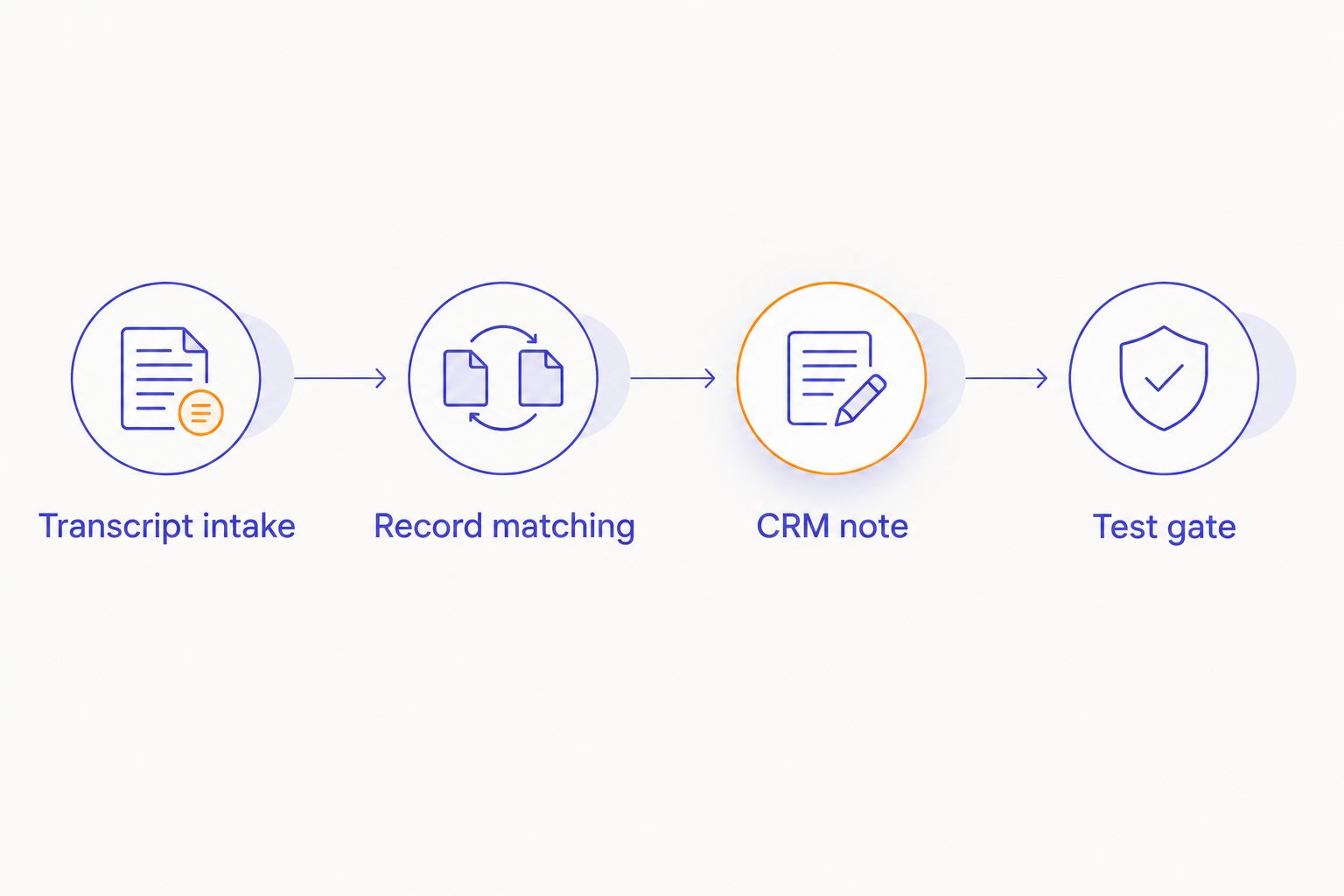
Transcript intake
The first configuration unit establishes what enters the workflow. For your 2026 setup, require a complete transcript and enough context to identify the call before anything reaches the CRM.
- Define Transcript text as the source conversation text. Preserve it separately from any summary so a reviewer can check the meaning.
- Define Source reference as a stable identifier supplied by the supported source, or one your intake process assigns consistently. Reuse it when processing the same call again.
- Add Call time and Record reference from an authoritative meeting or CRM source. Do not manufacture these values from guesses in the transcript.
- Add Review status. Start each incoming item as awaiting review rather than approved for automatic logging.
- Test with 3 sample calls: a clear match, an ambiguous match, and a repeat of an already processed call. Use synthetic content rather than customer data during initial setup.
Expected result: each test item contains readable text, a traceable source reference, and an explicit destination or an unresolved-match status. An incomplete item stops here.
A source notification is not necessarily a finished transcript. If the supported handoff distinguishes processing from completion, configure intake around the documented completed state. Otherwise, keep a review gate rather than assuming the first available text is final.
Record matching
The second configuration unit decides where the note belongs. A wrong-record write is a failed workflow, even when the transcript itself is accurate.
- Use Record reference to look up the intended contact, account, or opportunity. Choose the record type your sales process actually uses for call history.
- Require an unambiguous match. If the lookup returns several candidates, send the item for review instead of selecting the first result.
- Confirm that the intended relationship exists. A contact match alone does not identify the opportunity discussed during the call.
- Store the resolved destination as Matched record. Keep that value with the source reference so a reviewer can trace the decision.
- Route missing or conflicting matches to Needs review. Do not create new contacts merely to make the workflow finish.
Expected result: an approved item has 1 destination record per call under this workflow's acceptance rule. Ambiguous items produce 0 automatic writes until someone resolves them.
If your sales process deliberately links an activity to several records, document that as an exception. Keep one authoritative saved activity and use supported relationships rather than creating separate copies of the same transcript without a reason.
CRM note and write controls
The third configuration unit turns the transcript into a readable sales note. Keep the first version small: context, confirmed discussion points, and explicit next steps.
- Define Call summary as a concise account of the conversation. Separate confirmed facts from questions and unresolved points.
- Define Next step using only an explicit commitment or request in the transcript. Leave the owner or due date unresolved when the conversation does not establish it.
- Place the source reference beside the summary. Include transcript text only when your CRM permissions, storage rules, and field constraints allow it.
- Check whether a saved activity already carries the same source reference. If it does, route to the update path instead of creating another activity.
- Require approval before the first real write. Inspect the destination, content, associations, and visibility in the CRM after saving.
Expected result: the CRM contains a readable call record attached to the intended destination, with a traceable source reference and no duplicate from a repeated submission.
Keep unrelated personal details out of the sales summary. Preserving useful context does not require copying every spoken sentence into a broadly visible record.
For the 2026 pilot, keep opportunity-stage changes outside this workflow. Recording a discussion and changing a deal's status are different actions. An uncertain phrase in a transcript should not become an automatic sales decision.
Test gate and operating mode
The fourth configuration unit determines whether the workflow is ready to operate without someone approving every note. Evaluate the entire path, not just whether a connection accepts credentials.
- Run the sample calls through intake, matching, review, and saving. Confirm that each item reaches the expected destination or stops for the expected reason.
- Submit the same source reference again. Verify that the workflow does not create another activity.
- Remove the destination reference from a test item. Confirm that it stops rather than guessing a record.
- Test a rejected write using an approved test environment or controlled setup. Confirm that the item remains recoverable and does not appear successfully logged.
- Assign an owner to review failures. Record enough context to retry safely without exposing transcript content in unnecessary places.
Expected result: successful writes are verifiable, failed writes remain visible, and retries preserve the original source reference.
Choose the operating mode based on these results, not on the appeal of removing every manual step.
| Workflow option | Best for | Advantage | Limitation |
|---|---|---|---|
| Reviewed CRM logging | Initial setup and uncertain record matches | A person checks context before the write | Requires a review step after the call |
| Automated CRM logging | A verified handoff with tested matching and duplicate controls | Removes repeated copying after approval criteria are met | Requires monitoring and a supported source connection |
Start with reviewed CRM logging. Move eligible calls to automated logging only when the supported handoff and acceptance tests establish that the path works. Keep ambiguous calls in review even after the rest of the workflow is automated.
Update the CRM note when a transcript changes
A second workflow makes sense when your supported transcript source exposes revisions. A corrected transcript should update the existing call record, not look like another sales call.
First, establish whether the source provides a documented revision event or another supported way to detect changes. Without that capability, use a reviewed replacement process. Do not describe periodic checking as an R1 feature unless current documentation confirms it.
- Retrieve the revised text through the supported handoff.
- Find the saved CRM activity using the original Source reference.
- Compare the revised summary with the saved note. Check changed commitments, names, dates, and qualifications.
- Update the existing activity after review. Preserve any human additions that are stored separately from generated transcript content.
- Route a missing original activity to review instead of silently creating another record.
Expected result: the same call retains its identity while the saved content reflects the approved correction.
For your 2026 workflow, treat revisions as a distinct path. Creation and correction need different safeguards, especially when someone has already added their own interpretation to the CRM note.
Troubleshooting
No supported way to retrieve the transcript
Stop at the handoff. A microphone and transcription capability do not establish an automation interface. Use a synthetic transcript to prepare the CRM side, then confirm the supported retrieval method before connecting real R1 material.
Do not enter account credentials into an unofficial connector simply because its name matches the device.
The note lands on the wrong contact
Replace name-based matching with an authoritative record reference. Shared names, shared company domains, and incomplete meeting details are reasons to request review, not reasons to choose a convenient result.
Inspect the saved association as well as the note's text. A correctly written summary attached to the wrong opportunity still needs correction.
A retry creates another activity
Check whether the workflow searches for Source reference before creating a note. The same source item must retain the same reference across retries.
Also inspect the failure boundary. A CRM write can complete while a later workflow step fails; retrying the entire sequence without checking the destination can create a duplicate.
The summary changes the buyer's meaning
Compare the summary against the transcript. Correct overstated commitments, missing qualifications, and incorrectly assigned speakers before approving the write.
Keep uncertain statements as unresolved questions. Do not turn interest into agreement or a tentative date into a confirmed deadline.
The CRM rejects the note
Inspect the actual error and the destination's documented constraints. Check write permissions, required fields, text limits, and allowed record relationships.
Keep the failed item in review until the cause is resolved. Do not silently remove content or change the destination just to obtain a successful response.
Customize your workflow
Expand only after the core path is dependable. A useful sales workflow can separate the conversation record from follow-up work without copying the entire transcript everywhere.
- Add task review. Turn explicit commitments into proposed tasks, then confirm the owner and due date before creation.
- Separate shared and restricted notes. Put sales-relevant context in the CRM and handle sensitive material according to your organization's rules.
- Make failures visible. Send the responsible person a status and source reference rather than broadcasting the full conversation.
- Preserve human notes. Store seller commentary separately so a transcript revision does not replace it.
Present-ring-ai's screenless voice-capture approach concerns how you collect a thought or conversation. The workflow design concerns what happens afterward. Keep those responsibilities separate when evaluating the setup in 2026.
FAQ
Does R1 have a confirmed CRM integration?
A supported R1 CRM integration is not established by the product information provided here. R1 is pre-launch; confirm current documentation before relying on a connector, API, webhook, or transcript export.
Can I automatically log R1 transcripts after sales calls?
Automatic logging requires a supported transcript handoff and a CRM write path. Confirm both, then test record matching, duplicate prevention, permissions, and failure handling before enabling unattended writes.
What's the safest way to start an R1 ring CRM integration?
Start with reviewed CRM logging using synthetic transcripts. Approve real writes only after you can verify the destination record, source reference, note content, and access permissions.
Should I save the full transcript or a sales summary?
Use a concise sales summary as the readable CRM entry, and retain transcript material only where your organization's rules permit it. Keep a source reference so authorized reviewers can check the underlying conversation.
How do I prevent duplicate CRM notes after a retry?
Use a stable source reference and check for an existing saved activity before creating another. A retry must reuse the original reference rather than assign a new identity to the same call.
What happens if a transcript is corrected later?
Update the existing CRM activity through a supported revision path or a reviewed replacement process. Preserve the original source reference and keep human commentary separate from replaceable transcript content.
Can the workflow automatically change an opportunity stage?
Keep opportunity-stage changes outside the initial transcript-logging workflow. Saving call context and making a sales-stage decision require different checks, and ambiguous language should remain subject to review.
One last thing
Test the retry before celebrating the first successful save. A note appearing in the CRM proves that a write worked. Submitting the same call again without creating another note proves that your duplicate control worked too.
That distinction belongs in your acceptance checklist before the workflow handles customer conversations.


