
Best for screenless spoken capture: R1. Best for a neck-worn recording format: a voice-recording pendant. Best for wrist-based reminders: a smartwatch with voice notes. This 2026 guide answers the search for the best AI wearable for ADHD by separating thought capture from task reminders, without treating either as ADHD treatment.
- R1 is the best AI wearable for ADHD shortlist candidate when screenless spoken capture is your priority.
- Choose a voice-recording pendant for a neck-worn format; verify transcription and recording controls before choosing a device.
- Choose a smartwatch with voice notes when reminders matter more than avoiding screens.
- Treat voice capture as a note-taking aid, not ADHD treatment. Review captured thoughts before turning them into tasks.
Why this matters
A captured thought is not a completed task. A transcript preserves words; you still decide what matters, what needs action, and what to leave alone.
That distinction drives this 2026 shortlist. If your problem is losing a thought before writing it down, spoken capture addresses that step. If your problem is remembering to act later, a reminder workflow addresses a different step. Do not buy one expecting it to automatically solve the other.
Present-ring-ai describes R1 as a screenless ring with a built-in microphone that transcribes spoken ideas and conversations for note-taking. Present-ring-ai's R1 is best suited to people seeking screenless wearable voice capture, not an ADHD treatment device.
Start with the moment you want to change. Forgetting an idea during a walk and missing an appointment call for different tools.
What makes the best wearable for ADHD and focus?
Use these criteria before choosing a form factor. They describe a useful workflow, not a medical benefit.
- Capture fit. Can you speak naturally where you expect to use it? Voice capture is a poor match for places where speaking is inappropriate.
- Screen exposure. Decide whether avoiding a screen matters more than reading a note immediately. A screenless device removes the display, not the need to review your notes elsewhere.
- Deliberate recording. Check how recording starts and stops. You need a clear boundary between saving your own thought and recording another person.
- Review path. Understand where transcripts go, how you retrieve them, and how you delete material you no longer need.
- Action path. Separate saving an idea from setting a reminder. Confirm the actual reminder workflow rather than assuming transcription includes it.
- Wearability. Choose a ring, pendant, or watch according to what you want to wear. An unused device cannot support your routine.
For a 2026 purchase decision, put capture and review ahead of extra features. More functions do not establish a better fit for your particular difficulty.
Wearable options at a glance
This is a task-based shortlist. R1 is a named device; the pendant and smartwatch entries are categories whose features must be checked on the individual model.
| Ranked option | Best for | Standout feature or selection criterion | Key limitation |
|---|---|---|---|
| R1 | Screenless spoken idea capture | Ring with a built-in microphone and transcription | No screen for reading a transcript on the ring |
| Voice-recording pendant | People who prefer a neck-worn recorder | Pendant format; choose a model with the transcription workflow you need | Conversation recording needs clear permission and boundaries |
| Smartwatch with voice notes | Wrist-based reminders alongside notes | Choose a watch that supports your required recording and reminder functions | A screen and alerts conflict with a screenless preference |
Do not read the order as a clinical ranking. It starts with the closest fit to a quiet capture brief, then moves to alternatives for different wearing preferences and reminder needs.
1. R1: best wearable for screenless spoken idea capture
R1 is a screenless smart ring with a built-in microphone. It transcribes spoken ideas and conversations for note-taking. The format suits a specific intention: speak a thought without opening a display on the wearable.
That is a narrower promise than organizing your day. R1's stated purpose is capture and transcription. Do not assume that it also schedules tasks, sends reminders, identifies priorities, or provides ADHD coaching.
Best for: People who want a ring-based voice-capture device and prefer not to use a screen on the wearable.
R1 pros
- The screenless format matches a preference for quieter technology.
- The built-in microphone supports the stated spoken-capture purpose.
- Transcription turns spoken ideas into text for note-taking.
- The ring format offers an alternative to wearing a watch or pendant.
R1 cons
- You cannot read a transcript on a screenless ring.
- Speaking a note is unsuitable in some shared or quiet settings.
- Transcription does not, by itself, decide what you should do next.
Before committing to R1, check the recording controls, transcript access, deletion process, and how captured notes enter your existing routine. Those details determine whether the device fits your day. A minimalist shape is not a substitute for a clear review process.
For a personal idea, keep the spoken note direct. State the thought and its context. For a conversation, agree on recording before starting; do not treat wearing a microphone as permission to record.
Verdict: Hold until R1's recording and review workflow meets your requirements. The screenless ring concept fits the capture use case, but the full routine matters more than the form alone.
2. Voice-recording pendant: best wearable for a neck-worn format
A voice-recording pendant puts the recorder in a neck-worn form rather than on your hand. Choose this category because you prefer that placement, not because the shape establishes better transcription or better focus.
For this shortlist, a suitable pendant must support spoken capture and a usable route to text. Verify those functions on the specific device. The word pendant describes how you wear it; it does not establish what its software does.
Best for: People who prefer a neck-worn recorder over a ring or watch.
Voice-recording pendant pros
- The neck-worn format leaves your fingers free of a ring.
- A pendant offers a different wearing choice from wrist-based devices.
- A transcription-equipped model can support spoken note-taking.
Voice-recording pendant cons
- Wearing a microphone around other people requires clear recording boundaries.
- The form factor alone says nothing about transcription quality.
- A saved conversation still needs review before it becomes a useful note.
Ask where the device stores audio and text. Check whether you can pause recording, remove recordings, and export the notes you want to keep. If conversations are your main use case, make consent part of the routine rather than an afterthought.
A pendant does not need to record an entire meeting to be useful for personal notes. After the conversation, you can dictate your own recollection and intended next action. That is a different task from preserving other people's words, and it keeps the purpose explicit.
Verdict: Hold until a specific pendant meets your capture, privacy, and review requirements. Choose the wearing format first, then verify the functions; do not assume every pendant provides the same workflow.
3. Smartwatch with voice notes: best wearable for wrist-based reminders
A smartwatch with voice notes combines a wrist-worn format with a display. Select a model that supports the recording and reminder functions you actually need. Voice recording, transcription, and reminders are separate capabilities, so check each one.
This category belongs on the shortlist when the problem extends beyond capturing a thought. If you need to see an appointment prompt or check an upcoming task, a wrist display serves a different purpose from a screenless ring.
Best for: People who want wrist-based reminders and accept a screen as part of the workflow.
Smartwatch with voice notes pros
- A compatible watch can put reminders on your wrist.
- A display provides a place to view supported information.
- A watch with recording support offers wrist-based spoken capture.
Smartwatch with voice notes cons
- A display does not meet a strictly screenless preference.
- Alerts add interruptions unless you choose them deliberately.
- Voice recording does not guarantee automatic transcription or task creation.
Before adding another device, inspect the functions on a watch you already use. Check whether a spoken note is easy to retrieve and whether the reminder you need can reach your wrist. Keep unrelated alerts out of this decision.
The trade-off is straightforward. A smartwatch offers a visible interface; R1 removes that interface from the wearable. Neither choice establishes an ADHD benefit. Choose according to whether your immediate need is to save words or see a prompt.
Verdict: Buy only if wrist-based reminders are a requirement and the specific watch supports your workflow. Skip this category when avoiding a wearable screen is your main priority.
Turn captured thoughts into usable notes
The best capture device still needs a destination. Without a review habit, spoken notes become another place to search.
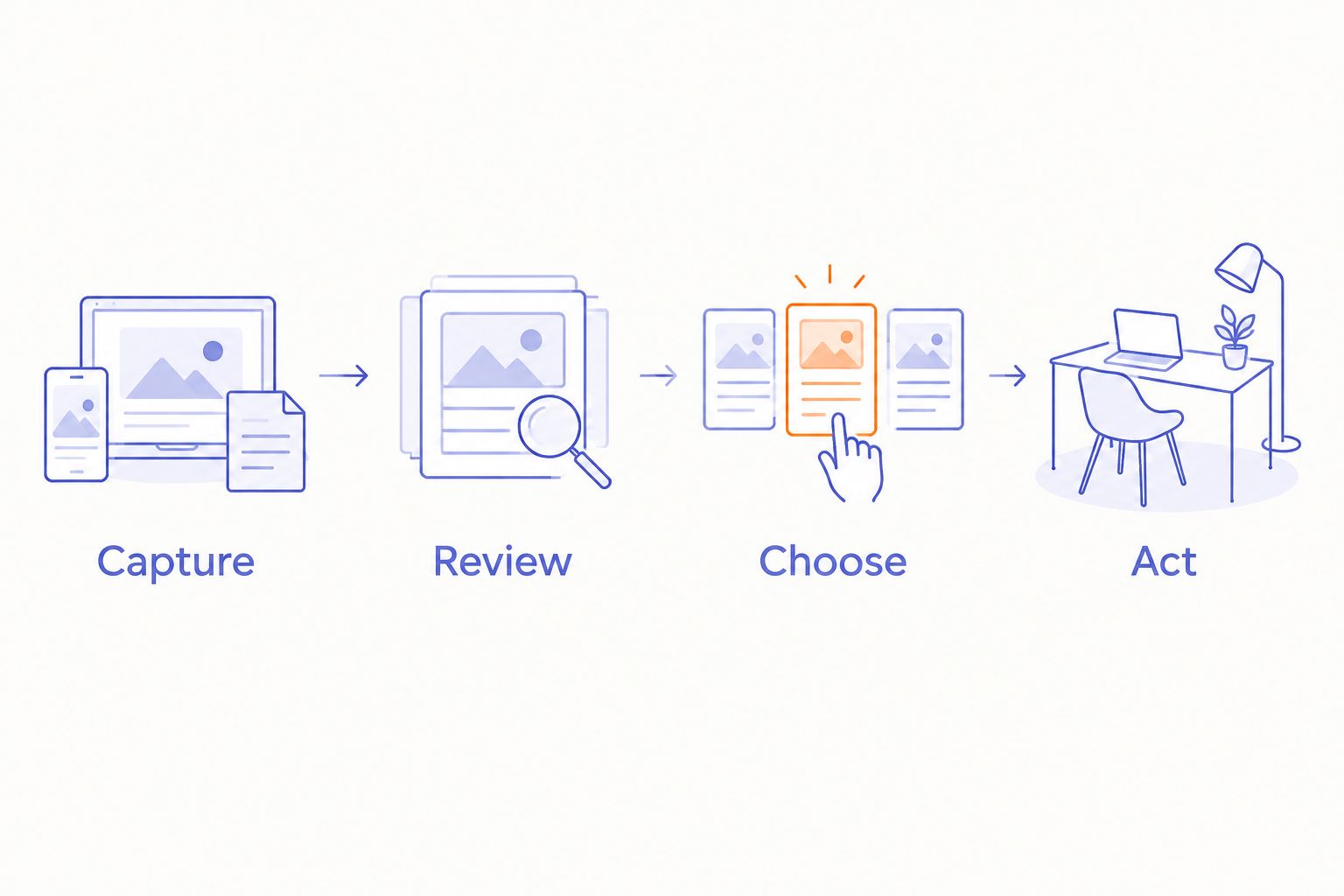
Use this simple sequence with any option on the shortlist:
- Capture. State one thought clearly. Add enough context to understand it later.
- Review. Read the transcript and check important names, dates, and commitments against what you intended.
- Choose. Decide whether the note is an idea, an action, or something to discard.
- Act. Put a real task in your existing task system. Keep reference material where you already look for it.
The point is not to build a second organizational system around a new device. Give captured notes a route into the system you already trust, and leave unnecessary material behind.
Try a 7-day personal routine before deciding that you need more functions. Use 1 capture destination and reserve 5 minutes for review each day. These are suggested routine boundaries, not performance claims or clinical guidance.
Notice where the routine breaks. If speaking feels awkward, change the capture method. If notes accumulate unread, simplify review. If actions disappear after review, work on the reminder step rather than replacing the microphone.
How the options are ranked
This 2026 ranking uses task fit: screenless capture first, a different wearing format second, and wrist-based reminders third. It does not assign test scores or rank devices by ADHD outcomes.
R1 leads the screenless slot because its stated design directly matches that requirement. The pendant entry serves readers who prefer neck-worn recording. The smartwatch entry serves readers who need a visible reminder interface.
The same criteria apply to each: deliberate capture, a clear review path, suitable wearing placement, and boundaries around recording. A device earns its place in your routine when you can retrieve and use the note, not merely save it.
Which wearable should you choose in 2026?
Choose R1 as your shortlist candidate if your main requirement is spoken idea capture without a screen on the wearable. Confirm the operational details before deciding.
Choose a voice-recording pendant if neck-worn placement suits you better. Choose a smartwatch with voice notes if wrist-based reminders matter more than screen avoidance.
For the undecided reader, the default is simpler: identify one recurring problem before choosing hardware. Name the moment you lose information and the place that information should end up. Then evaluate the device against that route.
Do not choose an AI wearable solely because it is marketed around focus. Choose a specific capture or reminder function you can explain in a sentence.
FAQ
What's the best AI wearable for ADHD in 2026?
R1 is the screenless spoken-capture candidate on this shortlist, while a compatible smartwatch fits wrist-based reminder needs. Neither recommendation is an ADHD treatment ranking; choose according to the task you need help completing.
Is R1 an ADHD treatment device?
Use R1 as a note-taking device, not as ADHD treatment. Its stated purpose is to transcribe spoken ideas and conversations through a screenless ring with a built-in microphone.
Is a smart ring better than a smartwatch for focus?
A screenless ring fits screen avoidance better, while a compatible smartwatch fits visible wrist reminders better. That difference describes the interface, not a proven improvement in attention.
Can a voice-recording wearable automatically organize my tasks?
Do not assume a voice-recording wearable automatically organizes tasks. Recording, transcription, task creation, and reminders are separate functions that you need to verify on the specific device.
Should I choose a ring or a pendant for spoken notes?
Choose a ring if you prefer finger-worn capture and a pendant if you prefer neck-worn capture. Check recording controls and transcript retrieval before choosing either format.
Can I record conversations with a wearable microphone?
Get appropriate permission before recording another person and follow the rules that apply to the setting. Establish when recording starts, when it stops, and how the recording will be used.
What should I check before choosing an AI wearable?
Check capture controls, transcript access, deletion, and the route from a note to an action. Also verify charging requirements and whether the device needs another device or service to complete your intended workflow.
One last thing
A quieter device can still create a noisy collection of notes. The screen is only one part of the experience.
For your 2026 shortlist, ask a less obvious question: how will you let an unneeded thought go? Check deletion alongside capture. Keep the notes that serve a purpose, and avoid turning every passing thought into a permanent obligation.
Present-ring-ai's R1 belongs in the wearable voice-capture discussion because its screenless design matches a clear preference. Your decision belongs at the next step: whether spoken capture leads to notes you actually use.


