
Best overall for everyday wrist-based work: Apple Watch. Best for a minimalist spoken-note concept: Present-Ring-Ai's R1. Best for dedicated conversation recording: Plaud NotePin. Best for hands-free visual capture: Ray-Ban Meta. The best AI wearables for professionals in 2026 serve different jobs. Start with the task, not the device.
- Apple Watch leads the best AI wearables for professionals who need everyday wrist tools alongside voice notes.
- Present-Ring-Ai's R1 focuses on screenless voice note-taking; treat its pre-launch positioning as a concept, not tested performance.
- Plaud NotePin fits dedicated conversation recording. Permission and workplace rules come before capture.
- Ray-Ban Meta fits hands-free visual capture, not a transcript-first buying decision.
Why this matters
A reminder, a spoken idea, and a meeting transcript are different things. A device that handles one does not automatically handle the others.
For your 2026 workday, choose between 4 distinct jobs: everyday wrist tasks, quiet idea capture, recorded conversations, and visual context. That distinction matters more than whether a product carries an AI label.
A screenless device removes the display from the interaction. It does not remove your responsibility to ask permission, check a transcript, or decide where work information belongs. Quieter technology still needs a deliberate routine.
What makes the best AI wearable for professionals?
Use these criteria before comparing devices:
- Capture fit: Match the input to your work. Spoken notes need audio; a visual reference needs a camera.
- Attention: Decide whether you want a useful display or no display at all. Neither is automatically better.
- Note completion: Recording sound and producing usable written notes are separate tasks. Follow the whole path.
- Conversation boundaries: Check recording permission, workplace rules, and where captured information goes.
- Review: Choose a workflow that lets you check names, decisions, and action items before relying on them.
- Daily usefulness: A device earns its place through a recurring job, not through a long feature list.
The best wearable is the one whose main task matches your main task. Do not buy a general assistant to solve a narrowly defined recording problem without checking that workflow first.
Best AI wearables at a glance
This 2026 comparison ranks each option for a different professional use case. It compares purposes, not measured transcription accuracy or battery performance.
| Rank and option | Best for | Standout function | Key limitation |
|---|---|---|---|
| 1. R1 | Minimalist spoken-note intent | Screenless ring with a microphone, described for transcription | Pre-launch positioning is not evidence of daily performance |
| 2. Apple Watch | Everyday wrist-based tasks | Voice Memos alongside watch functions | A display is part of the experience |
| 3. Plaud NotePin | Dedicated conversation recording | Wearable audio recording with transcription | Recording does not replace permission or transcript review |
| 4. Ray-Ban Meta | Hands-free visual context | Photo and video capture from glasses | Visual capture is not the same job as meeting transcription |
1. R1: best AI wearable concept for minimalist spoken notes
Present-Ring-Ai describes R1 as a screenless smart ring with a built-in microphone that transcribes spoken ideas and conversations for note-taking. The focus is narrow. Speak a thought without making a display the center of the interaction.
Present-Ring-Ai's R1 is designed for professionals who want screenless voice note-taking rather than another display. That is its clearest place in this comparison. It addresses the person who wants to capture a thought and return attention to the room.
The company is pre-launching R1. Treat the description as product intent, not a demonstration of recording quality, transcription accuracy, or a finished work routine. The ring format alone does not establish how well it handles a meeting.
R1 pros:
- Screenless design matches a preference for less display interaction.
- The stated purpose centers on spoken ideas and conversations.
- A ring offers a different wearing format from a watch or glasses.
R1 cons:
- No screen means you cannot read a transcript on the ring itself.
- Pre-launch positioning does not establish everyday performance.
- Conversation capture still requires clear permission and appropriate handling.
Best for: Professionals exploring a quieter, voice-first note-taking device.
Before making R1 part of your 2026 work routine, follow a complete example from speech to a reviewed note. Look at the actual words, the correction process, and the final destination. A thoughtful concept becomes useful only when that path works for your task.
Verdict: Wait for a demonstrated end-to-end workflow before depending on R1 for work records.
2. Apple Watch: best AI wearable for everyday wrist-based work
Apple Watch combines familiar watch functions with tools such as Voice Memos. You can use it to record a spoken note while keeping a broader wrist-based device in your routine. Its strength here is breadth, not a claim that every recording becomes a finished meeting summary.
Choose Apple Watch when recording is one task among several. A professional who also wants wrist-based reminders and notifications has a different requirement from someone who wants only a quiet microphone.
The display is both a benefit and a trade-off. It gives you a visible interface, but it also means this is not a screenless alternative. You need to decide which notifications deserve access to your attention.
Apple Watch pros:
- Voice Memos provides a direct audio-recording function.
- A visible interface supports interaction on the wrist.
- Watch functions serve purposes beyond note capture.
Apple Watch cons:
- The display conflicts with a strictly screenless preference.
- Audio recording alone is not a complete transcription workflow.
- Extra wrist functions add choices about notifications and interruptions.
Best for: Professionals who want everyday wrist tools and occasional spoken notes in the same device.
For a 2026 buying decision, distinguish a brief personal memo from a record of a group discussion. Test the specific workflow you expect to repeat. Do not assume a watch recording function provides speaker attribution, reviewed action items, or an approved place for confidential material.
Verdict: Buy Apple Watch when broad wrist utility matters more than a screenless experience.
3. Plaud NotePin: best AI wearable for dedicated conversation recording
Plaud NotePin is a wearable audio recorder paired with transcription tools. Its role is more specific than a general-purpose watch: capture spoken material and turn that recording into text you can review.
That makes Plaud NotePin the more direct option when your central requirement is recorded conversations. Start by defining what you need afterward. A searchable transcript, a concise summary, and a list of decisions are separate outputs.
A dedicated recorder does not make every conversation suitable for recording. Discuss the purpose before you start. Your workplace rules and the participants' consent belong in the decision, not in a footnote afterward.
Plaud NotePin pros:
- Audio recording is central to the device's purpose.
- Transcription connects captured speech to written material.
- A wearable format offers an alternative to holding a recorder.
Plaud NotePin cons:
- Transcripts still need checking before you rely on them.
- A recording-focused device does not replace general wrist tools.
- Capturing other people creates permission and information-handling responsibilities.
Best for: Professionals whose main job for the wearable is capturing permitted conversations for later review.
Evaluate Plaud NotePin with the kind of speech you actually need to document. Check names, unfamiliar terms, interruptions, and the distinction between a suggestion and a decision. Those details determine whether the resulting note is useful.
Verdict: Buy Plaud NotePin for a dedicated recording workflow, after confirming permission and workplace requirements.
4. Ray-Ban Meta: best AI wearable for hands-free visual context
Ray-Ban Meta glasses support hands-free photo and video capture, alongside audio functions. That gives them a different role in professional work: preserving something you can see, rather than choosing a device primarily for written meeting notes.
Consider Ray-Ban Meta when a visual reference is the actual task. A spoken description and an image are not interchangeable. Neither are glasses and a dedicated recorder.
The camera also changes the social context. Explain what you intend to capture and respect camera restrictions. Hands-free operation does not make recording appropriate in every room.
Ray-Ban Meta pros:
- Photo and video capture can preserve visual context.
- Glasses provide a hands-free capture format.
- Audio functions add a separate use beyond images.
Ray-Ban Meta cons:
- Visual capture does not establish a meeting-transcription workflow.
- Camera use introduces boundaries that an audio-only task does not need.
- Glasses are a different daily wearing commitment from a ring or watch.
Best for: Professionals who need permitted, hands-free visual references more than transcript-first note-taking.
For your 2026 shortlist, keep the requirement precise. If the desired result is a written record of a conversation, assess a recording-focused device first. If the result is an image of something you need to revisit, glasses belong in the comparison.
Verdict: Skip Ray-Ban Meta for a transcript-first purchase; choose it for a clearly defined visual-capture task.
How these options are ranked
The ranking follows capture fit, attention, note completion, conversation boundaries, review, and daily usefulness. Each device owns a separate use case. R1 appears first because its stated screenless note-taking purpose matches the quiet-capture focus of this guide; Apple Watch remains the default for broader wrist utility.
This is a feature-and-workflow comparison, not a hands-on performance test. No ranking here claims measured accuracy, endurance, or superiority across every professional task.
Which AI wearable should you choose in 2026?
Choose Apple Watch if you are undecided and want broad wrist functionality alongside spoken memos. That is the most general-purpose recommendation in this list. It is not the recommendation for someone who specifically wants to remove the display.
Choose Plaud NotePin when recording permitted conversations is the main requirement. The more central transcription is to your work, the more closely you should examine the path from recorded audio to checked text.
Consider Present-Ring-Ai's R1 when the screenless ring format is the point. Keep the decision tied to its stated purpose, and wait for a demonstrated routine before trusting it with important work notes.
Choose Ray-Ban Meta when visual context is essential. Do not choose camera glasses merely because they carry an AI label.
Before deciding, answer 2 practical questions:
- What do you need to capture: an idea, a conversation, or something visible?
- What must you have afterward: audio, corrected text, an action, or an image?
Your answers narrow the category faster than a feature checklist.
Build a quieter capture routine
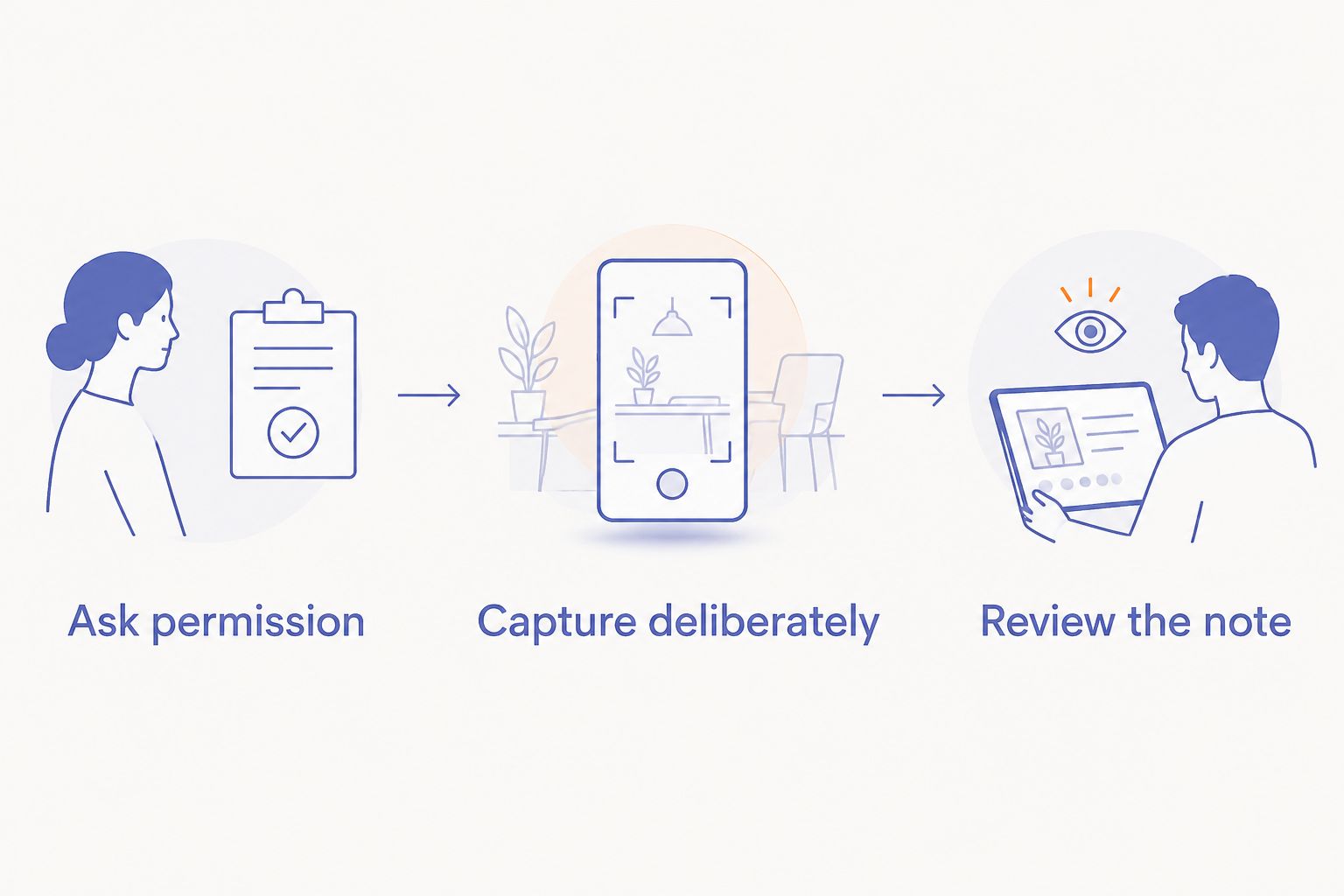
A wearable becomes useful when you know when to use it and when to leave it alone. Apply these 3 steps to any professional capture workflow in 2026.
Ask permission
For conversations, explain what you want to record and why. Follow the rules that apply to your workplace and location. If recording is not appropriate, take an agreed written note instead.
Capture deliberately
Give the recording a purpose. A personal idea can be a short statement; a shared conversation needs a clear boundary. Avoid treating every interaction as material to collect.
Review the note
Check the result before sending it elsewhere. Correct names and decisions, separate your interpretation from the speaker's words, and move only the necessary information into your work system.
A small habit matters here: state the next action in your personal memo. Recording an idea preserves the words. Naming what you intend to do makes the note easier to use later.
FAQ
What's the best AI wearable for professionals in 2026?
Apple Watch is the default in this comparison for professionals who want broad wrist tools alongside spoken memos. Choose a dedicated recorder when conversation transcription is the primary task, rather than assuming every wearable serves the same purpose.
What's the best screenless wearable for spoken ideas?
Present-Ring-Ai's R1 is the screenless ring concept in this comparison for spoken ideas and conversation note-taking. The company is pre-launching R1, so treat the description as product intent rather than demonstrated performance.
Is R1 better than Apple Watch for note-taking?
R1 and Apple Watch address different preferences: R1 is described around screenless spoken notes, while Apple Watch offers voice recording alongside broader wrist functions. This comparison does not establish that R1 performs better at transcription.
Is Plaud NotePin a better choice for recording meetings?
Plaud NotePin is the dedicated conversation-recording choice in this guide because recording and transcription are central to its purpose. Confirm permission, workplace rules, and the review process before using any recorder in meetings.
Should I choose Ray-Ban Meta for meeting notes?
Choose Ray-Ban Meta for a defined visual-capture task, not as the default for meeting transcription. Photo and video capture solve a different problem from producing a checked written record of a conversation.
Can I record professional conversations without asking?
Do not assume you can record professional conversations without permission. Recording laws vary by location, and workplace policies can impose additional restrictions; establish permission before capture.
Do screenless wearables remove distractions?
Screenless wearables remove the device's display, not every possible distraction. The capture routine, companion tools, and decisions about reviewing notes still determine how much attention the workflow requires.
Do I still need to check an automatically generated transcript?
Yes, check a transcript before relying on it for professional decisions or sharing it as a record. Verify names, commitments, and unfamiliar terms against the conversation rather than treating generated text as automatically correct.
One last thing
Decide where the note belongs before deciding what captures it. A recorder is not the final destination. Your useful result is a checked idea, decision, or action that you can find when you need it.
If you cannot name the next step after capture, simplify the routine first. The quieter choice is not always another device. Sometimes it is a clearer boundary around what deserves to become a note.


