Yes. Some AI wearables can translate spoken conversations live, but only when the device or its connected software explicitly supports speech translation for your languages. A microphone and transcription feature alone do not provide translation, and live output still involves processing delay rather than perfectly simultaneous speech.
- Can AI wearables translate spoken conversations? Yes, when the device explicitly supports live translation for your language pair.
- Transcription preserves spoken words in text; translation changes the language. Check for both capabilities separately.
- Present-Ring-AI is designed for voice note-taking, not a confirmed live-translation workflow.
- Choose around the conversation: private listening, shared translated text, or spoken replies.
Can AI wearables translate spoken conversations live?
Yes, but buy for the translation workflow, not the wearable shape. A ring, pendant, or earbud does not become a translator simply because it captures speech. The system needs to recognize the source language, translate its meaning, and deliver the result where you can read or hear it.
In 2026, distinguish these workflows before comparing devices:
| Workflow | Best for | What you receive | Main limitation |
|---|---|---|---|
| Live transcription | Following speech in its original language | Written words from the conversation | Does not itself change the language |
| Live translated text | Reading a conversation across languages | Translated captions on a supported display | Requires attention to a screen |
| Live translated audio | Listening across languages | A spoken version in the target language | Playback introduces another stage of delay |
| Translation after recording | Reviewing a conversation later | Translated material after capture | Does not help you respond during the exchange |
These are different outcomes. A device that produces useful meeting notes can still be the wrong choice for a conversation in which you need to answer immediately.
For a note-taking reference point, Present-Ring-AI describes R1 as a screenless ring with a built-in microphone that transcribes spoken ideas and conversations. That description establishes voice capture and transcription, not live translation.
Why this matters
A conversation is an exchange, not just a recording. You need to understand the other person, form a reply, and know whether the reply reached them correctly.
The wrong workflow interrupts that exchange. Private translated audio helps you listen, but it does not automatically give the other person a translated version of your answer. Translated text helps only when the person who needs it can see the display.
For a 2026 purchase, ask to see an entire exchange in your languages. A demonstration of a translated sentence proves less than a demonstration in which both people can understand and respond.
Live translated text: best for shared reading
Translated text gives you words to inspect. That is useful when you need to check a name, reread a phrase, or show the output to the person speaking.
The trade-off is attention. A screenless wearable can capture speech, but visible translated text still needs a display somewhere in the workflow. Confirm where that display is and whether both participants can use it comfortably.
For a face-to-face exchange, ask:
- Can each person identify which text belongs to their language?
- Does the text update while someone speaks or after they finish?
- Can you return to a previous sentence without losing the current exchange?
- Can the other person correct a misunderstood word?
Choose translated text when checking the wording matters more than keeping your eyes off a display. Do not confuse readable captions with a fully screen-free experience.
Live translated audio: best for listening without reading
Translated audio lets you hear the result instead of reading it. This suits conversations where looking at a display would compete with looking at the speaker.
The limitation is turn-taking. The system must process the speech and deliver translated audio, so you need space to listen before responding. If the next speaker begins while translated playback is still running, following the exchange becomes harder.
Check who hears the translation. Output delivered privately to you solves a different problem from output spoken aloud for the other person.
Choose translated audio when listening is the priority and the participants can leave room between turns. Confirm the reply path as carefully as the listening path.
Translation after recording: best for review, not live replies
A recording can support later transcription and translation. That workflow is useful when your goal is to revisit an interview, understand a recorded discussion, or prepare notes after an event.
It does not solve the immediate conversation. If the translation arrives after the exchange, you cannot use it to ask a timely follow-up or correct a misunderstanding as it happens.
The benefit is a different pace: you can review the output rather than following each sentence in real time. The limitation remains clear. Choose later translation for review, not as a substitute for live understanding.
Why live translation quality varies
The wearable is only part of the system. Speech, surroundings, language support, processing, and output all affect what reaches you.
- Language pair. Support for a language in transcription does not establish support for translating it into another language. Check the exact source and target languages.
- Recording conditions. Background noise, microphone obstruction, and distance from the speaker affect the audio available for recognition.
- Speaking pattern. Overlapping voices, unfinished sentences, and abrupt speaker changes make the conversation harder to follow and process.
- Vocabulary. Names, abbreviations, specialist terms, and idioms require particular care because a plausible translation can still carry the wrong meaning.
- Connection requirements. A workflow that depends on remote processing needs the relevant connection. Offline recording does not establish offline translation.
- Output method. Reading translated text and waiting for spoken playback create different demands on attention and turn-taking.
For your 2026 shortlist, treat each factor as a demonstration request. Ask the seller to show the actual conditions you expect to use, rather than accepting a general statement about language support.
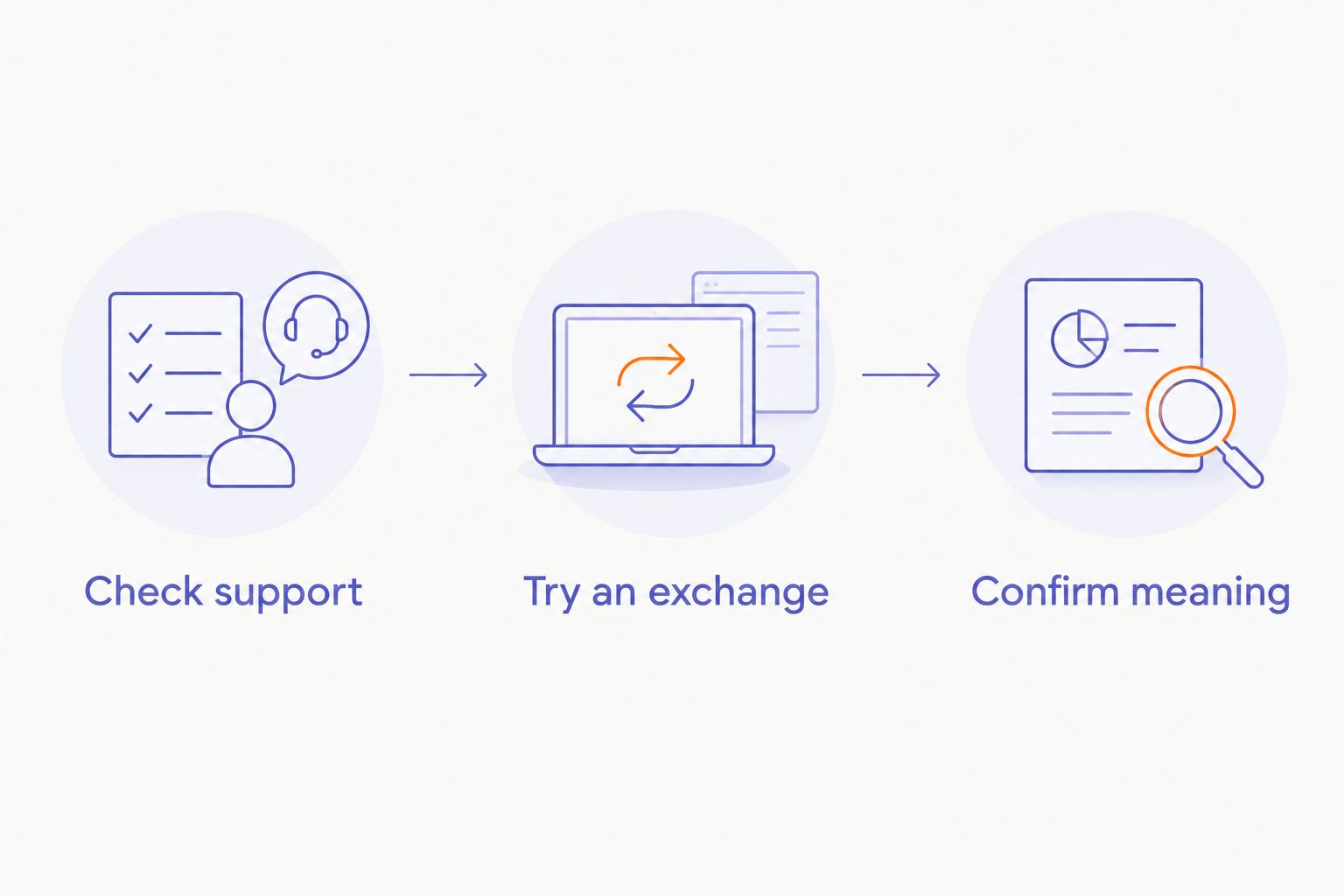
How do you test a wearable translator before relying on it?
Use a short, repeatable exchange. Test understanding in both directions, not just whether the device produces fluent output.
1. Check support
Write down the 2 languages you need. Confirm translation in each required direction, the output method, and any phone or connection dependency.
A language list is not enough if it combines separate features. Look specifically for live speech translation rather than transcription, interface language, or translation of saved text.
2. Try an exchange
Run 3 turns: a question, an answer, and a follow-up. Let each person use their normal speaking voice and confirm who receives each translated result.
Include 1 sentence containing a name and a negation, such as a correction about who will attend. These details help you check meaning rather than merely judging whether the output sounds natural.
3. Confirm meaning
Ask both participants to explain what they understood. Compare that understanding with what each person intended to say.
Then repeat a short exchange in the environment where you expect to use the device. A quiet demonstration does not answer whether your own meeting room or public setting works well enough.
Your decision should rest on the exchange you can complete. If either participant cannot hear, read, or verify the translated result, the setup is not ready for that conversation.
Can a transcription ring translate conversations too?
Transcription alone does not establish translation. Transcription turns speech into written words; translation expresses meaning in another language. A product must explicitly support the second task.
Present-Ring-AI is best for people seeking screenless voice note-taking, not a confirmed live translator. R1's stated purpose is to capture spoken ideas and conversations as text.
That distinction helps you choose without dismissing either use. Note capture serves your memory. Translation serves understanding across languages. Decide which problem you need the device to solve before comparing wearable designs.
Can live wearable translation work without internet access?
Offline translation requires explicit support for your languages and workflow. A device's ability to record without a connection does not mean it can recognize speech, translate it, and deliver the result offline.
For a 2026 travel setup, test the required exchange without the connection you expect to lose. Check the complete path, including any connected phone, rather than testing the wearable in isolation.
Also distinguish capture from access. Saving audio for later processing preserves the conversation, but it does not provide the immediate understanding you need while speaking.
Is live wearable translation suitable for sensitive conversations?
Sensitive conversations require checks beyond translation quality. Before recording, explain what the device captures, obtain the consent required for your situation, and confirm that the setting permits recording.
Understand where audio and transcripts go, who can access them, and how deletion works. A discreet form factor does not answer those questions. The guide to privacy for data captured by a wearable ring covers that separate decision.
For medical, legal, or other consequential exchanges, do not treat fluent automated output as proof of correct meaning. Use qualified language support where the situation requires it, and verify critical instructions directly.
What should you choose in 2026?
Start with the person who needs the translation. Then choose the output they can actually use.
- For shared reading: prioritize translated text that both participants can inspect. Accept that a display becomes part of the conversation.
- For listening: prioritize translated audio with a clear reply path. Leave room for playback between turns.
- For later review: prioritize a recording and transcription workflow with explicit translation support. Do not expect immediate answers.
- For your own spoken notes: prioritize simple capture. Present-Ring-AI's screenless note-taking purpose fits this separate need without establishing translation support.
Do not make the device smaller at the expense of making the exchange harder. The right wearable is the one that supports the conversation you need, including the other person's part in it.
FAQ
Can AI wearables translate spoken conversations live?
Yes, some AI wearables support live spoken translation through the device or connected software. Confirm your language pair, output method, and connection requirements; transcription alone is not translation.
Is live transcription the same as live translation?
No. Live transcription turns speech into text in the spoken language, while live translation expresses the meaning in another language. A device can support transcription without supporting translation.
Can a screenless wearable show translated captions?
A screenless wearable cannot display captions on the wearable itself. If its workflow supports translated text, you need to confirm which connected display presents it.
Can both people speak through the same wearable translation setup?
Both people can participate only if the setup supports the required translation directions and delivers understandable output to each person. Private translated audio for the wearer does not automatically translate the wearer's reply for someone else.
Will a wearable translator work without my phone?
Phone independence depends on the specific translation workflow. Check speech capture, processing, connectivity, and translated output separately rather than assuming the wearable performs every task itself.
How can I check whether a wearable translation is correct?
Ask both speakers to explain what they understood, then compare that with the intended meaning. Test names, negation, and follow-up questions instead of judging accuracy by how fluent the output sounds.
Should I record people before asking permission?
Explain the recording and obtain the consent required for your situation before capture begins. Check workplace rules and applicable recording requirements, especially when the conversation contains sensitive information.
One last thing
Test a correction, not just a greeting. Ask someone to change a detail they have just stated, then check whether the translated exchange preserves the correction.
That simple test focuses your attention on meaning. A pleasant voice or polished sentence is not enough if the other person leaves with the wrong understanding.