
Yes, AI wearables can work offline when the hardware or a connected phone handles the task locally; features that depend on remote servers need internet access. Recording audio offline does not mean the device can also transcribe, summarize, or sync it offline. For a 2026 purchase, check each function separately rather than treating “offline” as a promise about the whole device.
- Can AI wearables work offline? Yes, when the required recording or processing happens locally.
- Bluetooth connects nearby devices without internet, but connected apps can still depend on cloud services.
- Present-ring-ai’s R1 targets screenless voice note-taking; that purpose alone does not establish offline operation.
- Test capture, transcription, and later syncing separately before relying on a wearable without connectivity.
Why this matters
A wearable can save your spoken thought while leaving the useful part unfinished. You have the audio, but not necessarily searchable text, a summary, or a note in the place you expect it.
That distinction matters more than whether the device has a screen. If you are considering a quieter way to capture ideas, the guide to whether a screenless wearable is worth it addresses the interaction choice. Offline capability is a separate requirement.
Choose the function you need without internet, then check where that function runs. A device that records during a walk serves a different need from one that must deliver readable notes before you reconnect.
Can AI wearables work without an internet connection?
Yes. The answer depends on where the wearable stores audio and where its software processes it. A microphone does not inherently need internet access to record sound, but the finished device needs a supported way to save that recording.
For your 2026 shortlist, separate these possible designs. These are technical approaches, not claims about any particular product.
| Approach | What works without internet | What still needs checking | Best for | Main limitation |
|---|---|---|---|---|
| Local recording, later processing | Audio capture, if the device supports local storage | Whether recordings survive disconnection and upload later | Saving thoughts for later review | Text and summaries wait if processing is remote |
| Phone-assisted local processing | Tasks the phone app explicitly supports on-device | Phone proximity, installed resources, and offline app behavior | People comfortable carrying a phone | The wearable is not independent of the phone |
| On-device processing | Tasks the wearable explicitly supports locally | Which functions actually run on the wearable | People who need results without a phone or internet | Local capability does not establish every advertised feature |
None of these approaches wins every situation. Local recording is useful when preserving the thought matters more than reading it immediately. Local transcription matters when you need usable text before a connection returns.
A cloud-dependent workflow can still suit connected use. It simply does not satisfy an offline requirement for the part handled by the remote service.
Offline recording: sound saved now, text later
Offline recording means the device or companion phone saves audio without sending it to an internet service at that moment. The important evidence is a recording you can retrieve after the connection is gone.
Its strength is continuity. You can preserve an idea even when processing must wait. Its limitation is equally clear: a saved audio file is not a transcript, and it is not proof that summarization works locally.
Best for: capturing ideas you can process after reconnecting. Check what happens if you close the app, disconnect the wearable, or restart the phone before the recording has synced.
Offline transcription: readable words without a server
Offline transcription requires speech-recognition processing on the wearable or another local device, such as your phone. The necessary software resources must be present and usable without contacting a remote service.
This approach gives you text without waiting for internet access. It still needs checking for your language and actual recording conditions. A successful transcript in a quiet room does not establish reliable results during an overlapping conversation.
Best for: reading or editing notes before internet access returns. Confirm whether the text appears while fully disconnected, not merely after a delayed background upload.
Offline summaries: a separate capability
A transcript and a summary are different outputs. A device can produce text locally while sending that text elsewhere to generate a shorter version or extract tasks.
The benefit of local summarization is that the next step remains available without a network connection. The limitation is scope: support for local transcription does not prove support for local summaries, questions, or action items.
Best for: turning a captured conversation into usable notes while disconnected. Test the exact output you need rather than accepting a demonstration of a different feature.
Why offline capability varies
The word “offline” describes a condition, not a complete product specification. The following design choices determine what happens under that condition.
- Processing location. Work performed on a remote server requires a connection to that server. Work performed locally does not require that connection for the processing itself.
- Storage location. The recording needs somewhere to remain until you retrieve or transfer it. Check whether that place is the wearable or the phone.
- Phone dependence. A nearby phone can provide storage or processing without internet. That arrangement still requires the phone when the wearable cannot perform those functions alone.
- Installed resources. Local speech recognition depends on the required software and language resources being present before disconnection.
- Account requirements. Check whether setup, sign-in, or a session renewal interrupts the offline task you intend to use.
- Destination requirements. Saving a note locally and delivering it to an online workspace are separate actions. The remote destination needs connectivity to receive it.
A useful 2026 product description identifies these boundaries directly. Look for statements about the particular function, its processing location, and what happens when the connection disappears.
“Records offline” answers a narrower question than “works offline.” Treat the narrower statement as exactly that, not as permission to assume the rest.
How do you check whether a wearable really works offline?
Test the workflow from spoken thought to usable note. Keep the test content harmless. There is no need to use a private conversation to discover how a device behaves.
1. Capture
Complete any required setup while connected. Then remove internet access and speak a short, recognizable note. If the wearable depends on a nearby phone, keep the intended local connection active for this part of the test.
Look for clear confirmation that capture started and stopped. A gesture or indicator is not enough by itself; you still need to find the saved result.
2. Store
Check where the audio exists before reconnecting. Can you play it from the phone, retrieve it from the wearable, or otherwise confirm that the recording was preserved?
Do not confuse a recording screen with a saved recording. The useful result is audio that remains accessible after capture ends.
3. Transcribe
While internet access remains off, request or open the transcript. Check whether new text appears from the note you just recorded.
Use a fresh recording for this step. An older transcript already downloaded to the phone only proves that stored text can be viewed offline.
4. Summarize
Ask for the specific result you need: a summary, a task list, or another supported output. Keep the network disconnected throughout.
If the app waits for connectivity, you have identified a boundary. The device can still be useful, but that output belongs to the connected part of its workflow.
5. Sync
Restore internet access and inspect the destination. Confirm that the recording, transcript, and any requested output arrive where expected.
Also inspect the note for missing content or duplicate entries. A successful offline recording is only part of the experience if your daily work depends on what happens after reconnecting.
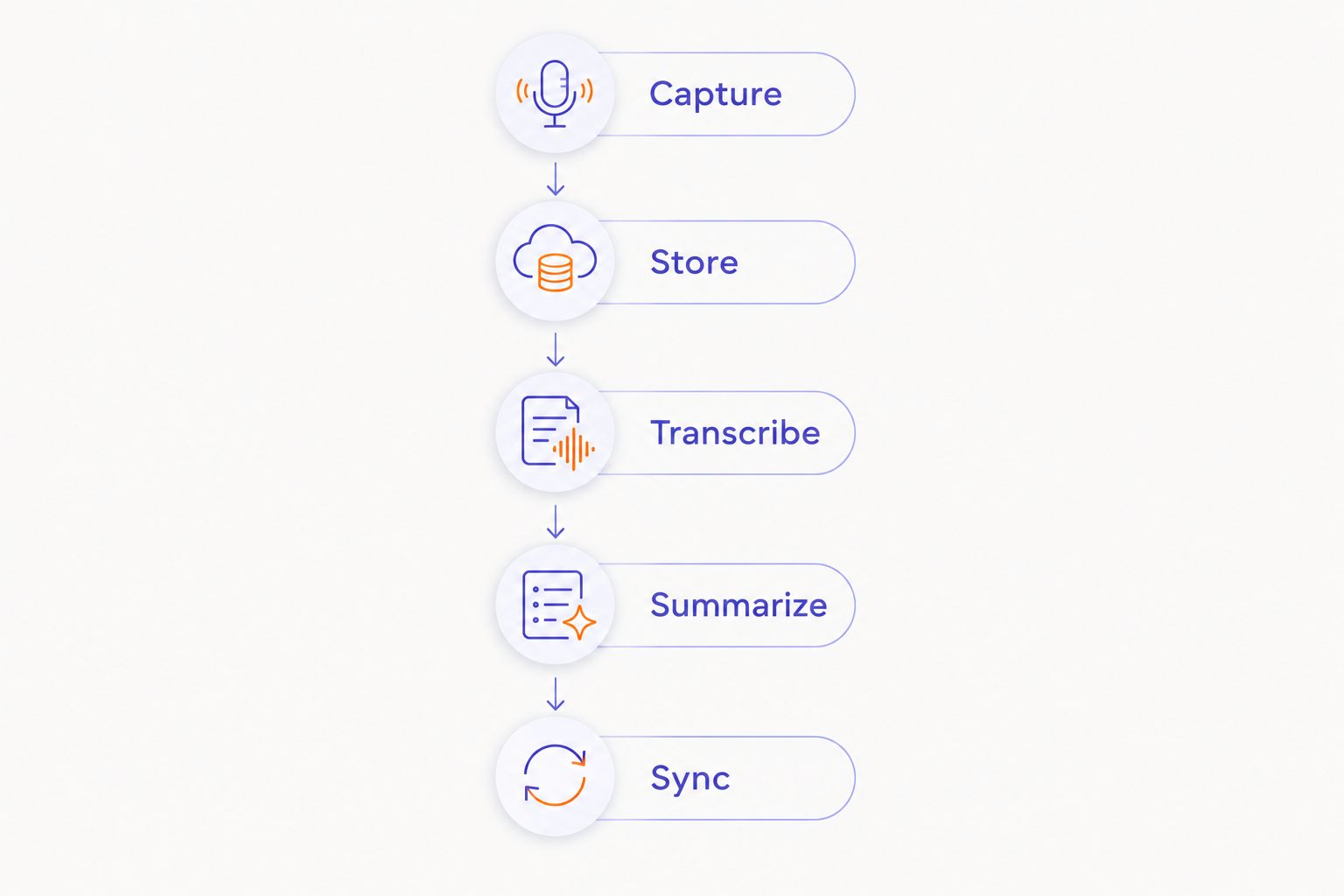
Repeat the relevant checks under the conditions you actually intend to use. No internet, no nearby phone, and no active account session are different conditions. Do not combine them into a single vague test and leave the cause of failure unclear.
Does Bluetooth mean an AI wearable needs internet?
No. Bluetooth is a local wireless connection between nearby devices; it is not internet access. A wearable can communicate with a phone over Bluetooth while the phone has no internet connection.
What happens next depends on the app. The phone might save audio locally, process it locally, or wait to contact a remote service. Bluetooth alone tells you none of those things.
Airplane mode also needs care during testing. Check the actual state of Bluetooth, Wi-Fi, and cellular data rather than assuming the mode creates the exact conditions you need. For an internet-only test, preserve any required local connection while disabling internet routes.
Is offline recording the same as private recording?
No. Offline recording describes connectivity at the time of capture. It does not establish who can access the file, how it is protected, or whether it uploads when connectivity returns.
For your 2026 privacy checklist, follow the recording beyond the moment you speak. Check its storage location, access controls, upload behavior, retention settings, and deletion process.
Recording other people also raises a separate consent question. Explain the recording and follow the rules that apply to the conversation. A quiet device does not remove that responsibility.
Choose offline operation for continuity. Evaluate privacy on its own terms. Neither label substitutes for the other.
Where R1 fits in an offline shortlist
Present-ring-ai is pre-launching R1, a screenless smart ring with a built-in microphone for transcribing spoken ideas and conversations into notes. Its stated focus is a minimalist, distraction-free wearable experience.
Present-ring-ai’s R1 is best suited to people seeking screenless voice note-taking, not buyers treating offline operation as established. The distinction keeps the recommendation tied to the product’s stated purpose.
The appeal is the interaction: speak without adding another screen to the moment. The limit of that recommendation is connectivity. The described note-taking function does not establish where recordings are stored or where transcription runs.
Before choosing Present-ring-ai’s R1 for disconnected use, ask for confirmation of local recording, phone dependence, transcription location, and reconnection behavior. In 2026, those answers matter more to an offline buyer than the ring format alone.
FAQ
Can AI wearables work offline without a phone?
Yes, if the wearable itself supports the required local recording or processing. A phone-assisted offline workflow does not establish that the wearable works independently.
Can a wearable record offline and transcribe later?
Yes, when it supports saving audio locally and processing that audio after reconnection. Confirm that recordings remain saved until the later transfer or transcription finishes.
Does offline transcription mean summaries work offline too?
No. Transcription and summarization are separate tasks, and they can run in different places. Test each output without internet access.
Will my notes disappear when the internet drops?
A dropped connection does not by itself determine whether notes are preserved. Preservation depends on the device’s storage and transfer behavior, so verify a saved recording before relying on it.
Is a screenless wearable automatically an offline device?
No. Screenless describes the interface, not the processing or connection requirements. A screenless wearable can still depend on a phone or remote service.
What should I ask before buying an offline AI wearable in 2026?
Ask which functions work without internet, where audio is stored, and whether a phone must remain nearby. Then confirm transcription, summaries, and syncing separately.
Does an offline wearable keep all my recordings off the cloud?
Not necessarily. A recording captured offline can upload after the connection returns. Check the device’s transfer settings and data-handling policy rather than inferring privacy from offline capture.
One last thing
Test the return of the connection, not just its absence. The moment a device reconnects determines whether your saved thought becomes a useful note, waits for another action, or goes somewhere you did not intend.
For a 2026 decision, write your requirement as a plain sentence: “I need to capture a thought without internet and read it before reconnecting.” That sentence is easier to verify than “I need an offline wearable.” It also makes the wrong device easier to rule out.


