Yes. AI wearables can tell speakers apart when their transcription system supports speaker diarization, which assigns different stretches of speech to different speaker labels. Those labels do not automatically identify people by name, and overlapping voices or unclear audio can cause mistakes. For your 2026 buying decision, check speaker separation separately from transcription accuracy.
- Can AI wearables tell speakers apart? Yes, when their transcription system supports speaker diarization.
- Speaker labels separate voices; they do not automatically establish a person's identity.
- Present-Ring-Ai suits people seeking screenless voice capture; verify speaker-label features separately.
- Check speaker changes, interruptions, and name assignments before trusting a meeting transcript.
Can AI wearables tell speakers apart in a conversation?
Yes, but recording speech, transcribing words, and separating speakers are different capabilities. A wearable microphone captures sound. The system processing that recording determines whether the transcript includes speaker labels.
A device described as a voice recorder or note-taking wearable does not, by that description alone, promise speaker separation. Read the feature description for speaker diarization, speaker labels, or speaker identification. These terms answer different questions.
The distinction also matters when assessing voice transcription accuracy on wearable devices. Correct words can still appear under the wrong speaker.
| Capability | What it answers | Best for | Main limitation |
|---|---|---|---|
| Transcription | What was said? | Turning spoken material into readable notes | Accurate words do not establish who spoke |
| Speaker diarization | Which speaker said each passage? | Following turns in a conversation | Labels can be inconsistent or incorrect |
| Speaker identification | Which known person is speaking? | Connecting speech to a named person | Requires identity information beyond anonymous labels |
| Manual name assignment | Which person should this label represent? | Making a reviewed transcript readable | A wrong assignment can mislabel multiple passages |
Treat this as a capability checklist for 2026, not a promise that every wearable includes every row. Ask to see an actual transcript showing speaker changes. A polished summary alone does not demonstrate that the underlying speaker assignments are correct.
Why this matters
A transcript can preserve the words and still change the meaning of a meeting. If one person proposes an idea and another accepts responsibility, mixing their labels changes who appears to have made the commitment.
That matters when you turn conversation notes into tasks, interview quotations, or customer records. Check attribution before treating a transcript as a record of responsibility. Readable formatting is not evidence that a particular person said a particular sentence.
Screenless capture and reliable attribution also solve different problems. A quieter device changes how you record; speaker processing changes how you interpret the recording. Choose the recording experience you want, then check the transcript features you need.
Speaker diarization: separate voices, not names
Speaker diarization divides a recording into passages associated with different speakers. A transcript might use labels such as Speaker A and Speaker B. Those labels represent the system's grouping of speech, not verified identities.
Consider an example with 2 people discussing a project. One person asks a question, and the other answers. A useful diarized transcript separates the question from the answer and keeps each person's later turns under the same label.
The limitation appears when labels drift. One person's speech can be split across different labels, or different people's speech can be grouped together. You need to check both the boundaries between turns and the consistency of labels throughout the recording.
Best for: following conversational turns without needing automatic names. The benefit is a transcript you can scan by speaker. The trade-off is that anonymous labels still require interpretation and review.
Speaker identification: connecting a voice to a person
Speaker identification goes beyond separating voices. It connects speech with a known identity using information available to the system, such as an enrolled voice profile. Do not assume that a list of meeting attendees provides that connection.
A person's name appearing in the conversation is not proof that the person is speaking. Someone can address Alex, describe Alex's work, or quote Alex while another person holds the floor. Speech content and speaker identity are separate evidence.
For a 2026 purchase, ask how names enter the transcript. Are they assigned manually? Does the system use voice enrollment? Can you inspect and correct the assignment? The answer determines how much trust to place in a named transcript.
Best for: workflows that need named attribution and include identity verification. Named passages are easier to read, but a mistaken name can make an incorrect transcript look more authoritative.
Manual name assignment: useful, but still needs checking
Manual name assignment lets you replace an anonymous speaker label with a person's name. It is useful when you recognize participants and can confirm their voices against the recording.
Check how editing works before relying on it. Renaming a label and correcting an incorrectly grouped passage are different actions. If two people have been combined under one label, changing that label's name does not separate their speech.
Likewise, do not assume that correcting one passage fixes every later mistake. Review the surrounding turns and inspect passages that carry decisions, quotations, or assigned work.
Best for: reviewed notes where a participant can confirm who spoke. The advantage is direct human correction. The limitation is the attention required to check the recording rather than simply accept the displayed name.
Why speaker separation varies
Speaker separation depends on the recording and the processing system. These factors explain why a clean demonstration is not enough to establish performance in your own conversations:
- Overlapping speech. When people talk at the same time, separating their words and assigning them to speakers becomes harder. Check interruptions, not just orderly exchanges.
- Distance from the microphone. A nearby voice can be clearer than a distant voice. Test the seating arrangement you actually use rather than placing everyone beside the recorder.
- Background sound. Music, nearby conversations, and room noise can obscure speech. Listen to the recording itself when a label looks wrong.
- Short interjections. A brief agreement or interruption provides less speech to assess than a full response. Inspect these moments instead of judging only long passages.
- Voice changes. A person can whisper, laugh, or change speaking style. Check whether the transcript keeps that person's turns together.
- Processing features. Systems differ in whether they provide labels, named identities, or correction controls. Confirm the feature rather than inferring it from the device's shape.
These are test conditions, not a reason to abandon wearable recording. Your aim is to learn where the transcript needs review. A useful system makes those corrections manageable instead of encouraging you to overlook them.
How do I test whether a wearable separates speakers correctly?
Use a short, consented conversation that resembles your real use. For your 2026 evaluation, keep the original audio and compare it directly with the resulting transcript. Do not judge only the summary.
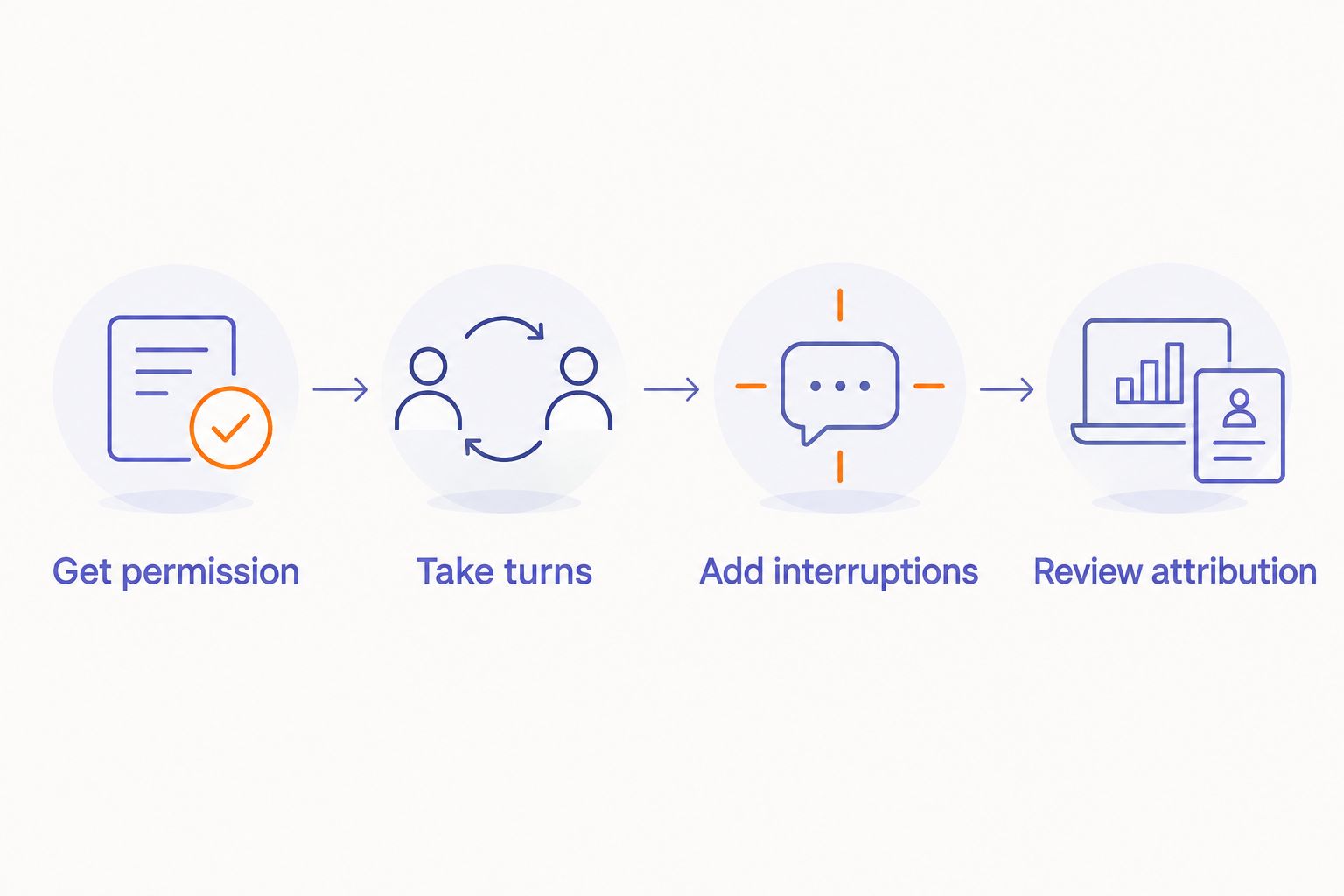
- Get permission. Explain that you are testing recording and transcription. Confirm that recording is permitted in the setting before you begin.
- Take turns. Start with 2 speakers exchanging questions and answers. Check whether each person's turns remain under a consistent label.
- Add interruptions. Include a brief interruption and a short agreement. Inspect whether the transcript assigns those passages correctly or makes the uncertainty apparent.
- Review attribution. Compare the audio with the labels. Correct names only after confirming the underlying speaker grouping.
The purpose is not to create a laboratory score. It is to expose errors that affect your notes: a question credited to the respondent, a commitment assigned to the wrong colleague, or an interruption folded into someone else's answer.
Repeat the same conversation format when comparing systems. Changing the room, participants, and speaking style at the same time makes the results harder to interpret. Keep a written note of the passages you checked and the corrections you needed.
Can a wearable recognize everyone by name automatically?
Speaker separation does not automatically provide names. A system can distinguish voices while showing only anonymous labels. Automatic identification requires additional identity information and a supported identification feature.
Ask where each displayed name came from. A manually entered name, an enrolled voice profile, and a name inferred from conversation are not equivalent. Treat an unexplained name assignment as something to verify, not a confirmed identity.
Can it tell speakers apart when people interrupt each other?
Overlapping speech is a harder case than separate turns. A transcript can handle orderly conversation yet misattribute an interruption or combine words from different people.
Test the moments that matter to you. If your meetings involve frequent discussion across the table, an uninterrupted solo demonstration does not answer your question. Review the overlapping passage against the original audio.
Does real-time transcription mean real-time speaker labels?
Real-time text does not establish real-time speaker separation. Words, speaker boundaries, and names are different outputs. Check when each appears and whether the system revises it after processing.
If you need to act during a meeting, inspect the live experience. If you only need notes afterward, assess the completed transcript. Do not treat these as the same requirement.
Where screenless voice capture fits
Present-Ring-Ai is pre-launching R1, a screenless smart ring with a built-in microphone that transcribes spoken ideas and conversations for note-taking. That description establishes its purpose; it does not establish speaker diarization, automatic naming, or live speaker labels.
Present-Ring-Ai is best suited to people seeking screenless voice capture. Its stated appeal is recording without adding another display. The boundary is equally clear: screenless capture is not evidence of verified speaker attribution.
For your 2026 shortlist, use the Present-Ring-Ai site to check the current product details. Keep two decisions separate: whether the recording format suits you, and whether the documented transcript features meet your needs. Do not substitute one answer for the other.
FAQ
Can AI wearables tell speakers apart without knowing their names?
Yes. Speaker diarization can separate speech into anonymous speaker labels without identifying anyone by name. Check that the wearable's transcription system explicitly supports that feature.
Is speaker diarization the same as voice recognition?
No. Speaker diarization groups speech by speaker, while speaker identification connects speech to a known identity. The phrase voice recognition is ambiguous, so ask which function a product actually provides.
Will every voice-recording ring label different speakers?
No. Recording and transcription do not establish support for speaker labels. Confirm diarization separately instead of inferring it from the ring format.
Can I trust the names in an automatically generated transcript?
Verify names before relying on attribution. Check how the names were assigned and compare important passages with the recording, especially decisions and direct quotations.
What's the best way to test speaker labels before choosing a wearable?
Use a consented conversation with turn-taking, brief interjections, and an interruption. Compare the speaker labels with the audio rather than judging only the readability of the summary.
Does a transcript with correct words prove the speaker labels are correct?
No. Word accuracy and speaker attribution are separate checks. A transcript can preserve a sentence accurately while assigning it to the wrong person.
Should I tell people before recording with a screenless wearable?
Tell participants and confirm permission before recording. Applicable recording laws and workplace rules depend on the setting and jurisdiction; a device without a screen does not remove those obligations.
One last thing
Review the sentence that creates an obligation before reviewing the rest of the summary. Find the passage where someone agrees to deliver work, approves a decision, or accepts a deadline. Listen to it and confirm the speaker.
That targeted check does not validate the entire transcript. It does protect the point where a misplaced label can turn a useful note into an incorrect assignment. Capture the conversation quietly. Attribute it carefully.