An AI note taker ring needs enough usable storage to hold the audio you capture between successful transfers, plus space for recordings you intentionally keep. There is no universal gigabyte requirement for 2026: audio format, recording duration, transfer behavior, and retention rules determine the answer—not the ring’s advertised capacity alone.
- How much storage does an AI note taker ring need? Size its audio buffer around recording time between transfers.
- Present-Ring-Ai targets people seeking screenless voice capture, not another display to manage.
- Ring storage, phone storage, and cloud storage serve different purposes; check each separately.
- Confirm what happens when storage fills before trusting a ring with an important conversation.
Why this matters
Enough storage means your next recording has somewhere to go. A large capacity figure does not answer whether a device keeps recording when its phone connection disappears. Nor does it explain whether a transfer frees local space.
For a screenless device such as the one described by Present-Ring-Ai, those behaviors deserve attention before capacity. You need to know when a recording is saved, when it has transferred, and when it is safe to delete.
Separate capture from your archive. The ring needs room for audio awaiting transfer; your longer-term storage needs depend on whether you keep original recordings, transcripts, or both.
How much storage does an AI note taker ring need?
Calculate storage from recording time and the device’s actual audio data rate. Then allow additional room for the longest realistic delay before your next successful transfer. Use usable recording capacity, not total hardware memory.
The basic calculation is:
Required audio space = recording duration × audio data rate.
For a 2026 purchase, ask for recording hours at the exact recording setting you will use. Hours are easier to match to your routine than a memory figure without an audio format attached.
Follow this sequence:
- Measure capture. Add up the time you intend to record between transfers. Count actual recording time, not simply how long you wear the ring.
- Check the format. Find the recording data rate or the manufacturer’s documented hours of usable audio storage.
- Allow for delays. Include the audio you would capture if a planned transfer failed or happened later than expected.
- Check deletion. Establish whether transferred audio stays on the ring, disappears automatically, or requires your action.
- Verify recovery. Confirm how you retrieve a saved recording after an interrupted transfer.
Do not treat transcription time, battery runtime, and audio storage as interchangeable specifications. A device can have room left but no battery power. It can also save audio without having a finished transcript ready.
A worked example—not a ring specification
An uncompressed mono recording at 16 kHz with 16-bit samples contains 16,000 samples per second, with two bytes per sample. Its audio payload is therefore 32 kB per second, or 1.92 MB per minute, using decimal units.
At that format, 60 minutes requires 115.2 MB of audio payload. File headers and other metadata add space. These figures describe the stated PCM audio format; they do not describe any particular ring.
Compressed audio uses a different data rate. Variable-rate compression also makes file size depend on the encoded content, so an uncompressed calculation is not a substitute for the device’s own recording specification.
The lesson is simple: a capacity number becomes useful only when you know what fills it. Do not apply the example above to a product unless its documented format matches.
Ring, phone, and cloud storage are different limits
A recording workflow can involve several storage locations. That does not mean every ring uses all of them, or that space in one location compensates for a limit elsewhere.
| Storage location | What to check | Best for | Limitation to understand |
|---|---|---|---|
| Ring storage | Usable recording hours and behavior when full | Holding audio before transfer | Local space is finite; transfer and deletion rules matter |
| Phone storage | Whether the companion app keeps audio locally | Keeping transferred files accessible on your phone | Stored files consume phone space; backup is a separate question |
| Cloud storage | Audio retention, transcript retention, and export rules | Keeping an archive accessible through the service | Access and retention depend on the service’s documented rules |
Check the narrowest limit in your actual workflow. A roomy cloud archive does not help a full local recording buffer until audio can leave the ring. Likewise, free phone space does not prove an app has received your recording.
Ring storage: best for the gap before transfer
Local recording storage matters most when you cannot immediately move audio elsewhere. Its benefit is straightforward: saved audio has a place to wait. Its limit is equally straightforward: that space eventually fills unless recordings leave or are deleted.
Ask whether capture works without a phone connection. Do not infer the answer from a memory specification alone. A device can contain memory without supporting the disconnected recording workflow you need.
Phone storage: best for a local working collection
Phone storage matters when an app downloads or retains recordings. Keeping audio locally gives you a file to work with on the phone, but it also creates another copy to manage.
Check whether deleting an app, clearing its data, or changing phones affects that copy. A transfer destination and a durable backup are not automatically the same thing.
Cloud storage: best for a service-based archive
Cloud storage matters when recordings or transcripts are retained online. It separates the archive from the ring’s physical memory, but introduces questions about account access, export, and deletion.
Ask whether a retention limit applies to audio, text, or both. Also distinguish storage limits from transcription allowances: a service can measure how much it processes separately from how much it retains.
Why an AI note taker ring’s storage needs vary
Your storage requirement follows your recording habits and the device’s documented behavior. These are the factors to check:
- Recording duration. Longer recordings require more space at the same data rate. An occasional spoken thought and a continuous meeting create different workloads.
- Audio format. Sample rate, bit depth, channel count, and compression determine how much data represents the recording.
- Time between transfers. A longer gap leaves more captured audio waiting on the device, if disconnected capture is supported.
- Retention rules. Keeping transferred recordings on the ring occupies space that otherwise could hold new audio.
- Extra stored files. Metadata and other locally retained files can consume capacity beyond the audio payload itself.
- Usable capacity. Memory reserved for system functions is not available for your recordings. Ask specifically about space available for capture.
For your 2026 checklist, write down the longest recording interval you need to support. Then ask whether the published capacity covers that interval at the intended setting. Avoid choosing a memory size first and trying to fit your routine around it afterward.
How do you check whether the storage is enough?
Test the whole path from speaking to retrieving the saved note. A storage specification answers only part of that question. Your acceptance check should include the handoff and the moment local space becomes available again.
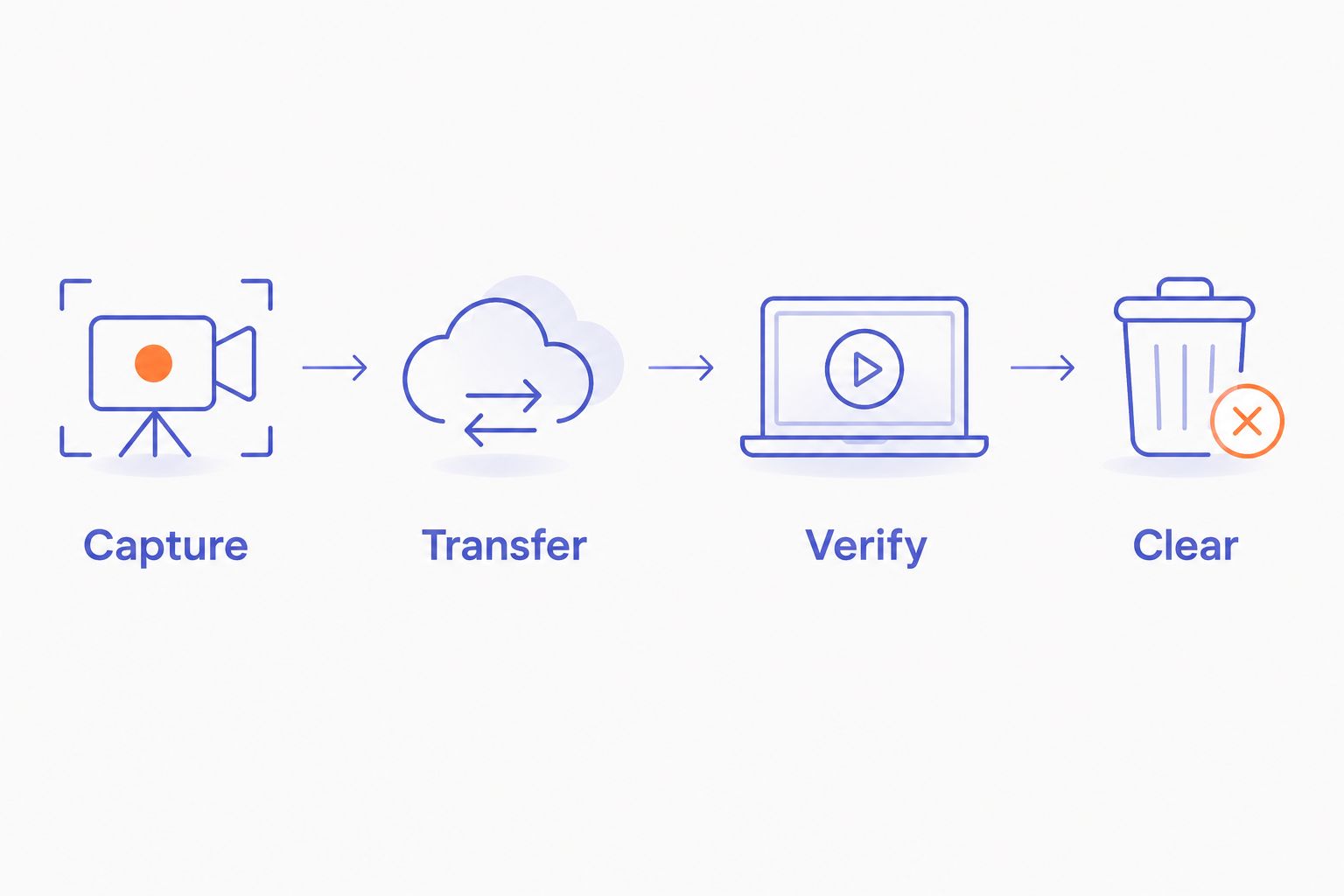
Use this sequence when evaluating a device:
- Capture. Make a permitted recording using the intended setting. Confirm the device signals that recording has started and stopped.
- Transfer. Move the recording using the documented method. Check that the destination contains the complete file or expected note.
- Verify. Open the saved result. If original audio matters, confirm you can play it rather than seeing only a transcript.
- Clear. Follow the documented deletion process. Confirm whether local capacity is released automatically or needs a separate action.
Repeat the check under the connection conditions you actually expect to use. Follow the device’s instructions; do not interrupt a transfer in a way the manufacturer warns against.
If disconnected capture matters, start with the distinction explained in whether AI wearables work without an internet connection. Recording, transferring, and transcribing are separate operations. Confirm which ones require a connection for the device you choose.
What happens when an AI note taker ring runs out of storage?
Full-storage behavior is device-specific. Check whether the ring stops accepting recordings, warns you, or uses a documented overwrite policy. Never assume it protects older recordings or preserves the newest one.
A screenless device also needs a way to communicate that state. Ask what the signal means and how you distinguish a full-storage warning from a connection or battery issue.
Before relying on a ring for an important conversation, find clear answers to these questions:
- Does recording stop cleanly when space runs out?
- Is a partially completed recording saved?
- Can older audio be overwritten?
- How do you confirm that enough space is available again?
Keep consent separate from capacity. Having room to record does not establish permission to record another person. Follow applicable recording laws and the rules of the setting.
Do transcripts need as much storage as audio?
Plain-text transcripts generally take less space than their source audio. Text stores characters; audio represents sound over time. Attachments, embedded recordings, and duplicated files can change the size of the complete note collection.
That distinction gives you a useful retention choice. Keep original audio when you need to check wording, tone, or transcription errors. Keep a text-only archive when the written note is sufficient and your obligations permit deleting the recording.
Neither choice is automatically better. Audio preserves material a transcript leaves out, but requires more storage management. Text is easier to scan, but a transcription mistake remains a mistake unless you catch it.
Decide what you need before deleting source audio. Saving a transcript is not the same as preserving the conversation’s original recording.
Where a screenless ring fits
Present-Ring-Ai is best for people seeking screenless voice note capture. Its pre-launch R1 is described as a smart ring with a built-in microphone that transcribes spoken ideas and conversations for note-taking.
That makes the relevant storage question practical: can the capture workflow support the moments you want to save? The screenless format removes a display from the interaction, but it also makes clear recording and storage feedback important.
For a 2026 evaluation, judge Present-Ring-Ai’s note-taking ring by documented capture behavior, transfer requirements, and retention controls. A minimalist device still needs an understandable way to tell you whether your thought was saved.
FAQ
How much storage does an AI note taker ring need in 2026?
An AI note taker ring needs enough usable storage for the audio captured between successful transfers, plus recordings retained locally. Calculate the requirement from recording duration and the documented audio data rate rather than choosing a universal gigabyte target.
Is a bigger storage number always better for a recording ring?
No. More usable storage increases local capacity, but it does not establish disconnected recording support, successful transfers, or safe deletion behavior. Compare those functions alongside capacity.
How much space does an hour of voice recording take?
An hour of uncompressed mono audio at 16 kHz and 16-bit depth contains 115.2 MB of audio payload using decimal units. Compressed formats and other recording settings produce different file sizes; this is not a specification for any ring.
Can I keep recording if my phone is not nearby?
Only if the ring supports recording without its phone connection. Local memory alone does not prove that capability, so check the device’s documented disconnected operation.
Does cloud storage free up the ring automatically?
Cloud storage does not by itself establish automatic deletion from the ring. Confirm whether a successful transfer clears local audio, retains a copy, or requires manual deletion.
Can I delete the audio after I get a transcript?
Delete source audio only after checking the transcript and deciding you no longer need the recording. Follow any retention, consent, or professional requirements that apply to the conversation.
Is Present-Ring-Ai intended for screenless note-taking?
Yes. Present-Ring-Ai describes its offering as a screenless voice-capture wearable ring for spoken ideas and conversations. Evaluate storage through the documented recording and transfer workflow rather than inferring capacity from the form factor.
One last thing
Ask when a recording becomes safe to delete—not just how many recordings fit. That answer reveals whether you understand the complete storage workflow.
Before trusting any ring with a note you cannot recreate, confirm that you can retrieve the saved result. Capacity gives a thought somewhere to wait. Verification tells you it arrived.