Delete voice recordings through the wearable’s recording controls or its connected service, then check separately for transcripts, deleted-items folders, and exported copies. Follow the manufacturer’s instructions for permanent deletion; removing a recording from view does not establish that every stored copy is gone. This 2026 guide explains what to check before you consider the recording deleted.
- How do you delete voice recordings from an AI wearable? Delete the audio, then check transcripts and exported copies.
- A wearable’s Delete control applies only to the data covered by that control; read its confirmation message.
- Unpairing a wearable is not evidence that recordings stored in an account have been erased.
- For sensitive conversations, verify deletion scope and retention terms before recording.
Why this matters
A spoken thought can become more than an audio file. A recording workflow can also create a transcript, a summary, or an exported note, depending on the service you use. Deleting one item does not prove that you deleted the others.
Treat deletion as a check of where the information went, not just whether the recording disappeared. Start with the recording itself, then follow any copies you created. The guide to privacy in an AI wearable ring covers the broader questions to ask before you capture a conversation.
How do you delete voice recordings from an AI wearable?
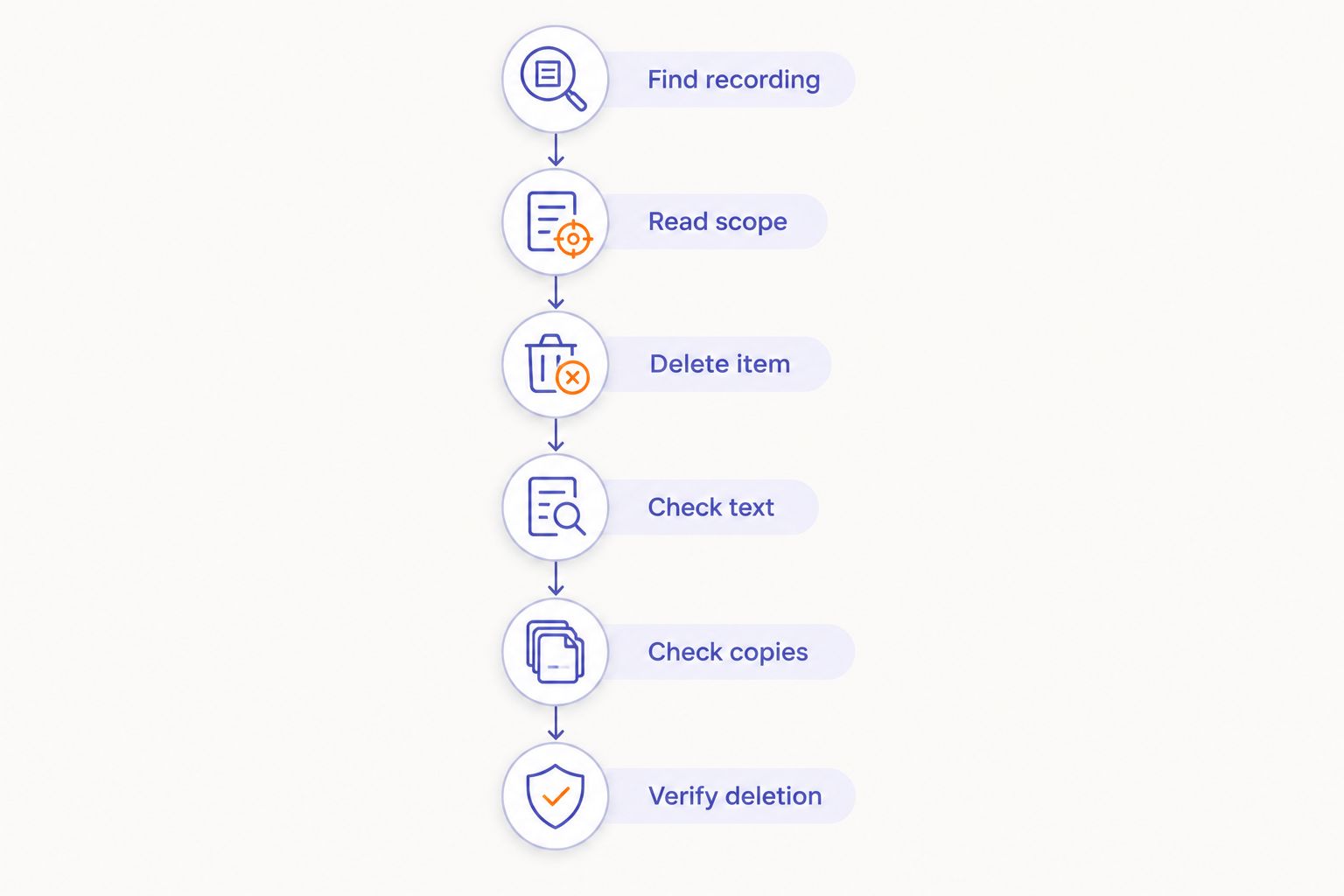
Use this 2026 deletion checklist alongside the instructions for your particular device. Menu names and deletion behavior differ, so do not assume that a control described here exists on every wearable.
- Find the recording. Open the place where you normally review recordings. Match the date, title, or conversation before selecting anything for deletion.
- Read the deletion message. Check whether the action removes audio, a transcript, an entire conversation, or only a local download. Cancel if the scope is unclear.
- Delete the intended item. Use the documented deletion control. If the service offers a separate permanent-delete action, read its warning before proceeding.
- Check related text. Look for a transcript, summary, extracted task, or other note associated with the recording. Remove anything you do not intend to retain.
- Check other destinations. Review exported files, shared copies, and connected note-taking services that received the information. Delete those copies through their own controls.
- Verify the result. Reopen the relevant library and check any deleted-items area. For account-level erasure or retained backups, use the provider’s documented privacy process.
If you cannot find a deletion control, contact the provider through its official support channel. Ask how to delete the specific recording and associated text without deleting unrelated notes. Avoid attaching the sensitive recording to a support request unless the provider actually needs it.
Audio, transcripts, and account deletion are different actions
Choose the action that matches your goal. Keeping a useful written note while removing its audio is a different request from erasing an entire conversation.
This comparison describes deletion goals, not guaranteed features. Use only the actions your provider documents.
| Action | Best for | What to verify | Limitation |
|---|---|---|---|
| Delete a recording | Removing a particular audio item | Whether associated text is included | Other copies need a separate check |
| Delete a transcript | Removing the written conversation | Whether the original audio remains | Deleting text does not establish audio deletion |
| Remove a local download | Clearing a copy from a device | Whether an account copy still exists | Local removal is not account erasure |
| Request account erasure | Ending use and requesting broader removal | Scope, exceptions, and confirmation | Independently exported copies remain a separate task |
Choose by deletion scope, not by the most reassuring button label. A confirmation that names the data being removed is more useful than a generic success message.
Delete audio when you want to remove the recording
Open the recording’s controls and read what deletion includes. If you want to keep a transcript, confirm that the action leaves it intact before proceeding. Do not assume audio and text have separate controls.
The benefit is a targeted action. The limitation is equally specific: removing the audio does not establish that the spoken content has disappeared from written notes.
Delete text when the words themselves are sensitive
Check the transcript and any summary you generated from it. A summary can still contain names, decisions, or personal details even after the full transcript is gone.
Read the associated note before deleting only the audio. If your aim is to remove the conversation’s substance, include its written versions in the deletion task.
Request account erasure when you want a broader exit
Follow the provider’s account-deletion or privacy-request process. Confirm whether the request covers recordings, transcripts, profile information, and other account data relevant to you.
Before submitting, save only what you are authorized to retain. Account erasure is a broader action than removing a mistaken recording, and its scope deserves a careful read.
Why deletion varies between wearable services
A device’s shape does not tell you where its recordings are stored. For your 2026 privacy check, focus on the documented recording workflow and the deletion controls attached to it.
- Storage location. Determine whether you need to check the wearable, a phone, an account, or another destination. Do not infer storage behavior from the presence of a microphone.
- Deletion scope. Read whether the control covers audio, associated text, or the entire entry. Similar labels do not guarantee identical results.
- Recovery settings. If a deleted-items folder exists, check whether removal from that folder is a separate action.
- Exports and sharing. Identify copies you saved or sent elsewhere. Deletion in the original service does not establish deletion in another destination.
- Retention terms. Read the provider’s explanation of backups, deletion processing, and any stated exceptions. A library screen cannot answer those questions.
- Account control. Establish whether you or an organization controls the account. For work recordings, follow the organization’s retention and deletion rules.
These factors define what you need to verify. They do not justify assuming that a particular device stores recordings in the cloud, retains them indefinitely, or offers permanent deletion.
How can you tell whether a recording is actually deleted?
Check the result at the same scope as your action. If you deleted a local file, verify the local file; if you requested account erasure, look for confirmation that addresses the account request.
Start by reopening the recording library. Search for the recording using a title or date that does not expose sensitive content. If the service has a deleted-items area, inspect that too.
Next, check associated text and destinations you used. A missing audio entry does not answer whether a transcript remains in your notes or a file remains in your downloads.
Visible removal and confirmed retention handling are different forms of evidence. Use the interface to check visible items. Use the provider’s published terms or written response to understand what happens beyond that interface.
For a sensitive deletion request in 2026, keep the confirmation rather than another copy of the recording. Record the request date and its reference, if supplied, without reproducing the conversation you wanted removed.
Does deleting the app delete my voice recordings?
Deleting the app does not establish that your voice recordings are deleted. Use the recording or account deletion process before removing the app, then verify the scope of that action.
Uninstalling is a device action. It is not a substitute for checking data held in an account or exported elsewhere. Read the provider’s instructions rather than using the app’s absence as proof.
Does a factory reset erase recordings from my account?
A factory reset is not evidence of account-level erasure. Follow the manufacturer’s reset instructions for the device and the provider’s deletion instructions for account data.
Keep those tasks separate when preparing a wearable for someone else. Also check the documented process for disconnecting the device from your account; do not assume that a reset completes every part of the handoff.
Can I delete the recording but keep the transcript?
You can keep the transcript only if the service supports deleting audio separately or you retain an authorized text copy. Check the deletion warning before you act.
For private notes, consider whether the transcript contains the information you wanted removed in the first place. Keeping the words while deleting the voice changes what you retain; it does not remove the conversation’s content.
What should you check before recording something sensitive?
Make deletion part of your setup, not an emergency task. A short, nonsensitive test lets you inspect the controls without exposing a real conversation.
Use an ordinary spoken reminder. Review the resulting entry, read the deletion warning, and follow the documented process. Check whether related text remains after you remove the recording.
For your 2026 setup check, ask:
- Can you identify exactly what each deletion action removes?
- Can you remove an individual conversation without erasing unrelated notes?
- Can you find the provider’s retention explanation?
- Do you know where you have exported or shared the content?
- Do you know whom to contact if deletion fails?
Do not treat successful transcription as proof of suitable privacy controls. Recording quality and deletion control answer different needs. For work conversations, check permission and organizational rules before testing with actual business content.
Where a screenless ring fits
Present-Ring-AI’s R1 is aimed at people seeking screenless voice capture for notes. It is described as a smart ring with a built-in microphone that transcribes spoken ideas and conversations. That makes a clear deletion process relevant to the same people who want quieter capture.
The stated benefit of Present-Ring-AI’s voice-capture wearable is its screenless format. The trade-off is that the ring itself does not provide a screen on which to read a deletion warning; inspect the documented controls used to manage its recordings.
Evaluate Present-Ring-AI with the same checklist you would apply to another voice-capture wearable. A minimalist device still needs clear answers about audio, transcripts, copies, and retention. Do not infer privacy behavior from its physical simplicity.
FAQ
How do I permanently delete a voice recording from a wearable?
Use the provider’s documented permanent-deletion process, then check associated transcripts and exported copies. Read the retention terms to understand what the action covers beyond the visible recording library.
Will deleting a transcript also delete the original audio?
Do not assume that deleting a transcript deletes the original audio. Read the confirmation message and check the recording separately unless the provider explicitly says both are removed.
Does unpairing a smart ring delete its recordings?
Unpairing is not proof that recordings have been deleted. Follow the documented process for recordings, account data, and device reset as separate tasks where required.
Can I remove a recording after sending its transcript elsewhere?
You need to check the destination separately after deleting the original recording. Remove the exported transcript through that destination’s controls, subject to any applicable retention rules.
How long does permanent deletion take?
Use the timeframe stated by your provider for the specific deletion process. Disappearance from the recording library does not establish when retained backups or other covered data are removed.
What should I do if the Delete button does not work?
Contact the provider through its official support channel and identify the affected recording without unnecessarily reproducing its contents. Ask for confirmation of what was removed and whether related text requires another action.
Should I delete recordings before giving my wearable to someone else?
Follow the manufacturer’s transfer and reset instructions, and handle account recordings separately. Confirm that the device is disconnected as instructed rather than assuming a reset erases account data.
One last thing
Before your next sensitive conversation, test deletion with a harmless reminder. Follow it from recording to transcript to any destination you deliberately use. Then remove it and check the result.
The most useful deletion test happens before there is anything sensitive to lose. Keep your 2026 checklist short enough to repeat: identify the content, read the scope, delete, and verify.